Introducing Milestones: Track Project Goals Without Adding Complexity
Every project has moments that matter. A product launch. A sprint deadline. A client deliverable. These aren't just tasks - they're goals that pull everything together.
Today we're introducing Milestones in t0ggles - a way to group related tasks under a single goal and track progress in real time. But here's what makes our approach different: milestones aren't a new entity cluttering your board. They're tasks - with superpowers.
#The Problem With Traditional Milestones
Most project management tools treat milestones as a separate concept. You get a dedicated milestones view, a different creation flow, separate settings. Before you know it, you're managing two parallel systems - your tasks and your milestones - and hoping they stay in sync.
This adds cognitive overhead. Where do milestones live? How do they relate to tasks? Can you see them in your Kanban board or only in a timeline view? The more concepts a tool introduces, the more time you spend learning the tool instead of doing the work.
#Our Approach: Milestones Are Tasks
We took a different path. In t0ggles, a milestone is simply a task with a special type. It lives on your board alongside regular tasks. You can drag it between columns, add a due date, write a description. Everything you already know about tasks applies.
The difference? Milestones display a diamond icon, show a progress bar, and track linked tasks. They strip away fields you don't need for goal tracking - no assignee, no priority, no start date. Just the goal and its progress.

This design keeps t0ggles clean. No new views to learn. No separate milestone management. Your board stays simple, and milestones fit naturally into your existing workflow.
#How Milestones Work
#Creating A Milestone
Any task can become a milestone. Open the task, click the menu, and select "Convert to Milestone." That's it. The task transforms - gaining a progress bar and losing fields that don't apply to goal tracking.
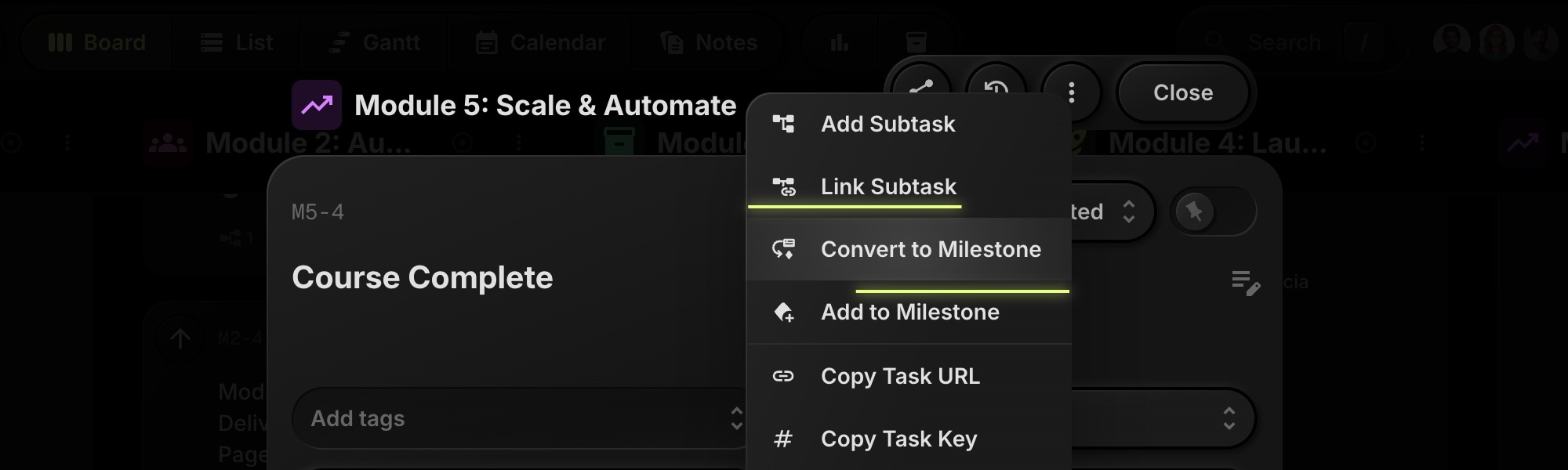
You can also convert back. If a milestone needs to become a regular task again, the option is right there in the menu.
#Linking Tasks
Once you have a milestone, link tasks to it. There are two ways:
From any task - Open the task menu and select "Add to Milestone," then choose from your available milestones.
From the milestone - Open the milestone details and click "Link Task" in the Milestone Tasks section. Search for tasks and add them.
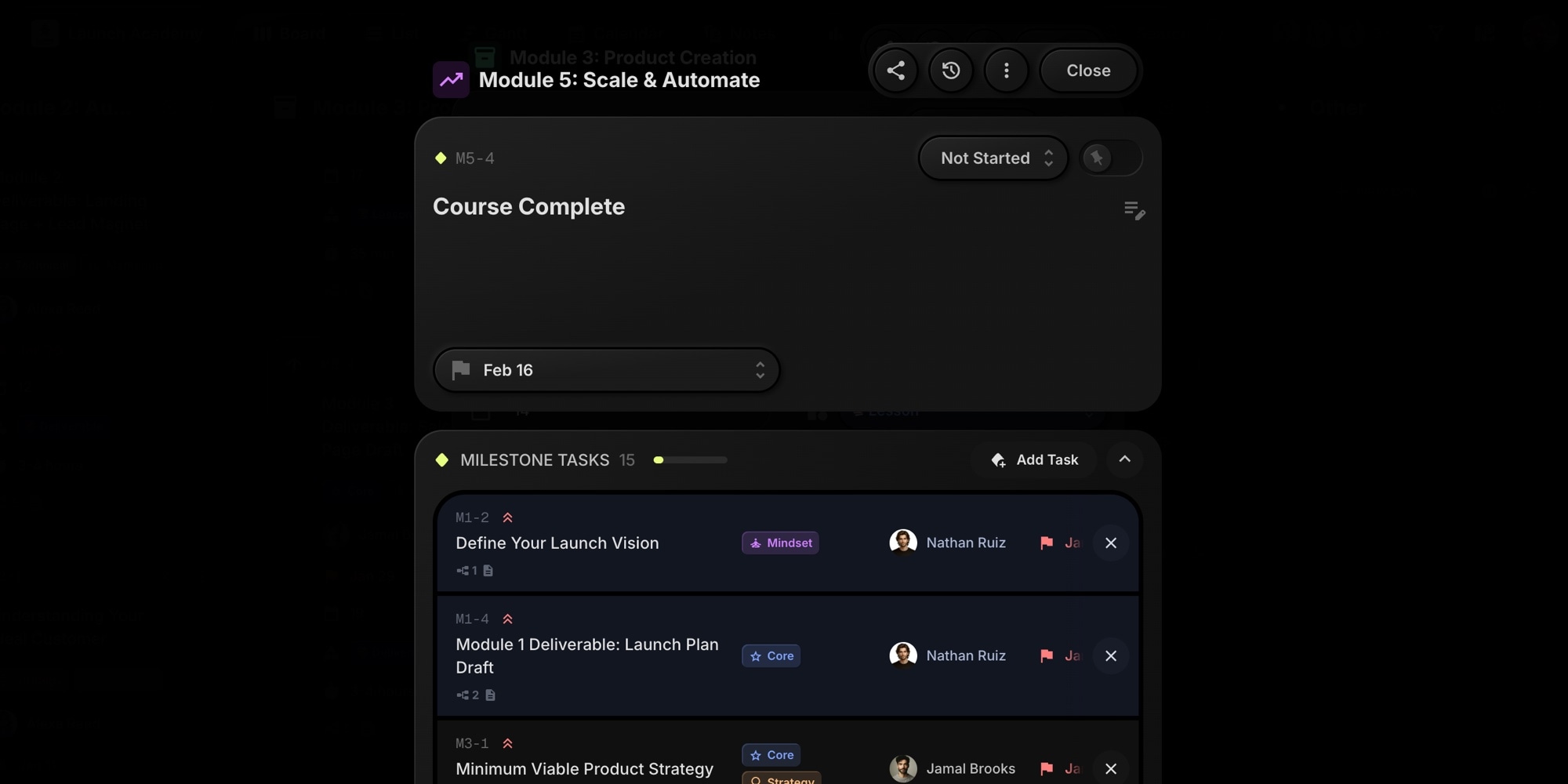
Each task can belong to one milestone at a time. Subtasks inherit their parent's milestone, so you don't need to link them individually.
#Tracking Progress
The milestone card shows two things: a progress bar and a count. If you've linked 8 tasks and 5 are complete, you'll see "5/8" and a bar at 62%.
Progress updates automatically. Complete a linked task, and the milestone reflects it instantly. No manual updates, no recalculations.
Archived tasks don't count toward progress. This keeps your numbers accurate even when you clean up completed work.
#Use Cases
#Sprint Goals
Create a milestone for each sprint. Link the sprint's tasks and watch progress as your team works through the backlog. When the sprint ends, you have a clear record of what shipped.
#Release Tracking
Product teams can create milestones for each release version. Link features, bug fixes, and documentation tasks. The milestone becomes your single source of truth for release readiness.
#Client Deliverables
Agencies managing multiple clients can use milestones for each deliverable. "Website Redesign Phase 1" or "Q1 Marketing Campaign" - group the related tasks and show clients exactly where things stand.
#Project Phases
Large projects often move through phases - discovery, design, development, launch. Create a milestone for each phase. As tasks complete, you see the phase progressing toward done.
#Why This Matters For Your Team
Visibility drives accountability. When everyone can see progress toward a goal - not just a list of tasks, but actual percentage complete - priorities become clear. Team members know what matters. Stakeholders get answers without asking.
Milestones also reduce status meetings. Instead of going around the room asking "where are we on X," you point to the milestone. The number speaks for itself.
For remote and distributed teams, this visibility is even more valuable. Async work depends on everyone having access to the same information. Milestones provide that shared context.
#Milestones And Dependencies
Milestones work great alongside task dependencies. You might have a milestone for "Beta Launch" with several linked tasks. Some of those tasks have dependencies - the deployment can't start until testing completes.
Dependencies handle the sequence. Milestones handle the goal. Together, they give you both the roadmap and the destination.
#Milestones In Reports
The Reports view now includes a dedicated Milestone Progress section. This gives you a bird's-eye view of all milestones across your board:
- Summary stats - See total milestones, how many are at risk, how many are complete, and average progress across all milestones
- At-risk detection - Milestones due within 7 days with less than 80% progress are automatically flagged so you can take action before deadlines slip
- Progress overview - Each milestone shows its progress bar and task count without opening individual cards
- Export support - Include milestone data in your CSV and PDF report exports for stakeholders
Click any milestone in the report to jump directly to it on your board. For teams running multiple milestones - sprint goals, release targets, client deliverables - this section provides the visibility you need to stay on track.
#Getting Started
- Pick a goal you're working toward - a release, a sprint, a deliverable
- Create a task for it (or find an existing one)
- Convert it to a milestone
- Link the tasks that contribute to that goal
- Watch progress as your team completes work
Milestones appear in Kanban and List views. Drag them between columns like any task. Move a milestone to "Done" when the goal is complete.
Read the full documentation | See the release notes
#Simple By Design
We could have built milestones as a separate system. A dedicated view, separate permissions, its own set of features. But that's not the t0ggles way.
t0ggles is built on the idea that project management doesn't need to be complicated. Multi-project boards, clean UI, fast performance - every decision we make aims to reduce complexity, not add it.
Milestones follow that philosophy. They're powerful enough to track your most important goals, simple enough that you already know how to use them.
#Who Is This For?
See how milestones fit your workflow:
- t0ggles for Hackathons - Track sprint milestones and demo deadlines
- t0ggles for Research Teams - Mark research phases and publication targets
- t0ggles for Robotics - Track hardware milestones from prototype to production
- t0ggles for AI Startups - Set product milestones and funding goals
- t0ggles for Course Creators - Track module completion and launch dates
Don't Miss What's Next
Get updates, design tips, and sneak peeks at upcoming features delivered straight to your inbox.