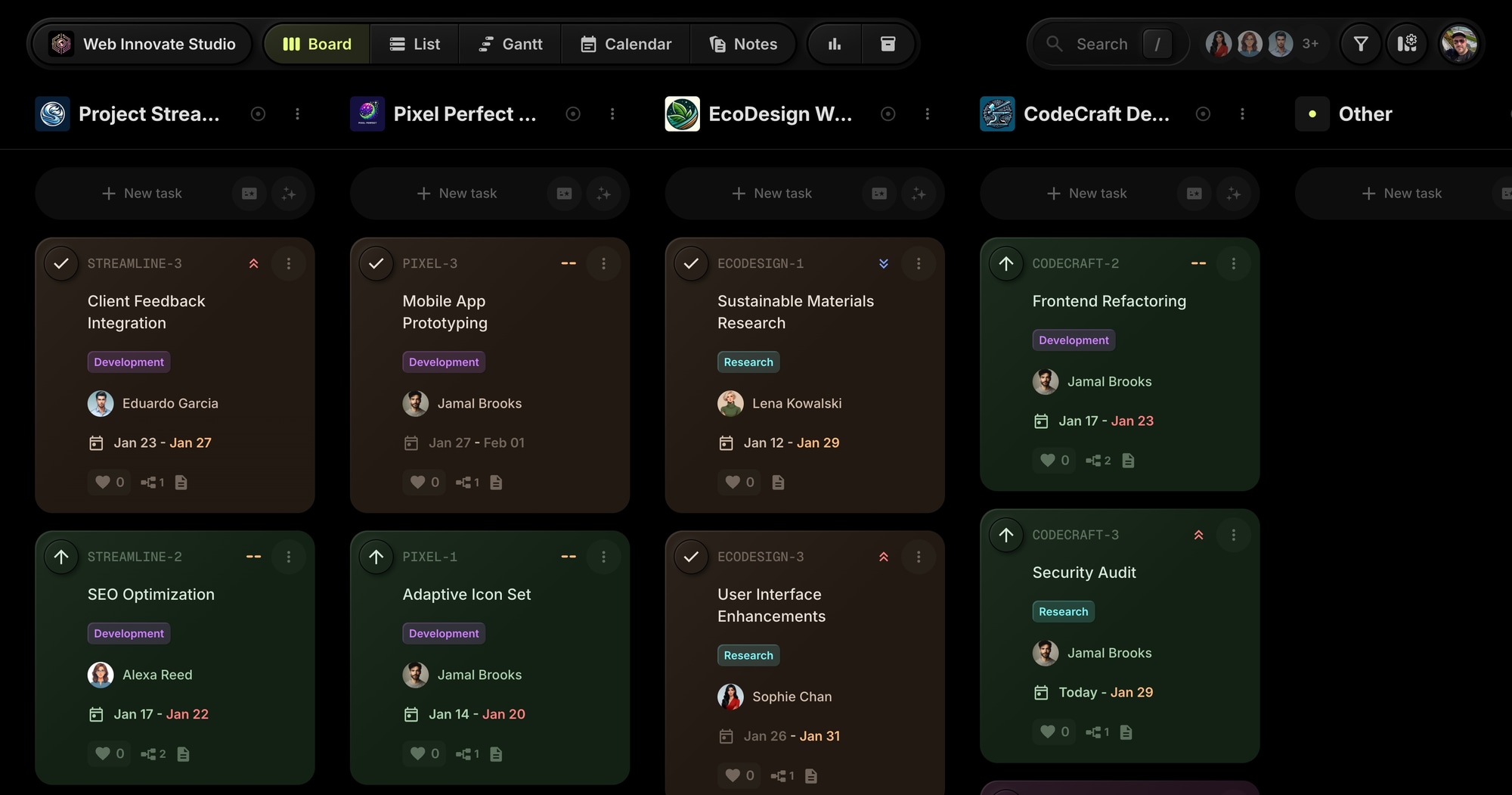
Web Innovate Studio - Agency Client Management Template
The Web Innovate Studio template gives web development agencies a ready-to-use board for managing multiple client projects. Track design work, development tasks, and client feedback across all your projects in one organized workspace.
#Who This Template Is For
- Web development agencies managing multiple client sites
- Digital agencies with design and development teams
- Freelance developers juggling several client projects
- Creative studios coordinating designers and developers
- Agencies needing clear status visibility across projects
#Pain Points This Template Solves
Agencies struggle when client work is scattered across email, Slack, and spreadsheets. Designers don't know what developers need. Clients ask for updates that take time to compile. Projects slip through the cracks.
Without centralized management, deadlines get missed, billable time goes untracked, and client satisfaction suffers.
#Why Project Management Matters For Agencies
Multiple clients mean multiplied complexity. Each client has their own timeline, expectations, and communication preferences. What works for one doesn't work for another. Without a system, agency owners spend more time managing chaos than doing billable work.
Visibility drives client confidence. When clients ask "where are we?", the answer should take seconds, not hours. Agencies that can instantly show project status win trust. Those that scramble for updates look disorganized.
Team coordination is the hidden cost. Designers need requirements from developers. Developers need assets from designers. QA needs builds from both. Every handoff is a potential bottleneck. Clear workflows reduce the coordination tax.
Scope creep kills profitability. "Can you just..." requests accumulate into unprofitable projects. Tracking what's in scope, what's blocked, and what's a change request protects margins and sets proper expectations.
#What's Included In This Template
#Pre-Built Projects
| Project | Purpose |
|---|---|
| Project Streamline | Landing page and SEO optimization project |
| Pixel Perfect Redesign | Website wireframe and mobile prototyping |
| EcoDesign Website Revamp | Sustainable design and green hosting |
| CodeCraft Developer Portal | API documentation and frontend work |
#Status Columns
- To-Do - Tasks ready to start
- In Progress - Active work underway
- Review - Awaiting client or team review
- Blocked - Waiting on external input
- Done - Completed work
#Tags
- Development (purple) - Coding and technical work
- Research (cyan) - Discovery and analysis
- Design (orange) - Visual and UX work
- Docs (yellow) - Documentation tasks
#Milestones
- Streamline Launch - Tracks Project Streamline deliverables and website launch readiness
#Notes
The template includes helpful notes for agency operations:
- Client Onboarding Process
- Website Accessibility Guidelines
- Monthly Team Meeting Agenda
#How To Use This Template
#1. Create Your Board
Sign up for a free t0ggles account - no credit card, nothing to cancel - and create a new board using the Web Innovate Studio template. Your agency workspace is ready immediately.
#2. Add Your Client Projects
Rename the sample projects to match your actual clients. Each project keeps all related tasks organized together while sharing the same status columns.
#3. Use Focus Mode for Deep Work
When working on a specific client, use Focus Mode to filter the board to just that project. Eliminate distractions and see only what matters.
#4. Track Client Feedback
Use the Review status to manage client approval workflows. Tag tasks with Client Feedback when waiting for input.
#5. Share Progress With Clients
Enable public board visibility for specific projects if clients want direct access to track progress.
#Best Practices For Agency Project Management
#Standardize Client Onboarding
Every new client engagement should follow the same initial process: kickoff meeting, requirements gathering, technical discovery, timeline agreement. Standardization ensures nothing gets missed and sets proper expectations.
Tip: Create an onboarding checklist in Notes. Duplicate it for each new client project. Check off items as you complete them.
#Make Blockers Visible
Nothing kills project momentum like unclear blockers. When work can't proceed, everyone should know immediately - and know why.
Tip: The Blocked status is your friend. Move tasks there when waiting on client feedback, third-party services, or internal dependencies. Add a comment explaining what's needed to unblock.
#Separate Client Communication From Internal Work
Some tasks are internal ("Set up staging environment"). Some require client involvement ("Get homepage copy approved"). Mixing them creates confusion about who's responsible for progress.
Tip: Use tags to distinguish client-facing tasks. Filter by tag when preparing client updates. This shows them what they're waiting on vs. what you're working on.
#Track Design and Development Separately
Agencies often blur design and development, leading to confusion about what's ready for implementation vs. still being designed.
Tip: The Design and Development tags clarify work type. Filter by tag to see all design work across clients, or all development work. This helps allocate team capacity.
#Document Everything
Client calls, requirements changes, approval decisions - these details matter when disputes arise or team members change.
Tip: Use task comments liberally. Summarize client calls. Document decisions. Link to relevant files. Your board becomes a project history.
#Key t0ggles Features For Agencies
- Multi-project boards - Keep all clients in one place
- Focus Mode - Filter to one project for deep work
- Milestones - Track client deliverables and launch dates
- Tags - Categorize work by type (design, dev, research)
- Notes - Store client briefs and project documentation
- List View - See all tasks across projects in a table
#Common Agency Challenges
#The Client Update Scramble
"Where are we on the project?" Every agency dreads this question when the answer requires digging through emails, Slack, and project files.
Solution: Your board is always current. Filter to that client's project, and the answer is visible: what's done, what's in progress, what's blocked. Client calls become status walks through the board.
#The Juggling Act
You're deep in code for Client A when Client B has an urgent request. Switching contexts is expensive, but ignoring clients damages relationships.
Solution: The board shows everything at a glance. Quick scan of all projects reveals true urgency. Focus Mode lets you dive deep into one client when needed.
#The Scope Creep Monster
"While you're in there, can you also..." Innocent requests accumulate into significantly more work than quoted.
Solution: New requests become new tasks. When they don't fit the current status columns, they're clearly out of scope. Track them separately, quote them separately, bill them separately.
#The Handoff Gap
Designer finishes mockups. Developer doesn't know they're ready. Work sits idle while billable time passes.
Solution: The status flow makes handoffs visible. When design work moves to Review, the developer sees it. When it's approved and moves to To-Do, implementation begins. No status meeting required.
#The Invisible Workload
Some team members are overloaded while others have capacity. But without visibility, work distribution is guesswork.
Solution: Board Reports show workload distribution. See who has too much on their plate. Rebalance before burnout happens.
#Agency Workflow Patterns
#The Monday Planning
Start each week with a clear view:
- Review all projects - what's overdue? What's blocked?
- Prioritize the week's work for each client
- Assign tasks to team members based on capacity
- Identify any client meetings or deadlines
#The Client Call
Structured updates build confidence:
- Open the client's project in Focus Mode
- Walk through Done items since last call
- Show In Progress work
- Discuss Blocked items and what's needed
- Preview upcoming To-Do items
#The Sprint Cycle
If your agency uses sprints:
- Move sprint items to To-Do at sprint start
- Track progress through statuses during sprint
- Review Done items at sprint end
- Plan next sprint from remaining To-Do and new requests
#The Project Wrap-Up
Close projects cleanly:
- Ensure all tasks are Done or explicitly deprioritized
- Document final deliverables in Notes
- Archive completed tasks
- Create maintenance tasks if ongoing support contracted
#Try The Template
Organize your agency with a proven project structure. Web Innovate Studio gives you multi-client management, status tracking, and team coordination from day one.
All four client projects fit on the free plan, so a small studio can run this board without paying anything, and public board sharing is the free way to let a client watch progress. Inviting clients in as guest users, putting the board on your own domain, and wiring up integrations are on the paid plan.
View the demo board to see it in action, or Start for free.
#Related Resources
#Use Cases
#Similar Templates
- PixelForge Games - Multi-discipline production
- Nova Content Studio - Multi-platform content
- Viva Metric - SaaS product development
#Documentation
#External Resources
- Awwwards - Web design inspiration
- Smashing Magazine - Web development resources
Don't Miss What's Next
Get updates, design tips, and sneak peeks at upcoming features delivered straight to your inbox.