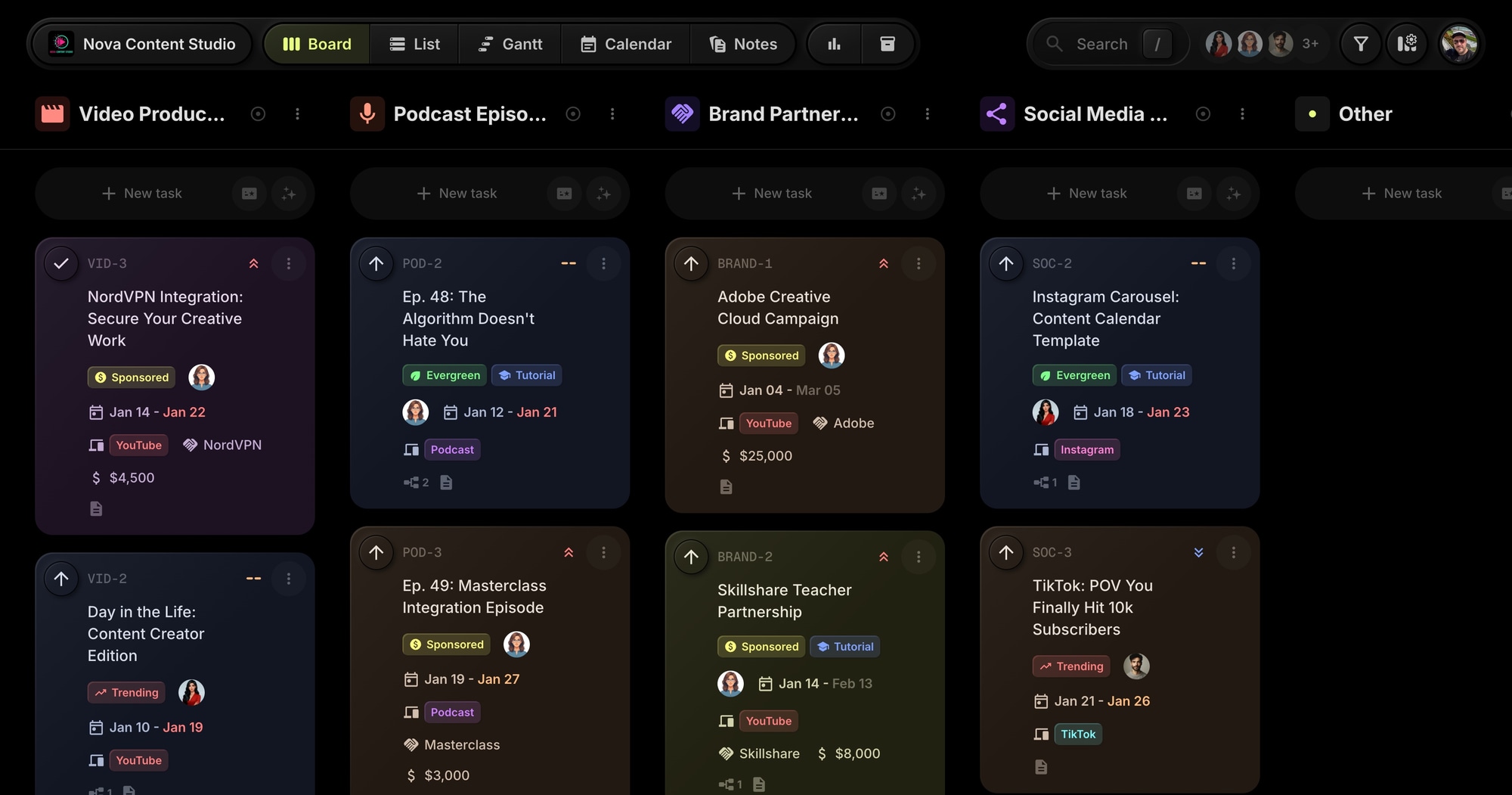
Nova Content - Content Creator Production Template
The Nova Content Studio template gives content creators a ready-to-use production board for managing videos, podcasts, social content, and brand partnerships. Track content from ideation through publishing with platform tagging, sponsor revenue tracking, and content calendar workflows.
#Who This Template Is For
- YouTubers managing video production pipelines
- Podcasters coordinating episode releases
- Content creators working across multiple platforms
- Influencers handling brand partnerships and sponsorships
- Social media teams producing short-form content
#Pain Points This Template Solves
Content creators juggle too many platforms and deadlines. Videos get stuck in editing. Sponsor deliverables slip. Social content happens reactively instead of strategically.
Without a production system, creators miss upload schedules, fumble brand deals, and can't scale beyond what one person can remember.
#Why Production Systems Matter For Content Creators
Consistency is the algorithm's favorite. Whether it's YouTube, TikTok, or podcasts, every platform rewards consistent publishing. The creators who build audiences aren't necessarily the most talented - they're the ones who show up reliably. A production system makes consistency possible.
Brand deals require professionalism. Sponsors expect deliverables on time, to spec, with proper disclosures. Fumbling a sponsorship doesn't just lose that deal - it damages your reputation with agencies who talk to each other.
Multi-platform is the new normal. A single piece of content can become a YouTube video, TikTok clips, Instagram Reels, a podcast segment, and a newsletter. Maximizing reach means repurposing efficiently, which requires tracking what content exists and where it's published.
Burnout is the creator killer. The pressure to constantly create leads many promising creators to quit. Those who survive long-term have systems that reduce decision fatigue and make production feel manageable rather than overwhelming.
#What's Included In This Template
#Pre-Built Projects
| Project | Icon | Purpose |
|---|---|---|
| Video Production | Movie | YouTube main channel content pipeline |
| Podcast Episodes | Mic | Episode planning, recording, and release |
| Brand Partnerships | Handshake | Sponsored content and affiliate deals |
| Social Media Content | Share | TikTok, Instagram Reels, and short-form content |
#Status Columns
- Ideation - Brainstorming and concept development
- Scripting - Writing scripts and outlines
- Production - Filming and recording
- Editing - Post-production work
- Review - Final checks before publishing
- Published - Live content
#Custom Properties
- Platform (Select) - YouTube, TikTok, Instagram, Podcast
- Sponsor (Text) - Brand partner name for sponsored content
- Revenue (Number) - Sponsorship or affiliate revenue in dollars
#Tags
- Trending (red) - Time-sensitive content riding trends
- Evergreen (green) - Long-lasting content with sustained views
- Sponsored (yellow) - Paid partnerships and integrations
- Collab (purple) - Collaborations with other creators
- Tutorial (blue) - Educational and how-to content
#Sample Tasks and Dependencies
The template includes realistic content workflows. Productivity setup video leads to day-in-the-life content. Podcast episodes follow sequential dependencies (Ep 47 -> 48 -> 49 -> 50). Brand content has approval dependencies before publishing.
#How To Use This Template
#1. Create Your Board
Sign up for t0ggles on the free plan - no credit card, nothing to cancel later - and create a new board using the Nova Content Studio template. Your production pipeline is ready for multi-platform content.
#2. Customize Your Platforms
Adjust the Platform property options to match where you publish. Add or remove platforms as needed. Each task can be tagged with its destination platform.
#3. Track Sponsorships
Use the Sponsor and Revenue properties to manage brand deals. Filter by the Sponsored tag to see all paid content at a glance. Track deliverables and payment status.
#4. Plan Your Content Calendar
Use the Calendar view to visualize your publishing schedule. Set due dates for upload days. Use start dates for when production begins.
#5. Coordinate With Your Team
If you work with editors, thumbnail designers, or producers, invite them to your board. Assign tasks to team members and track handoffs through status columns.
#Best Practices For Content Production
#Batch Similar Work
The most efficient creators batch production. Film multiple videos in one day. Record several podcast episodes in a session. Create a month's worth of thumbnails at once. Batching reduces setup time and keeps you in flow.
Tip: Use status columns to visualize batches. Move five video ideas to Scripting, write them all, then move them to Production. Film them all on shoot day. Batch editing follows.
#Separate Evergreen From Trending
Trending content has a short shelf life but can explode in views. Evergreen content builds slowly but compounds over time. Your content mix should include both, but they need different production approaches.
Tip: Use the Evergreen and Trending tags. Prioritize trending content when timely. Fall back on evergreen when you need reliable content without time pressure.
#Treat Sponsors Like Clients
Brand partnerships are business relationships. Deliverable dates, revision rounds, approval workflows, FTC disclosures - these details matter. Professional sponsors will work with you repeatedly; unprofessional ones damage your reputation.
Tip: Create tasks for each sponsor deliverable. Use dependencies for approval workflows. Track revenue to understand which partnerships are actually profitable.
#Plan Two Weeks Ahead
Flying by the seat of your pants works until it doesn't. Having a two-week content runway means you can handle illness, equipment failures, or just bad creative days without missing uploads.
Tip: Use the Calendar view to see your upcoming two weeks. If you don't have content through that window, shift focus to ideation and production.
#Repurpose Systematically
A single YouTube video can become 5+ TikToks, Instagram Reels, Twitter clips, newsletter content, and podcast discussion. But repurposing only happens if you plan for it.
Tip: When creating a main channel video, create linked tasks for repurposed content. The short-form clips depend on the main video completing. Track everything in one place.
#Key t0ggles Features For Content Creators
- Custom properties - Track platform, sponsors, and revenue per piece
- Calendar view - Visualize your content calendar
- Task dependencies - Model production workflows
- Notes - Store brand guidelines and content calendars
- Multi-project boards - Manage videos, podcasts, and social in one place
#Common Content Creator Challenges
#The Editing Bottleneck
For most creators, editing is the slowest part of production. Videos pile up waiting for post-production. Upload schedules slip.
Solution: The Editing status makes the bottleneck visible. When too many items stack up there, you know to either hire help, simplify your editing style, or adjust your publishing frequency.
#The Sponsor Scramble
Brand deal comes in with a tight deadline. You scramble to produce it, pushing other content back. The sponsor is happy but your regular audience wonders where you went.
Solution: Brand Partnerships is a dedicated project. Track sponsor deadlines alongside regular content. When a new deal comes in, you can see the impact on your existing schedule and negotiate realistic timelines.
#The Platform Whiplash
YouTube wants 10-minute videos. TikTok wants 60 seconds. Podcasts want an hour. Trying to serve every platform equally leads to serving none well.
Solution: Use the Platform property to see content distribution. Filter by platform to understand where you're under-investing. Make strategic decisions about where to focus rather than reactive ones.
#The Burnout Spiral
Creating content is creative work. But when production becomes a never-ending treadmill, creativity dies. Many creators quit not because they ran out of ideas but because they ran out of energy.
Solution: A clear production system reduces decision fatigue. You know what you're working on and when. The calendar shows your runway. When you need a break, you can plan for it rather than just crashing.
#Content Workflow Patterns
#The Weekly Planning Session
Start each week knowing what you'll create:
- Review the Calendar for upcoming deadlines
- Check Ideation for concepts ready to develop
- Move selected ideas to Scripting
- Assign due dates based on publishing schedule
- Review sponsor deliverables and integrate into the calendar
#The Production Day
Batch filming makes the most of setup time:
- Filter by Scripting status - these are ready to film
- Prepare all scripts, setups, and thumbnails
- Film everything in one session
- Move completed items to Editing
- Create repurpose tasks for short-form content
#The Sponsor Workflow
Professional sponsor management protects relationships:
- New deal creates a task with Sponsor and Revenue properties
- Brief review task depends on initial discussion
- Production tasks follow standard workflow
- Sponsor approval task gates publishing
- Published content triggers payment tracking
#Try The Template
Take control of your content production. Nova Content Studio gives you platform tracking, sponsor management, and multi-format organization from day one.
As shipped, the template lives comfortably on the free plan: one board, all four production projects, and space for the tasks and notes that keep your calendar full. It stays free for as long as you use it, so you can ship a few uploads before deciding whether to upgrade.
View the demo board to see it in action, or Start for free.
#Related Resources
#Use Cases
#Similar Templates
- PixelForge Games - Multi-discipline production
- Launch Academy - Course and education content
- Web Innovate Studio - Client project management
#Use Cases
- t0ggles for Newsletter Creators - Plan editions and content calendars
- t0ggles for Influencer Marketing - Manage brand deals and campaigns
- t0ggles for Community Managers - Track engagement and community growth
#Documentation
#External Resources
- Creator Economy Report - Industry trends and data
- YouTube Creator Academy - Official YouTube resources
Don't Miss What's Next
Get updates, design tips, and sneak peeks at upcoming features delivered straight to your inbox.