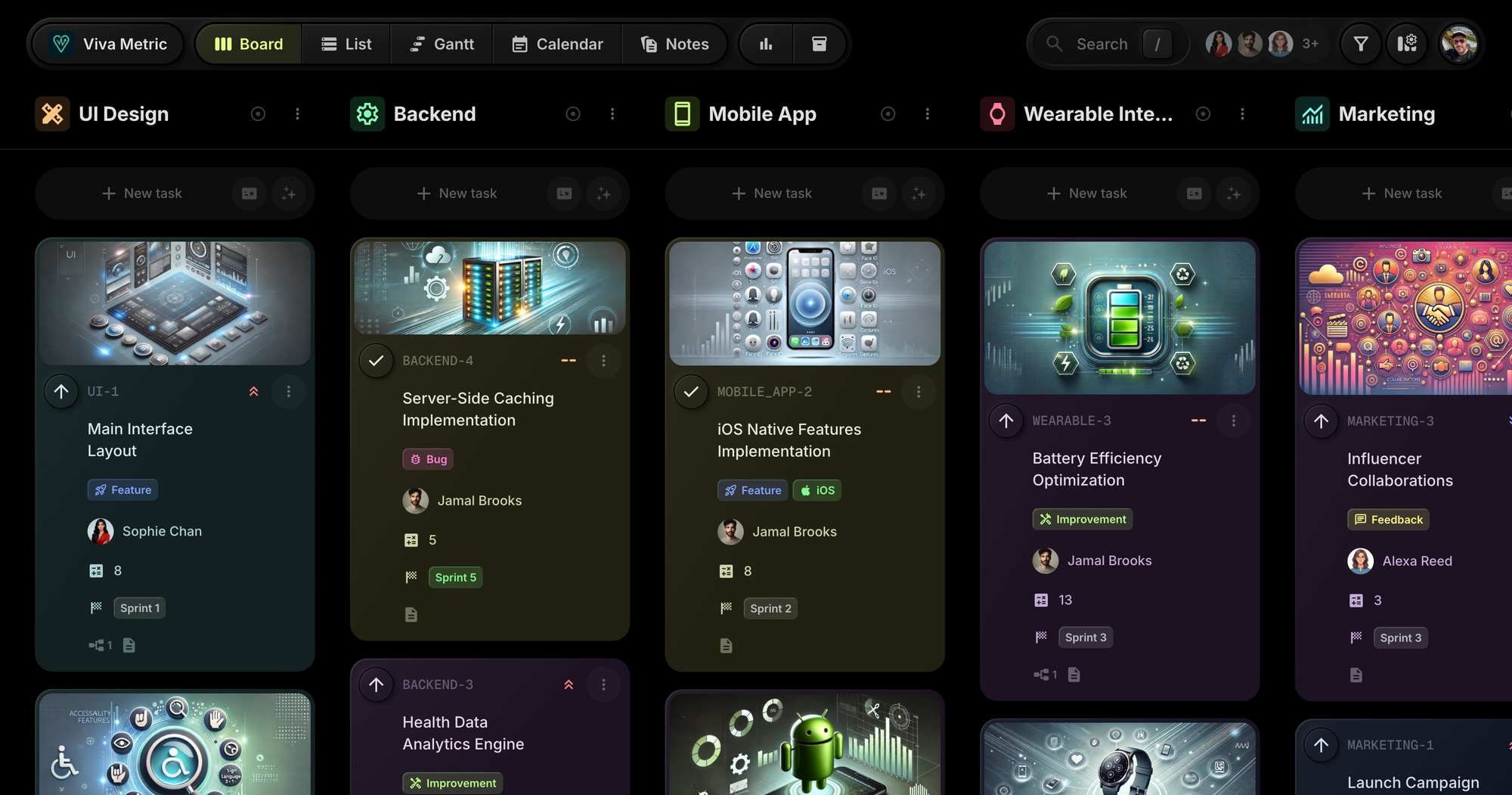
Viva Metric - SaaS Product Development Template
The Viva Metric template gives SaaS teams a ready-to-use board modeled after a health monitoring app development workflow. Sprint planning with story points, cross-platform development tracking (iOS, Android, wearables), and multiple project streams all in one place.
#Who This Template Is For
- SaaS product teams using agile methodologies
- Mobile app development teams building for iOS and Android
- Product managers planning sprints and backlogs
- Engineering teams coordinating frontend, backend, and mobile work
- Startups building health, fitness, or wearable apps
#Pain Points This Template Solves
Product teams struggle when work is scattered across Jira, spreadsheets, and Slack. Sprint planning takes too long. Cross-platform work isn't coordinated. Marketing and feedback loops disconnect from engineering.
Without a central hub, sprints drift, platform parity falls behind, and user feedback gets lost.
#Why Sprint-Based Development Matters For SaaS
Iteration speed determines product success. In SaaS, the teams that ship fastest learn fastest. Every sprint that delivers working software generates customer feedback that shapes the next sprint. Slow iteration means falling behind competitors who move faster.
Cross-functional coordination is the killer. Modern SaaS products involve design, frontend, backend, mobile, DevOps, QA, and marketing. When these functions don't coordinate, you get misaligned releases, broken features, and frustrated customers.
Technical debt compounds silently. Without visibility into what's building up, product quality erodes. Bugs accumulate. Performance degrades. Eventually, you're spending more time fighting fires than building features.
User feedback drives product-market fit. The companies that succeed are obsessive about user feedback. They have systems to collect it, prioritize it, and act on it. Feedback that sits in email or Slack threads might as well not exist.
#What's Included In This Template
#Pre-Built Projects
| Project | Icon | Purpose |
|---|---|---|
| UI Design | Design | Interface layout and accessibility work |
| Backend | Settings | Data handling, APIs, and analytics engine |
| Mobile App | Smartphone | iOS and Android native development |
| Wearable Integration | Watch | Smartwatch compatibility and sync |
| Marketing | Monitoring | Launch campaigns and social engagement |
| Feedback | Chat | User feedback and beta testing |
#Status Columns
- Backlog - Prioritized but not scheduled
- To-Do - Planned for current sprint
- In Progress - Active development
- In Review - Code review or design review
- QA - Quality assurance testing
- Completed - Done and verified
#Custom Properties
- Story Points (Number) - Effort estimation for sprint planning
- Sprint (Select) - Sprint 1 through Sprint 5 assignment
#Milestones
- v1.0 Launch - Tracks release readiness across all projects with tasks linked to this milestone
#Tags
- Urgent (red) - High priority items
- Bug (pink) - Defects to fix
- Feature (blue) - New functionality
- Improvement (lime) - Enhancements
- Docs (cyan) - Documentation
- Feedback (yellow) - User feedback
- Support (purple) - Support tickets
- iOS (green) - Apple platform work
- Android (orange) - Android platform work
#How To Use This Template
#1. Create Your Board
Signing up for t0ggles is free and takes no credit card. Create a new board using the Viva Metric template and your SaaS development workspace is ready immediately.
#2. Plan Your Sprints
Use the Sprint property to assign tasks to upcoming sprints. Filter by sprint to see your current workload. Adjust story points to balance capacity.
#3. Track Cross-Platform Work
Use iOS and Android tags to track platform-specific work. Filter by tag to see all mobile work or focus on one platform.
#4. Coordinate Teams
Separate projects for UI, Backend, Mobile, and Marketing let different teams focus while maintaining visibility across the board.
#5. Monitor Velocity
Use Board Reports to track burndown and velocity across sprints. Identify bottlenecks and improve estimation over time.
#Best Practices For SaaS Product Development
#Keep Sprints Sacred
The temptation to add "just one more thing" mid-sprint is constant. Resist it. Sprint scope should be locked once planning is complete. New urgent items go into the next sprint unless they're genuine emergencies.
Tip: Use the Backlog status as a parking lot. Urgent new requests that aren't true emergencies get tagged "Urgent" and prioritized for next sprint. The current sprint stays stable.
#Size Stories Consistently
Story points only work if the team applies them consistently. A 3-point story should feel roughly the same as other 3-point stories. Calibrate regularly.
Tip: Before each sprint planning, review completed stories from the previous sprint. Were estimates accurate? Discuss outliers to improve future estimates.
#Maintain Platform Parity
For cross-platform products, letting one platform fall behind creates a split user experience. iOS users expect the same features as Android users. Plan platform work together.
Tip: When creating a feature task, create linked tasks for both platforms. Use the iOS and Android tags to track them. Don't ship a feature on one platform without a clear plan for the other.
#Close the Feedback Loop
User feedback is only valuable if it reaches the team building the product. Create a direct path from feedback collection to sprint planning.
Tip: The Feedback project captures all user input. Review it weekly. Items that warrant action become tasks in the appropriate project (Backend, Mobile, etc.) with the Feedback tag preserved for tracing.
#Keep Bug Debt Visible
Every sprint should include some bug fixing. Letting bug debt accumulate creates a product that feels broken even as new features ship.
Tip: Filter by Bug tag weekly. Assign critical bugs to the current sprint. Track bug count over time - if it's growing, allocate more capacity to bug fixing.
#Key t0ggles Features For SaaS Teams
- Custom properties - Track story points and sprint assignment
- Reports - Burndown charts and workload analysis
- Milestones - Track release targets and key deliverables
- Tags - Platform tagging for iOS/Android
- Multi-project boards - Coordinate design, backend, and mobile
- AI task creation - Generate user stories and acceptance criteria
#Common SaaS Development Challenges
#The Never-Ending Sprint
Sprints that drag on without clear endings lead to drift. Work expands to fill time. Nobody knows when something will actually ship.
Solution: The Sprint property enforces boundaries. Sprint 1 ends when Sprint 1 ends. Incomplete work moves to Sprint 2, not "extended Sprint 1." Clear boundaries create accountability.
#The Design-Development Gap
Designers create mockups. Developers build something different. Nobody noticed until it was too late.
Solution: Separate UI Design and Mobile/Backend projects create clear handoff points. Design work moves through its own status flow. Development doesn't start until design is approved. The In Review status creates an explicit checkpoint.
#The Integration Nightmare
Backend says the API is ready. Mobile says it doesn't work. Fingers point. Time burns.
Solution: Task dependencies model integration points. Mobile tasks depend on Backend API tasks. The dependency isn't "done" until integration is verified. Clear ownership at integration points.
#The Invisible Technical Debt
Nobody tracks the shortcuts taken to meet deadlines. Then the codebase becomes unmaintainable and everything slows down.
Solution: Create tasks for technical debt. Tag them with Improvement. Track them in Backlog. Allocate capacity each sprint for debt reduction. Make the invisible visible.
#The Marketing Disconnect
Marketing announces features that aren't ready. Or features ship without any marketing. Neither is good.
Solution: The Marketing project lives on the same board as development. Marketing tasks depend on feature tasks. Launch campaigns don't start until features are in QA. Same board means same visibility.
#SaaS Development Workflow Patterns
#The Sprint Planning Session
Start each sprint with clear scope:
- Review Backlog by priority and story points
- Calculate team capacity (story points available)
- Move highest-priority items to To-Do until capacity is filled
- Assign Sprint property to all items
- Identify any cross-team dependencies
#The Daily Standup
Keep the team aligned:
- Filter board to current sprint
- Review In Progress items - any blockers?
- Review In Review items - what needs attention?
- Check QA items - anything ready to ship?
- Flag items at risk of not completing
#The Sprint Retrospective
Improve continuously:
- Review velocity - how many points completed?
- Compare to estimate - were we accurate?
- Identify what slowed the team down
- Create improvement tasks for next sprint
- Celebrate wins
#The Release Process
Ship with confidence:
- Items in Completed have passed QA
- Marketing tasks are ready for launch
- Coordinate release across platforms
- Move items to Completed status as they ship
- Monitor for issues post-release
#Try The Template
Build your SaaS product with proven sprint workflows. Viva Metric gives you story points, sprint planning, and cross-platform coordination from day one.
Start on the free plan - free forever, no credit card, no trial countdown - and shape the board around the streams your team actually ships. Move to the paid plan when you need more room, guest access for stakeholders, or integrations.
View the demo board to see it in action, or Start for free.
#Related Resources
#Use Cases
#Similar Templates
- Daily Standup - The standup ritual for a sprint team, with blockers tracked
- PixelForge Games - Multi-discipline development
- OSS Crew - Software project management
- Web Innovate Studio - Development agency
#Use Cases
- t0ggles for Data Science - ML workflows and experiment tracking
- t0ggles for AI Startups - Ship AI products with agile sprints
- t0ggles for DevOps - Infrastructure alongside product development
#Documentation
#External Resources
- Scrum Guide - Official Scrum methodology documentation
- Agile Manifesto - Foundational agile principles
Don't Miss What's Next
Get updates, design tips, and sneak peeks at upcoming features delivered straight to your inbox.