OSS Crew - Open Source Project Management Template
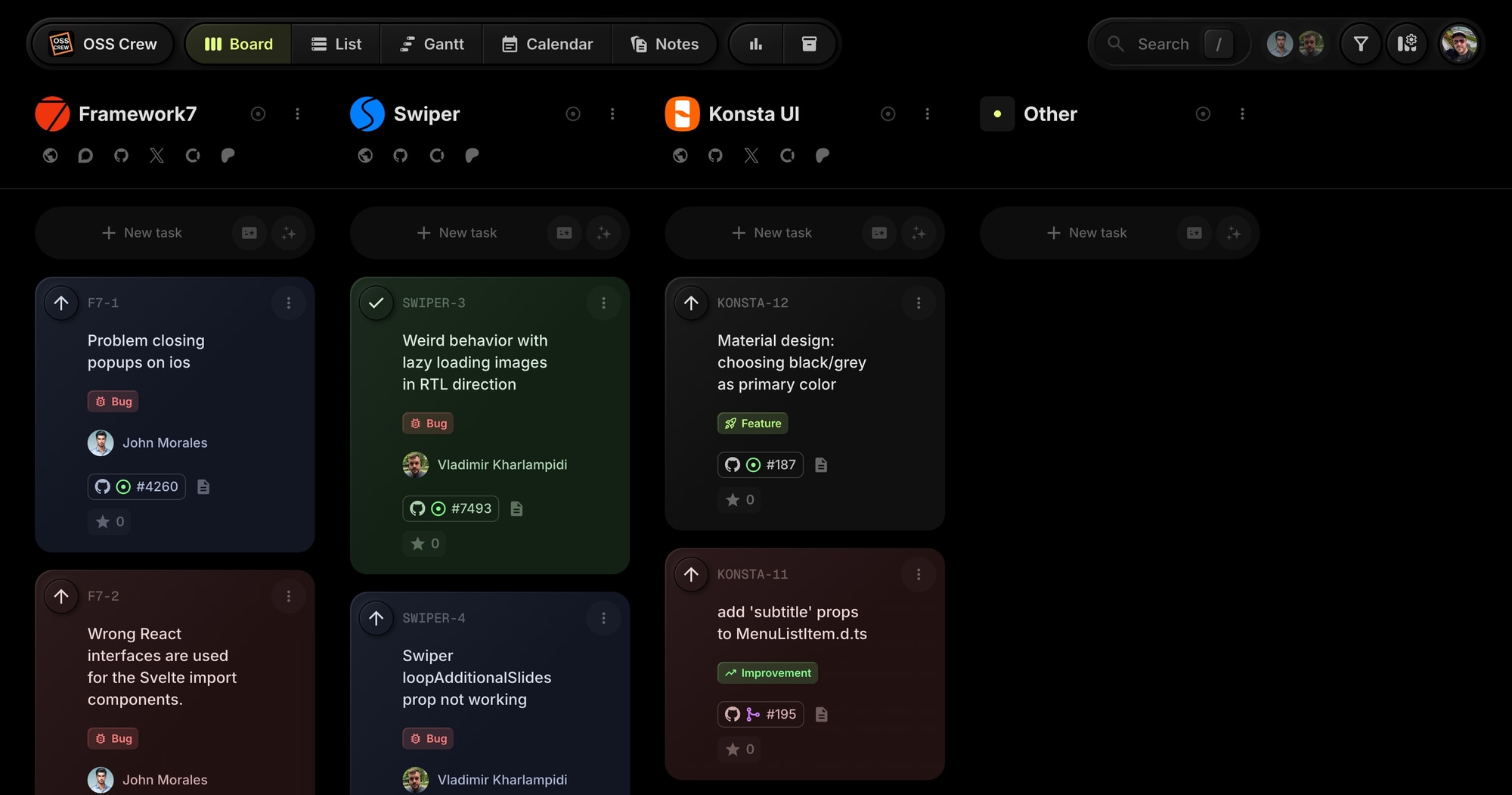
The OSS Crew template gives open source maintainers a ready-to-use project board inspired by real OSS workflows. Manage multiple libraries on one board, track issues and pull requests, and coordinate with contributors using public boards and GitHub integration.
#Who This Template Is For
- Open source maintainers managing multiple libraries
- OSS contributors coordinating feature development
- Developer advocates tracking community projects
- Teams running public roadmaps for their projects
- Solo developers maintaining popular packages
#Pain Points This Template Solves
OSS maintainers drown in GitHub notifications. Issues pile up without triage. PRs wait for review while contributors lose interest. Roadmap visibility is poor - users don't know what's coming.
Without centralized project management, maintainers burn out, community trust erodes, and projects stagnate despite having active users.
#Why Project Management Matters For Open Source
Open source has a maintainer crisis. High-profile projects have been abandoned because maintainers burned out. The combination of growing user expectations, endless issue queues, and ungrateful demands creates unsustainable pressure.
Structure reduces cognitive load. Maintainers who survive long-term share a common trait: they've systematized their workflows. They have clear criteria for what gets attention, processes for triaging issues, and roadmaps that set expectations.
Transparency builds community. When users can see what's planned, what's in progress, and why certain requests are deprioritized, they complain less and contribute more. Public roadmaps turn frustrated users into patient supporters.
Triage is the highest-leverage activity. Every minute spent on clear issue categorization saves hours of duplicate reports, misdirected contributor effort, and repeated explanations. Good triage is the difference between a maintainable project and an overwhelming one.
#What's Included In This Template
#Pre-Built Projects
| Project | Icon | Purpose |
|---|---|---|
| Framework7 | Custom | Mobile UI framework with iOS/Android components |
| Swiper | Custom | Touch slider library with framework support |
| Konsta UI | Custom | Tailwind CSS mobile UI components |
#Status Columns
- Backlog - Issues waiting for triage
- To-Do - Prioritized for upcoming work
- In Progress - Active development
- Done - Merged and released
#Tags
- Bug (red) - Issue reports and defects
- Feature (lime) - New functionality requests
- Improvement (green) - Enhancements to existing features
#GitHub Integration
Tasks link directly to GitHub issues and pull requests. The template shows real OSS workflows including:
- Issue tracking with reproduction links
- PR status visibility
- Cross-repository management
#Public Board Support
OSS Crew uses t0ggles' public board visibility so the community can see your roadmap and track progress. Enable star reactions to let users vote on features.
#How To Use This Template
#1. Create Your Board
Sign up for t0ggles - the free plan costs nothing and asks for no credit card - and create a new board using the OSS Crew template. Your project management structure is ready for open source work.
#2. Connect Your Repositories
Create projects for each library or repository you maintain. Add project links pointing to GitHub repos, documentation sites, and funding pages (Open Collective, Patreon).
#3. Import Issues
Use the GitHub integration to sync issues and PRs. Tasks automatically link back to GitHub for full context.
#4. Make Your Roadmap Public
Enable public visibility to share your roadmap with the community. Let users see what's planned, in progress, and recently shipped.
#5. Enable Community Voting
Turn on star reactions so community members can upvote features they want. Use the reaction count to prioritize your backlog based on real user demand.
#Best Practices For OSS Project Management
#Establish Clear Triage Criteria
Not every issue deserves the same attention. Define what makes an issue actionable:
- Bug reports need reproduction steps, expected vs. actual behavior, and environment details
- Feature requests need use cases and evidence of broader demand
- Questions should be redirected to discussions or Stack Overflow
Tip: Create a triage checklist in Notes. Link to it in your GitHub issue templates. Tasks that don't meet criteria get a "needs info" label and won't clutter your backlog.
#Use Voting To Prioritize
Maintainers often guess what users want. Direct feedback is better. Star reactions let your community vote on what matters most to them.
Tip: Sort your backlog by reaction count before each release planning session. High-vote items represent validated demand.
#Batch Similar Work
Context-switching is expensive. Grouping related issues - all documentation updates, all dependency bumps, all type definition fixes - lets you work more efficiently.
Tip: Use tags to categorize issues. Filter by tag when you have a block of focused time. Do all docs work in one session.
#Set Realistic Expectations
Nothing frustrates users more than promises that don't materialize. If a feature is months away, say so. If you're not sure you'll implement something, don't commit.
Tip: Only move items to "To-Do" when you genuinely plan to work on them soon. Keep everything else in Backlog. Your To-Do list is a promise to your community.
#Document Decisions
Why was this PR rejected? Why did you choose this API design? These decisions get asked about repeatedly. Documenting them once saves time forever.
Tip: Use Notes to store ADRs (Architecture Decision Records) and FAQs. Link to them when questions arise.
#Key t0ggles Features For Open Source
- GitHub integration - Sync issues and PRs automatically
- Public boards - Share roadmaps with your community
- Custom reactions - Let users vote on features with stars
- Multi-project boards - Manage multiple libraries in one place
- Project links - Quick access to repos, docs, and funding pages
#Common OSS Workflow Challenges
#The Notification Flood
Popular projects generate dozens of notifications daily. Email becomes unusable. GitHub's notification UI isn't designed for triage at scale.
Solution: t0ggles becomes your triage inbox. Sync issues to the board, process them there, and let GitHub be the place where discussion happens. Your board shows what needs attention.
#The Drive-By Feature Request
Users open issues for features that don't fit the project vision, would require massive effort, or duplicate existing functionality. Handling each one individually is exhausting.
Solution: Public roadmaps set expectations. When users can see what's planned, they're less likely to request random features. When they do, you can point to the roadmap and explain prioritization.
#The Abandoned PR
Contributors submit PRs and then disappear. The code is partially done, feedback was requested, but nobody's home.
Solution: Track PR status on your board. Set deadlines for contributor response. If a PR goes stale, close it with a clear explanation. Your board shows which PRs need follow-up.
#The Cross-Project Feature
Some features span multiple libraries. A change in your UI framework requires updates to the documentation site and starter templates.
Solution: Multi-project boards let you see all related work in one view. Create tasks in each project and link them with dependencies. Track the complete picture.
#Maintainer Burnout
The emotional labor of OSS - demanding users, thankless work, constant pressure - leads to burnout. Many maintainers quit projects they once loved.
Solution: Clear processes reduce decision fatigue. Triage criteria mean you're not debating every issue. Public roadmaps reduce angry "when is this shipping" comments. Star voting means the community helps prioritize. You focus on building, not explaining.
#Building Sustainable OSS Workflows
#The Weekly Triage Ritual
Set aside dedicated time for triage. Review all new issues, categorize them, respond or close as needed, and update the board. Then step away from notifications.
- Filter issues by "needs triage" in GitHub
- For each issue: categorize (bug/feature/question), assess quality, respond
- Good issues become tasks on your board
- Poor issues get a form response and close
#The Release Planning Process
Before each release, review your board:
- What's Done and ready to ship?
- What's In Progress and how close to completion?
- What To-Do items make sense for this release?
- What Backlog items have high community votes?
#The Contribution Guide
Make it easy for new contributors:
- Tag tasks as "good first issue" or "help wanted"
- Write clear descriptions with context
- Link to relevant documentation
- Respond quickly to PR submissions
#Try The Template
Give your open source projects the management they deserve. OSS Crew provides GitHub integration, public roadmaps, and multi-library organization from day one.
The template runs as shipped on the free plan: one board, its three library projects, and room for tasks. Public board sharing is free too, so your roadmap can be open to the community from the first day without paying for anything.
View the demo board to see it in action, or Start for free.
#Related Resources
#Use Cases
#Similar Templates
- Daily Standup - The daily ritual for a maintainer team, with blockers tracked
- PixelForge Games - Multi-discipline development
- Viva Metric - SaaS product development
- Web Innovate Studio - Development agency workflows
#Use Cases
- t0ggles for AI Agents - Let AI agents manage issues and contributions
- t0ggles for DevOps - CI/CD pipelines and infrastructure tracking
- t0ggles for Hackathons - Sprint planning for open source sprints
#Documentation
#External Resources
- Open Source Initiative - OSS licensing and advocacy
- GitHub Open Source Guides - Best practices for maintainers
Don't Miss What's Next
Get updates, design tips, and sneak peeks at upcoming features delivered straight to your inbox.