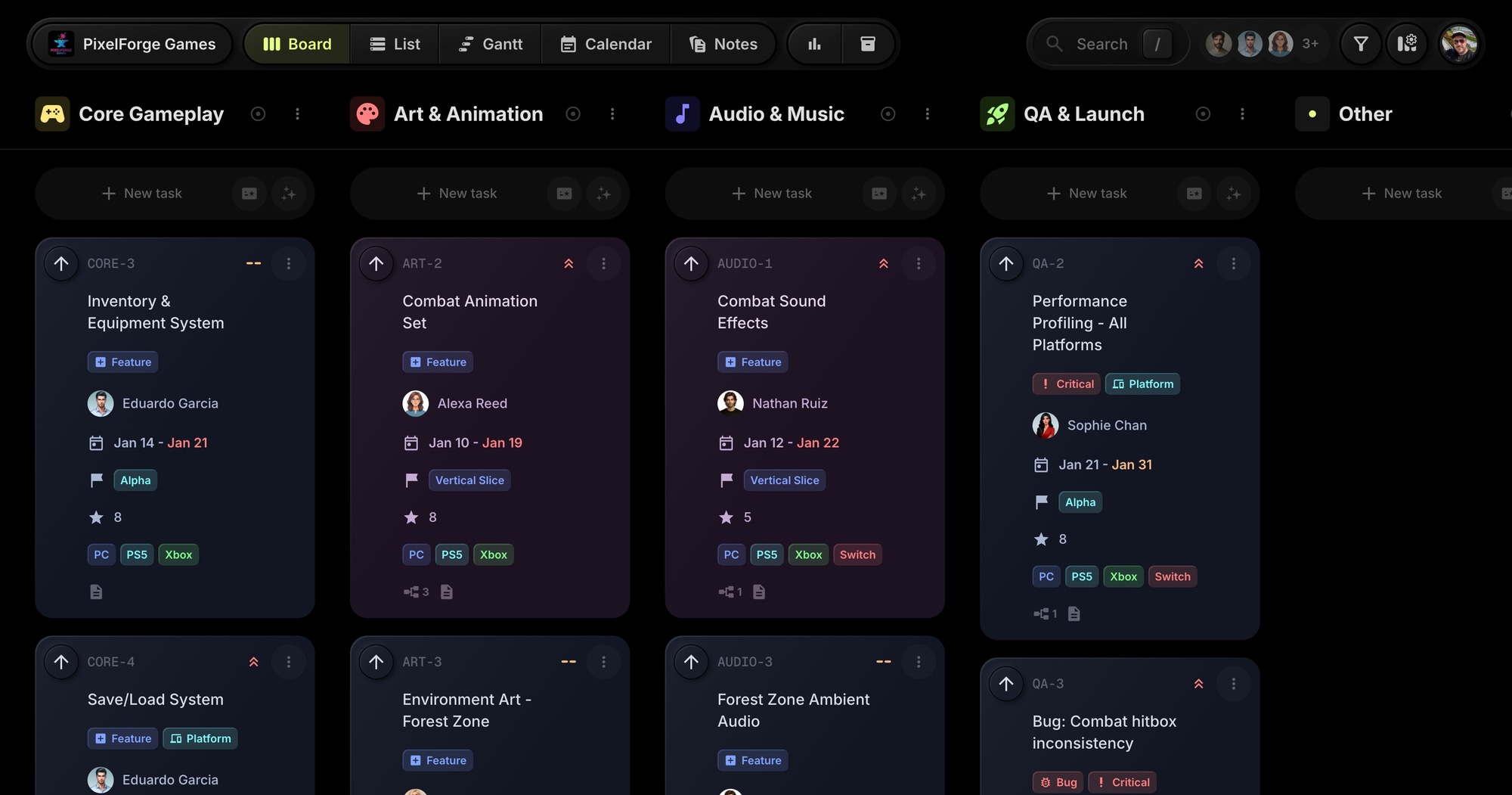
PixelForge Games - Game Development Project Management Template
The PixelForge Games template gives game development teams a ready-to-use production board modeled after a real indie studio workflow. Pre-configured with milestones from Prototype to Gold Master, cross-discipline projects, and task dependencies - everything you need to ship your game.
#Who This Template Is For
- Indie game studios managing multi-discipline teams
- Solo developers tracking gameplay, art, and audio work
- Game dev teams coordinating across programmers, artists, and designers
- Studios planning milestone-based production schedules
- Teams shipping to multiple platforms (PC, console, Switch)
#Pain Points This Template Solves
Game development teams struggle when work is scattered across Discord, spreadsheets, and email. Artists don't know what gameplay features are ready for assets. Audio waits on animations that aren't finished. QA finds bugs but can't track them properly.
Without a central hub, milestone deadlines slip, cross-discipline dependencies break, and nobody knows the true state of the build.
#Why Project Management Matters In Game Development
Game development is uniquely complex. A typical indie game involves programming, art, animation, audio, level design, UI, QA, and marketing - often with a small team wearing multiple hats. The interdependencies are intricate: character animations depend on finalized gameplay mechanics, sound effects need animation timing data, and QA can't test features until they're integrated.
The cost of poor coordination is high. According to industry data, over 80% of announced indie games never ship. Scope creep, team burnout, and missed milestones are primary culprits. Studios that survive to launch typically have one thing in common: a clear production process that keeps everyone aligned.
Milestone-driven development works. The game industry has converged on milestone-based production for good reason. Each milestone - Prototype, Vertical Slice, Alpha, Beta, Gold Master - represents a distinct state of the game with clear criteria. This gives teams concrete goals, helps publishers and investors understand progress, and forces difficult prioritization decisions early.
#What's Included In This Template
#Pre-Built Projects
| Project | Icon | Purpose |
|---|---|---|
| Core Gameplay | Controller | Player movement, combat, inventory, save/load |
| Art & Animation | Palette | Character models, animations, environment art |
| Audio & Music | Music Note | Sound effects, ambient audio, music tracks |
| QA & Launch | Rocket | Playtesting, performance, certification prep |
#Status Columns
- Backlog - Tasks waiting to be prioritized
- In Development - Active work in progress
- Integration - Merging into the main build
- Testing - QA verification in progress
- Done - Completed and verified
#Custom Properties
- Milestone (Select) - Prototype, Vertical Slice, Alpha, Beta, Gold Master
- Story Points (Number) - Effort estimation for sprint planning
- Platform (Multi-select) - PC, PS5, Xbox, Switch
#Tags
- Bug (red) - Track issues and defects
- Feature (blue) - New functionality
- Polish (purple) - Visual and feel improvements
- Critical (red) - High-priority items
- Platform (cyan) - Platform-specific work
#Sample Tasks and Dependencies
The template includes realistic tasks like "Player Movement System" and "Combat System - Melee" with proper dependencies. Combat animations depend on gameplay mechanics being finalized. Sound effects wait on animation timing. QA playtests depend on features being integrated.
#How To Use This Template
#1. Create Your Board
Sign up for t0ggles on the free plan - no credit card, no trial clock - and create a new board using the PixelForge Games template. Your entire production structure is ready instantly.
#2. Customize For Your Game
Rename projects to match your game's scope. Adjust milestones and statuses to fit your production schedule. Add team members and assign roles.
#3. Set Up Your Team
Invite programmers, artists, audio designers, and QA. Assign tasks based on discipline. Use project-level access to keep teams focused on their work.
#4. Plan Your Milestones
Use the Milestone custom property to track tasks against Prototype, Vertical Slice, Alpha, Beta, and Gold Master. Filter by milestone to see what's blocking your next major deadline.
#5. Track Dependencies
The template includes task dependencies showing how art waits on gameplay, audio waits on art, and QA depends on integration. View dependencies in the Gantt chart to spot bottlenecks.
#Best Practices For Game Development Production
#Keep Milestones Sacrosanct
The biggest threat to game projects is scope creep. Each milestone should have clear, agreed-upon criteria. When you hit Vertical Slice, you should have one complete, polished slice of gameplay that represents the final game. Alpha means all features are in, even if rough. Beta means content-complete and bug-fixing only.
Tip: Use the Milestone property to filter tasks. Before each milestone deadline, review everything not marked for that milestone - if it's not critical, it moves to the next milestone or gets cut.
#Model Your Production Pipeline
Game development has natural dependencies that many tools ignore. Animation can't start until the character rig is done. Sound design needs animation timing. QA can't test features until they're integrated. Ignoring these dependencies leads to wasted work and blocked team members.
Tip: Set up task dependencies early in production. Use lag days when you know there's a handoff time between disciplines.
#Separate Bugs From Features
During production, bugs accumulate. Mixing them with feature work makes prioritization difficult. The Bug tag lets you filter and track defects separately from new development.
Tip: Create a saved filter for "Bug" tags. Review bugs weekly. Critical bugs should block milestone completion - track them with the Critical tag.
#Plan For Multi-Platform Early
Shipping to PC, PlayStation, Xbox, and Switch means different certification requirements, input schemes, and performance targets. Tracking platform-specific work from the start prevents last-minute scrambles.
Tip: Use the Platform property to mark tasks that are platform-specific. Create a QA checklist for each platform's certification requirements.
#Key t0ggles Features For Game Development
- Multi-project boards - Keep gameplay, art, audio, and QA in one place
- Task dependencies - Model cross-discipline workflows with lag days
- Custom properties - Track milestones, story points, and target platforms
- Gantt view - Visualize your production timeline
- Reports - Monitor burndown and workload across disciplines
#Common Game Development Challenges
#The Content Avalanche
As development progresses, the amount of content (levels, assets, audio) explodes. Tracking it all becomes overwhelming.
Solution: Use projects to separate content types. The Art & Animation project houses all visual assets. Audio & Music captures sound work. Filter by project to see progress within each discipline.
#Cross-Discipline Communication Gaps
Programmers think a feature is done. Artists think it's still changing. Nobody knows who's waiting on whom.
Solution: Task dependencies make blockers visible. When the Player Movement System is complete, dependent animation tasks automatically become unblocked. Everyone can see what's holding them up.
#Crunch Culture and Burnout
Unrealistic schedules and poor visibility into workload lead to crunch - extended periods of overwork that harm team health and game quality.
Solution: Use Board Reports to monitor workload distribution. Story points help estimate capacity. When reports show uneven distribution, redistribute work before burnout sets in.
#The "It's Almost Done" Trap
Without clear definitions, tasks linger at 90% forever. Features are "almost done" for months.
Solution: Define clear criteria for each status column. In Development means actively being worked on. Integration means code is merged and building. Testing means QA is verifying. Done means shipped to a build that passes smoke tests.
#Try The Template
Start your game development project with a proven production structure. PixelForge Games gives you milestone tracking, dependency management, and cross-discipline organization from day one.
All four discipline projects fit inside the free plan, so you can set up the board, plan your milestones, and start assigning work without paying. Task dependencies, milestones, and the Gantt view are free too.
View the demo board to see it in action, or Get started free.
#Related Resources
#Use Cases
#Similar Templates
- Nova Content Studio - Multi-platform content production
- Web Innovate Studio - Agency project management
- Viva Metric - SaaS product development
#Use Cases
- t0ggles for Robotics - Hardware development and prototype tracking
- t0ggles for Hackathons - Game jam sprints and team coordination
#Documentation
#External Resources
- Game Developers Conference - Industry events and resources
- Gamasutra - Game development news and tutorials
Don't Miss What's Next
Get updates, design tips, and sneak peeks at upcoming features delivered straight to your inbox.