Launch Academy - Online Course Delivery Template
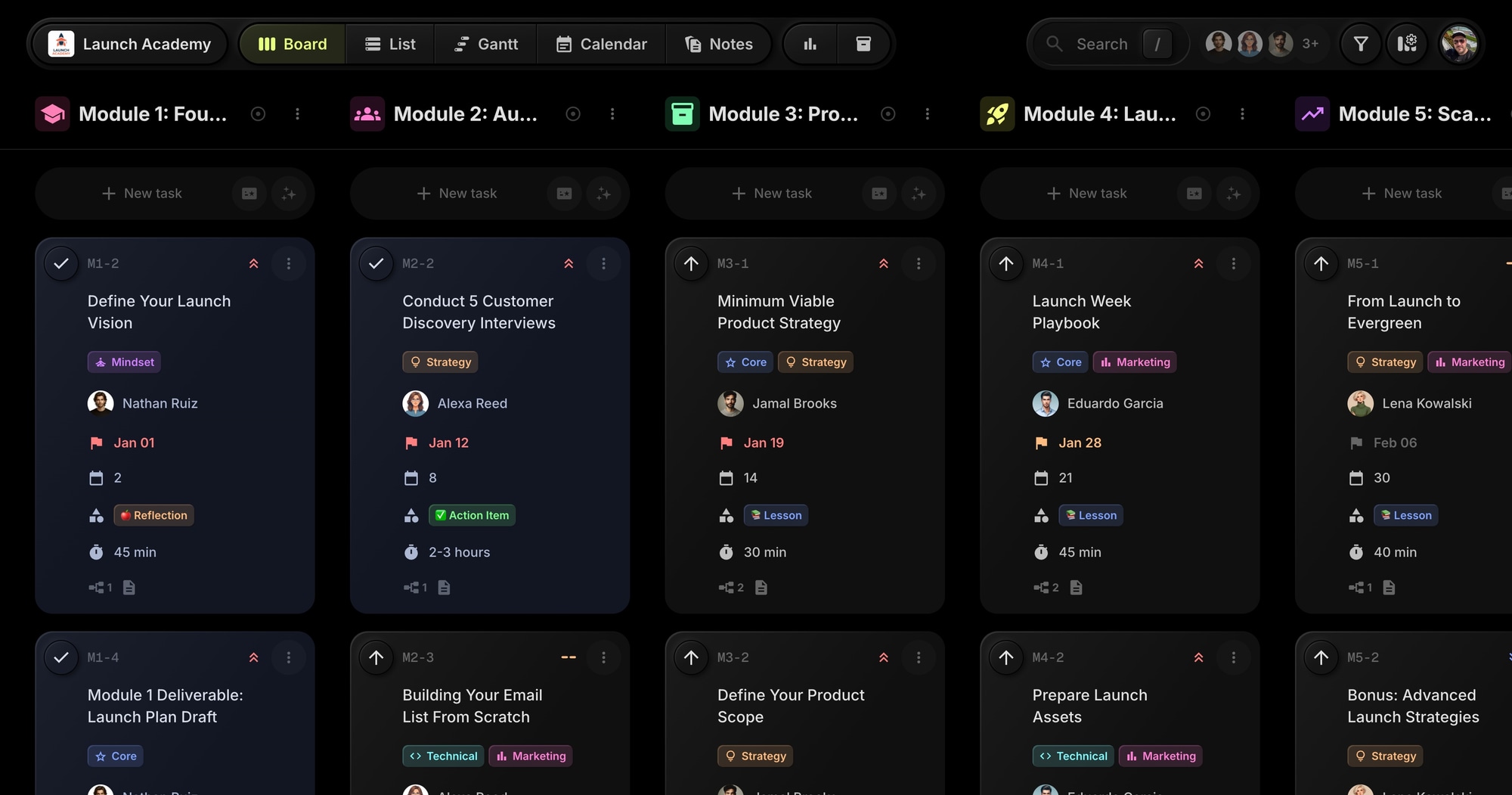
The Launch Academy template gives course creators a ready-to-use board for managing cohort-based online courses. Track lessons, action items, reflections, and deliverables across modules with day numbering, content types, and duration tracking built in.
#Who This Template Is For
- Course creators running cohort-based programs
- Online educators managing structured curricula
- Coaches delivering multi-week training programs
- Membership site owners organizing learning paths
- Content creators building educational products
#Pain Points This Template Solves
Course creators struggle to keep cohorts on track. Students lose their place in the curriculum. Deliverables pile up without deadlines. Course content lacks structure and students feel overwhelmed.
Without clear organization, completion rates drop, students disengage, and course revenue suffers from poor reviews.
#Why Course Structure Matters For Online Education
Completion rates define course success. Most online courses have completion rates below 15%. The courses that succeed have clear structure, paced delivery, and accountability mechanisms. Organization isn't optional - it's the difference between revenue and refunds.
Students need guidance, not just content. Dumping videos into a portal isn't a course. Students need to know what to do today, what comes next, and how it all connects. Structure provides that navigation.
Deliverables create transformation. Passive consumption doesn't create results. Courses that require deliverables - completed exercises, submitted projects, demonstrated skills - actually change student outcomes.
Cohort energy drives completion. Cohort-based courses outperform self-paced because peer accountability matters. But cohorts only work when everyone moves through the material together, which requires clear pacing.
#What's Included In This Template
#Pre-Built Modules (Projects)
| Module | Icon | Purpose |
|---|---|---|
| Module 1: Foundations & Mindset | School | Course overview, vision setting, mindset |
| Module 2: Audience Building | Groups | Customer research, email list, landing pages |
| Module 3: Product Creation | Package | MVP strategy, scoping, pricing, sales page |
| Module 4: Launch Week | Rocket | Launch playbook, assets, execution |
| Module 5: Scale & Automate | Trending | Evergreen funnels, advanced strategies |
#Status Columns
- Not Started - Upcoming lessons and tasks
- In Progress - Currently working on
- Completed - Finished and submitted
#Custom Properties
- Day (Number) - Course day number for sequencing
- Type (Select) - Lesson, Action Item, Reflection, Deliverable, Bonus
- Duration (Text) - Estimated time to complete
#Tags
- Core (blue) - Essential curriculum content
- Mindset (purple) - Mental frameworks and motivation
- Strategy (orange) - Planning and decision-making
- Technical (cyan) - Tools and implementation
- Marketing (pink) - Promotion and audience growth
#Task Dependencies
The template includes realistic course flow dependencies. Module 1 deliverable unlocks Module 2. Lessons lead to action items. Deliverables gate progress to the next module.
#Milestones
- Module 2 Complete - Tracks audience building completion including customer discovery, lead magnet, and landing page
- Course Complete - Tracks overall course completion across all modules and deliverables
#Course Resources (Notes)
- Discovery Interview Script
- Email Sequence Templates
- Launch Week Checklist
- Cohort Guidelines & Community Rules
#How To Use This Template
#1. Create Your Board
Sign up for t0ggles - it's free, and no credit card is required - then create a new board using the Launch Academy template. Your course management workspace is ready for student tracking.
#2. Customize Your Curriculum
Rename modules to match your course structure. Adjust lesson titles and descriptions. Add or remove content types as needed for your teaching style.
#3. Track Student Progress
Use the Day property to sequence content. Filter by status to see what's Not Started, In Progress, or Completed. The Type property helps students identify lessons vs. action items.
#4. Manage Deliverables
Deliverable tasks have clear requirements and checklists. Students track their progress through each module's final deliverable before advancing.
#5. Share Resources
Use Notes to store templates, scripts, and checklists. Students access these resources alongside their curriculum tasks.
#Best Practices For Online Course Delivery
#Structure Content by Type
Not all content is equal. Lessons teach concepts. Action items apply them. Reflections deepen understanding. Deliverables prove mastery. Different types need different approaches.
Tip: The Type property categorizes each piece of content. Lessons get consumed. Action items get done. Deliverables get submitted. Students know what's expected for each.
#Pace the Curriculum Deliberately
Overwhelming students with content leads to dropout. Too little and they lose momentum. Finding the right pace is crucial.
Tip: The Day property sequences content. Design for consistent daily effort - maybe one lesson plus one action item per day. The Calendar view shows how content flows over time.
#Make Deliverables Gate Progress
If students can skip deliverables, they will. But deliverables are where learning happens. Make them required.
Tip: Use task dependencies so the next module's content depends on the current module's deliverable. Students can't skip ahead without doing the work.
#Provide Clear Time Estimates
Students need to plan their time. "Watch this video" is vague. "30-minute video plus 45-minute exercise" is plannable.
Tip: The Duration property sets expectations. Be realistic - underestimating leads to frustrated students who fall behind.
#Build in Reflection Points
Learning requires processing time. Reflection prompts help students consolidate what they've learned before moving on.
Tip: Include Reflection type tasks between major sections. These don't need deliverables - just prompts for students to pause and think.
#Key t0ggles Features For Course Creators
- Custom properties - Track day numbers, content types, and duration
- Task dependencies - Model prerequisite learning paths
- Milestones - Set completion targets for modules and the full course
- Notes - Store course resources, templates, and guides
- Tags - Categorize by skill type (mindset, strategy, technical)
- Multi-project boards - Organize modules in one cohesive view
#Common Course Delivery Challenges
#The Dropout Cliff
Students start strong but disappear by week two. Completion rates plummet. Refund requests arrive.
Solution: Clear structure keeps students oriented. The Day property shows where they are and what's next. Dependencies create natural momentum. Progress through statuses provides satisfaction.
#The Overwhelm Spiral
Too much content, too fast. Students feel behind from day one. Stress leads to avoidance, which leads to more falling behind.
Solution: Deliberate pacing prevents overwhelm. Duration estimates help students plan. One deliverable per module keeps workload manageable. Clear progression through statuses shows achievable chunks.
#The Passive Consumption Trap
Students watch videos but don't do the work. They feel like they're learning but aren't actually changing behavior or building skills.
Solution: Action Items and Deliverables require active engagement. Dependencies mean students can't just watch videos and skip exercises. The Type property makes expectations clear.
#The Lost Student
"Wait, what am I supposed to be doing?" Students lose track of where they are in the curriculum and what comes next.
Solution: The board is a roadmap. Filter by module to see current work. The Day property shows sequence. Status columns show progress. Students always know what's next.
#The Resource Hunt
Students need a template discussed in a lesson. Or a checklist mentioned weeks ago. Hunting through videos is frustrating and time-consuming.
Solution: Notes store all course resources in one accessible place. Templates, checklists, scripts - everything students need, organized and searchable.
#Course Delivery Workflow Patterns
#The Cohort Launch
Start each cohort with clear expectations:
- Share board access with all students
- Walk through the structure in kickoff session
- Explain how statuses, modules, and deliverables work
- Set expectations for pace and participation
- Start everyone on Module 1, Day 1
#The Weekly Check-In
Keep cohorts moving together:
- Review completion rates by module
- Identify students falling behind
- Send encouragement to stragglers
- Celebrate students who completed deliverables
- Preview what's coming next week
#The Module Transition
Move cohorts through the curriculum:
- Set deadline for current module deliverable
- Review and provide feedback on submissions
- Unlock next module for students who completed
- Address common questions from module
- Preview and build excitement for next module
#The Course Completion
End with celebration and next steps:
- Final deliverable submitted
- Completion certificates issued
- Gather testimonials and feedback
- Offer next-level programs
- Archive cohort and prepare for next launch
#Try The Template
Deliver structured, engaging online courses. Launch Academy gives you module organization, progress tracking, and resource management from day one.
The free plan fits this template as it ships: one board with all five modules, dependencies, and milestones included. Public board sharing is free too, so your cohort can follow the curriculum without each student needing an account.
View the demo board to see it in action, or Start for free.
#Related Resources
#Use Cases
#Similar Templates
- Lesson Planner - Weekly lesson planning for multiple classes
- Nova Content Studio - Multi-platform content production
- Web Innovate Studio - Client project management
- Viva Metric - Sprint-based delivery with properties
#Use Cases
- t0ggles for Course Creators - Plan curriculum and track student progress
- t0ggles for Community Managers - Build and engage learning communities
#Documentation
#External Resources
- eLearning Industry - Online education trends and best practices
- Instructional Design Central - Course design resources
Don't Miss What's Next
Get updates, design tips, and sneak peeks at upcoming features delivered straight to your inbox.