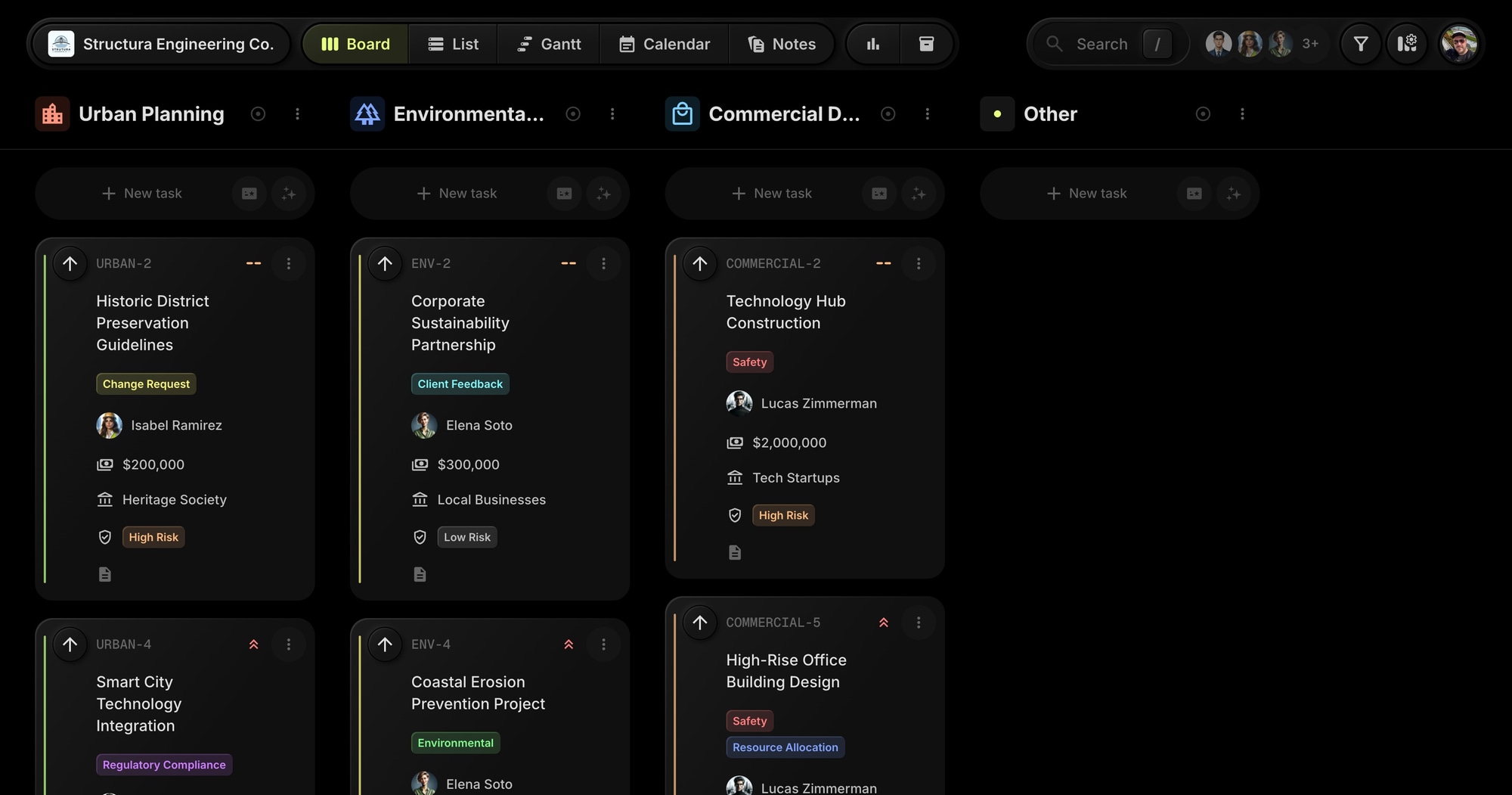
Structura Engineering - Construction Project Management Template
The Structura Engineering template gives civil engineering and construction teams a ready-to-use board for managing complex projects. Track proposals through planning, design, approval, construction, and inspection with budget tracking and risk assessment built in.
#Who This Template Is For
- Civil engineering firms managing infrastructure projects
- Construction companies tracking project phases
- Urban planning teams coordinating development
- Environmental project managers handling compliance
- Commercial developers managing multiple sites
#Pain Points This Template Solves
Construction projects have too many moving parts. Stakeholders need different information. Budgets drift without visibility. Regulatory approvals stall without tracking.
Without proper project management, proposals sit in limbo, inspections get missed, and budget overruns happen before anyone notices.
#Why Project Management Matters In Construction
Construction is high-stakes by nature. Cost overruns, schedule delays, and safety incidents don't just affect profits - they can end careers and companies. The difference between successful projects and disasters often comes down to coordination and visibility.
Every phase depends on the last. You can't start construction without design approval. You can't get permits without environmental review. You can't schedule inspections without construction progress. Managing these dependencies is the core challenge.
Stakeholder complexity compounds risk. Owners want budget control. Regulators want compliance. Contractors want clear specs. Community members want minimal disruption. Managing these competing interests requires systematic communication.
Documentation is your defense. When disputes arise - and they will - your project records determine outcomes. Who approved what? When was the change requested? What was the original scope? Good documentation protects everyone.
#What's Included In This Template
#Pre-Built Projects
| Project | Icon | Purpose |
|---|---|---|
| Urban Planning | City | City center development and smart city tech |
| Environmental Projects | Forest | River restoration and sustainability work |
| Commercial Development | Mall | Mixed-use, retail, and office construction |
#Status Columns
- Proposal - Initial project concepts
- Planning - Detailed project planning
- Design - Engineering design phase
- Approval - Regulatory and client approval
- Construction - Active build phase
- Inspection - Quality and safety verification
- Completed - Project delivered
#Custom Properties
- Budget (Number) - Project budget with currency formatting
- Stakeholder (Text) - Primary stakeholder or client contact
- Risk Level (Select) - Low, Medium, High, or Critical risk assessment
#Tags
- Safety (red) - Safety-related items
- Regulatory Compliance (purple) - Permit and code compliance
- Environmental (green) - Environmental impact work
- Resource Allocation (blue) - Staffing and equipment
- Client Feedback (cyan) - Client communication
- Documentation (lime) - Project documentation
- Change Request (yellow) - Scope changes
#How To Use This Template
#1. Create Your Board
Create your t0ggles account - it's free, and no credit card is required - then start a new board from the Structura Engineering template. Your construction project workspace is ready immediately.
#2. Customize Projects
Create a project for each major construction initiative. Use the pre-built structure as a starting point and adjust to match your project portfolio.
#3. Track Budgets and Risk
Use custom properties to track budget allocations and risk levels on every task. Filter by risk level to focus on critical items.
#4. Manage Stakeholders
The Stakeholder property lets you track which client or agency owns each deliverable. Filter by stakeholder when preparing status updates.
#5. View the Timeline
Use the Gantt view to visualize your construction timeline and identify scheduling conflicts across projects.
#Best Practices For Construction Project Management
#Make Risk Visible Early
The most expensive problems are the ones you don't see coming. Every task should have an assessed risk level, and high-risk items need mitigation plans.
Tip: Filter by "Critical" and "High" risk levels weekly. Review each item with your team. Create specific tasks for risk mitigation. Don't let high-risk items languish.
#Track Regulatory Approvals Separately
Permit delays kill construction schedules. Environmental reviews, building permits, inspections - these external dependencies have long lead times and need dedicated attention.
Tip: Use the Regulatory Compliance tag for all permit-related work. Filter by this tag to see your regulatory pipeline. Start permit processes early - earlier than you think necessary.
#Document Change Requests Religiously
"Scope creep" in construction means budget blowouts and schedule slips. Every change from original plans should be documented, costed, and approved before work begins.
Tip: Use the Change Request tag for all scope changes. Create a notes entry for each significant change documenting: who requested it, what it impacts, cost implications, approval status.
#Communicate Proactively With Stakeholders
Surprises destroy trust. When something goes wrong - and something always does - stakeholders should hear it from you first, with a plan attached.
Tip: The Stakeholder property lets you filter by who needs updates. Before any stakeholder meeting, filter to their items and review status. Come with answers, not just updates.
#Separate Planning From Execution
Design changes during construction are exponentially more expensive than during planning. The temptation to "figure it out as we go" leads to costly rework.
Tip: Don't move tasks from Design to Construction until they're truly ready. Use the Approval status as a gate. Items in Construction should be "shovel-ready."
#Key t0ggles Features For Construction
- Custom properties - Track budget, stakeholders, and risk levels
- Gantt view - Visualize project timelines
- Notes - Store safety procedures and guidelines
- Tags - Categorize by safety, compliance, environmental
- Multi-project boards - Manage multiple sites in one view
#Common Construction Challenges
#The Budget Black Hole
Costs accumulate in small increments until suddenly you're over budget. By the time the overrun is visible, it's too late to course-correct.
Solution: The Budget property tracks costs at the task level. Sum budgets by project to see total commitments. Review budget status in weekly project meetings. Catch variances early when they're still manageable.
#The Approval Bottleneck
Projects stall waiting for approvals - from clients, regulators, or internal stakeholders. Work that could proceed sits idle.
Solution: The Approval status column makes waiting items visible. Filter to see everything awaiting approval. Follow up proactively. Escalate when approvals drag.
#The Multi-Site Juggle
Managing multiple construction sites means multiplied complexity. Different schedules, different stakeholders, different issues - all demanding attention simultaneously.
Solution: Each site is a project on your board. The multi-project view shows all sites at once. Focus Mode lets you dive into one site when needed. Reports show workload across sites.
#The Safety Imperative
In construction, safety isn't optional. Incidents create liability, regulatory scrutiny, and human cost. But safety tasks compete with production pressure.
Solution: The Safety tag ensures safety items are never lost in the shuffle. Filter by Safety tag weekly. Make safety items visible in daily standups. Never deprioritize safety for schedule.
#The Weather Dependency
Outdoor construction depends on weather. Rain, extreme temperatures, and wind can halt work unexpectedly.
Solution: Track weather-dependent tasks separately. Use start dates to plan sequences. When weather delays hit, use the board to quickly identify impacted tasks and adjust schedules.
#Construction Workflow Patterns
#The Weekly Site Review
Keep projects on track with consistent oversight:
- Review each project's Gantt view for schedule status
- Check budget properties against planned values
- Identify blocked items and resolve dependencies
- Review high-risk items and mitigation status
- Prepare stakeholder communications
#The Phase Transition
Moving between phases requires clear handoffs:
- Verify all tasks in current phase are complete
- Document phase completion with approvals
- Review next phase tasks for readiness
- Confirm resource availability for next phase
- Update stakeholders on milestone achievement
#The Regulatory Cycle
Permit processes require dedicated attention:
- Create tasks for each required permit/approval
- Assign owners and track submission dates
- Follow up on pending approvals weekly
- Document approval conditions and requirements
- Ensure construction tasks don't start without permits
#The Inspection Flow
Quality control ensures project integrity:
- Create inspection tasks for each checkpoint
- Link inspections to construction completion
- Document inspection results and any remediation needed
- Track re-inspection if issues found
- Archive completed inspections for records
#Try The Template
Bring structure to your construction projects. Structura Engineering gives you phase tracking, budget visibility, and stakeholder management from day one.
The free plan runs this template as shipped - all three projects, the full proposal-to-inspection workflow, custom properties, and the Gantt timeline - with no credit card and no clock counting down. Upgrade when your portfolio outgrows a single board or your site teams grow past three people.
View the demo board to see it in action, or Start for free.
#Related Resources
#Use Cases
#Similar Templates
- GreenPath ESG - Sustainability consulting
- Horizon Ventures - Deal pipeline management
- Viva Metric - Product development with properties
#Documentation
#External Resources
- Construction Industry Institute - Industry best practices
- ASCE - American Society of Civil Engineers
Don't Miss What's Next
Get updates, design tips, and sneak peeks at upcoming features delivered straight to your inbox.