
The Best Jira Alternative: An In-Depth Comparison
Jira is the industry standard for agile software teams, with deep customization and a huge ecosystem - but the learning curve, admin overhead, and stacked product costs wear teams down. See how t0ggles compares feature by feature, and where each tool wins.
Most searches for a Jira alternative start the same way: the tool is powerful, but the steep learning curve, the configuration overhead, and the costs that pile up across Premium tiers and companion products wear teams down. t0ggles is a modern alternative built to simplify project management without sacrificing power - multi-project boards, dependencies, reports, automations, and public intake forms in one fast, intuitive package. In this comprehensive comparison, we'll put t0ggles and Jira head-to-head on features, usability, intake forms, pricing, and more so you can see exactly how they stack up.
- You want dependencies, reports, automations, and public intake forms without Premium tiers or extra products
- You're frustrated with Jira's complexity and don't want a dedicated admin just to keep the tool running
- You manage multiple projects and want them all visible on one fast, unified board
- You want one $5/user/month plan with all features included - docs, forms, and API
Stick with Jira if…- You need highly specialized custom workflows, issue types, and permission schemes
- You run a full service desk with SLAs and agent queues via Jira Service Management
- Your company is deeply invested in the Atlassian ecosystem (Confluence, Bitbucket, etc.)
- Your team fits in Jira's free plan - up to 10 users at no cost
#Why Teams Look for a Jira Alternative
Jira has earned its place as an industry standard, and this page documents where it still wins. But the reasons teams go looking elsewhere are consistent:
The rest of this page compares the two tools point by point so you can weigh those trade-offs against what Jira does well.
#Overview Of Tools
Jira - Developed by Atlassian, Jira has been a leading project and issue tracker for software teams for nearly two decades. It offers a wealth of features for agile development (scrum boards, backlogs, sprints, etc.) and is highly customizable to fit complex workflows. Jira is used by over 150,000 companies worldwide, making it a proven solution for large and small teams alike. Its strength lies in flexibility and a rich ecosystem of plugins and integrations.
t0ggles - Launched in 2024, t0ggles was designed to address common pain points in traditional project management software. Unlike tools that silo projects into separate boards, t0ggles allows managing multiple projects on a single board. This multi-project approach reflects modern workflows where tasks across different projects often intersect. Since launch, t0ggles has rapidly evolved to include task dependencies, board reports, automations, board forms for public intake, a public API, and integrations with Zapier, Google Calendar, GitHub, and Figma. The platform delivers enterprise-grade features in a fast, intuitive package.
#Features And Capabilities
Both Jira and t0ggles offer robust features for managing projects and tasks, but there are key differences in their capabilities and approach.
#Key Features Of Jira
- Agile Project Management: Jira was built with software development in mind. It supports Scrum and Kanban methodologies with features like backlogs, sprints, epics, user stories, and burndown charts.
- Customization and Workflow Control: One of Jira's biggest strengths is its extreme customization. You can define custom issue types, fields, statuses, and workflows to match any process.
- Advanced Reporting: Jira provides dozens of built-in reports and dashboards for metrics like team velocity, sprint progress, burn-down/up, and issue resolution times.
- Huge Integration Ecosystem: With over 3,000+ apps and integrations available via the Atlassian Marketplace, Jira can connect to almost any tool.
- Scalability: Jira scales from small teams to enterprise with offerings like Jira Software, Jira Work Management, and Jira Service Management.
#Key Features Of t0ggles
- Multi-Project Kanban Board: t0ggles' signature feature is the ability to manage multiple projects on one board. View and organize tasks from all your projects in a single, consolidated view without switching between boards.
- Task Dependencies: Create predecessor/successor relationships between tasks with optional lag days. t0ggles automatically detects circular dependencies and helps teams understand task sequencing and blockers.
- Board Reports: Built-in reporting including burndown charts, workload distribution, dependency health, and export options (CSV, PDF). Get insights without third-party plugins.
- Automations: Set up rule-based automations triggered by status changes, due dates, or other conditions. Automate repetitive workflows like assigning tasks, updating fields, or sending notifications.
- AI-Assisted Task Management: Create tasks using natural language with AI Tasks - describe what needs to be done, and t0ggles generates a structured task. The AI text assistant helps refine content in notes and descriptions.
- Built-in Notes & Documentation: Instead of relying on a separate wiki, t0ggles includes a Notes section for each project. Keep requirements, meeting minutes, and documentation alongside tasks.
- Public Boards and Sharing: Make projects or boards public for external stakeholders. Public task submissions let external users submit tasks or feedback without needing full access.
- Board Forms: Build a custom intake form for any board and share it on a public link (custom domains included). Answers map straight onto task fields, so bug reports, requests, and applications arrive as correctly routed tasks - with an optional approval queue and a two-way email thread with the submitter.
- Integrations: Connect with Zapier (access to 5,000+ apps), Google Calendar (two-way sync), GitHub, and Figma. The Public API enables custom integrations, and the MCP Server allows AI assistants to interact with your boards.
- Full Change History: Track every modification to tasks with a complete audit trail. See who changed what and when for full transparency.
- Flexible Access Control: Invite team members with role-based permissions, add guest users for external collaborators, and set project-specific access to control who sees what.
- Multiple Views: Switch between Columns/Kanban, List, Calendar, and Gantt Chart views. Each view offers a different perspective on your work.
#Comparison Of Capabilities
| Aspect | t0ggles | Jira Software (Cloud) |
|---|---|---|
| Project Management Style | Multiple projects on same board - great for cross-project visibility | One project per board by default - multiple boards needed for many projects |
| Ease of Use | Intuitive UI with minimal setup. Little to no learning curve | Powerful but complex. Often requires training or a dedicated admin |
| Task Dependencies | Built-in with lag days, circular dependency detection, and visual indicators | Available but requires configuration. Advanced features need Premium tier |
| Reporting | Built-in burndown, workload, dependency health reports. CSV/PDF export included | Extensive reporting with dozens of built-in options. Some require Premium |
| Automations | Built-in rule-based automations, no upcharge on the paid plan | Powerful automation engine. Limited rules on free/Standard, more on Premium |
| Change History | Full audit trail included on all plans | Available, more detailed history on Premium tier |
| Customization | Custom fields, tags, statuses. Works well out-of-the-box | Highly customizable workflows, issue types, fields. Requires configuration time |
| Performance | Fast and lightweight, even with many tasks | Feature-rich but can be slower with larger datasets or complex projects |
| Built-in Features | All-in-one: tasks, subtasks, notes/docs, calendar, Gantt, reports, automations, dependencies | Rich dev-oriented features. Docs require Confluence. Some features need add-ons |
| Integrations | Zapier (5,000+ apps), Google Calendar, GitHub, Figma, Public API, MCP Server | Extensive marketplace (3,000+ apps). Most integrations via add-ons |
| Intake Forms | Board forms on a public link. Answers map to task fields, with an approval queue and submitter email thread | Strong. Native Jira forms with public links and conditional logic; SLA-backed portals need Jira Service Management |
| AI Features | Native AI task creation and writing assistant | Available via third-party plugins |
| Guest Users | Built-in guest access for external collaborators on the paid plan | Available on paid plans with user limits |
| Ideal Use Cases | Teams wanting a modern, fast PM tool to manage multiple projects together. Great for startups, agencies, and teams frustrated by complex tools | Large organizations needing highly customizable workflows. Teams invested in the Atlassian ecosystem |
#Intake Forms And Request Collection
Most teams need a way for people outside the tool to send work in: bug reports from customers, requests from other departments, applications, feedback. This is one area where Jira is genuinely strong, so it is worth being precise about the difference.
Jira has forms, and good ones. Jira Service Management is built around request portals - a customer picks a request type, fills in a form, and a work item is created with the right fields, SLAs, and queues. If your organization already runs JSM, that intake pipeline is mature and hard to beat.
Jira also has native Forms in ordinary business and software projects, which is newer than most comparisons admit. What used to be sold as ProForma is now simply called Forms, and Atlassian has since added a public access level: a form can be shared as a link that anyone online can submit without a Jira license, with attachments up to 100MB per submission and conditional logic that shows or hides whole sections based on earlier answers. Responses create work items in the same space. That closes a real gap, and it is worth saying plainly.
Where Jira still asks more of you is setup and reach. Only space admins can build or edit a form, public access is an org-level toggle an admin can switch off, public submissions need a designated default reporter and can't touch fields like assignee, team, or labels, and Atlassian's docs describe no CAPTCHA on public forms. Anything resembling a branded customer portal with SLAs and queues still means Jira Service Management, a separate product with its own licensing and agent seats, plus request types, field schemes, and permission schemes to configure.
t0ggles Board Forms take the opposite approach. Every board can have a form, and building one is a matter of adding fields and copying a public link - which also works on a board's custom domain. Fields cover short text, long text, choice, email, number, date, checkbox, and file upload, so a bug report can arrive with its screenshot attached.
What makes submissions useful is the mapping. A choice field's options are your actual board entities - projects, tags, priority, status, due date - so an answer of "Billing" or "Urgent" sets the real field on the created task. Submissions land as correctly routed tasks with no manual sorting, and anything unmapped is kept in a structured block in the task description.
You decide who can submit. A form can be fully public for anonymous submissions with Cloudflare Turnstile spam protection, gated behind a verified email (a 6-digit code, no t0ggles account required), or limited to board members. Turn on the optional approval queue and submissions wait for review instead of creating tasks immediately: approve to create the task, decline to drop it, with bulk actions, CSV export, and a submissions table that keeps the full raw answers forever.
Because most intake needs a conversation, you can email the submitter directly from the submission view and read their replies in the same thread - ask for reproduction steps, then tell them it is fixed. New submissions and replies trigger in-app and push notifications. Forms render as a classic layout or as an interactive one-question-per-screen flow with keyboard navigation. Prefill links via query params let you send personalized intake links from a CRM, per-form outgoing webhooks (HMAC-signed) push submissions to Zapier, Make, or your own endpoint on the paid plan, and MCP tools let AI assistants triage the queue for you. The Board Forms docs walk through building and sharing one.
| Feature | t0ggles | Jira |
|---|---|---|
| Public form link | Yes - every board gets a shareable form, custom domains included | Yes - public access on Jira forms, plus Jira Service Management portals |
| Answers mapped to task fields | Yes - choice options are real board entities: project, tags, priority, status, due date | Yes - responses create work items, though public forms can't set assignee, team, or labels |
| Field types | Short text, long text, choice, email, number, date, checkbox, file upload | Comparable range, with attachments capped at 100MB per submission |
| Conditional logic | Yes - "Show when" branching on every plan, free included | Yes - conditions show or hide form sections |
| Access control | Public with Turnstile spam protection, verified email by 6-digit code, or members only | Limited, open, or public access levels, and portal permissions in JSM. No documented CAPTCHA |
| Who can build a form | Board admins, in the board where the work lives | Space admins only, and an org admin can disable public forms entirely |
| Approval queue | Yes - submissions wait for review, bulk approve or decline, CSV export | No - responses become work items on arrival and are triaged afterwards |
| Email thread with the submitter | Yes - write back from the submission view | Yes - customer notifications and portal comments are core to JSM |
| Form layout options | Classic form or one question per screen with keyboard flow | Standard form and portal layouts |
| Prefilled links | Yes - query params for personalized intake links | Available, depends on configuration |
| Per-form webhooks | Yes - HMAC-signed, on the paid plan | Through automation rules or marketplace apps |
| AI triage of the queue | Yes - MCP tools let Claude and other assistants work the submissions | Atlassian Intelligence and third-party apps |
| Extra product to buy | No - forms ship with every board on every plan | Not for basic intake anymore. Branded portals with SLAs still mean Jira Service Management |
| Free plan | 1 form per board, 50 submissions a month, badge on the public form | Free tiers exist for both products; Atlassian doesn't publish per-plan form limits |
If you run a service desk with SLAs, queues, and a dedicated support org, Jira Service Management is a serious product and t0ggles does not try to replace it. For everyone else - a product team collecting bug reports, an agency taking client requests, an internal team fielding IT or design asks - t0ggles gives you a public form, an approval queue, and an email thread with the submitter in minutes, on the board where the work already lives, without a space admin, an org-level toggle, or a second product to license.
#User Experience And Usability
One of the biggest differences between t0ggles and Jira is the user experience.
Jira's interface, while recently modernized, is still quite dense. New users often face a steep learning curve due to the sheer number of options and settings. Navigating between projects, configuring workflows, and managing filters or permissions can feel overwhelming. It's not uncommon for companies to have a dedicated Jira administrator to manage the tool.
t0ggles emphasizes a clean and intuitive UI/UX. The design is uncluttered, focusing on the work items themselves. On a t0ggles board you see cards for tasks organized by project or status, without an excess of menus or required fields. Everything needed is accessible but not intrusive.
Performance also plays into usability. t0ggles has been highlighted for its speed and efficiency - actions like updating tasks or switching views happen near-instantly. Jira - especially cloud-hosted instances - can sometimes suffer from slower load times, particularly in large projects or when using many add-ons.
t0ggles simplifies the mental model of project management. By allowing multiple projects in one space, users don't have to constantly think about which project's board they need to check. Jira can show multiple projects in one board via complex filters, but it requires setup. t0ggles provides this capability by default.
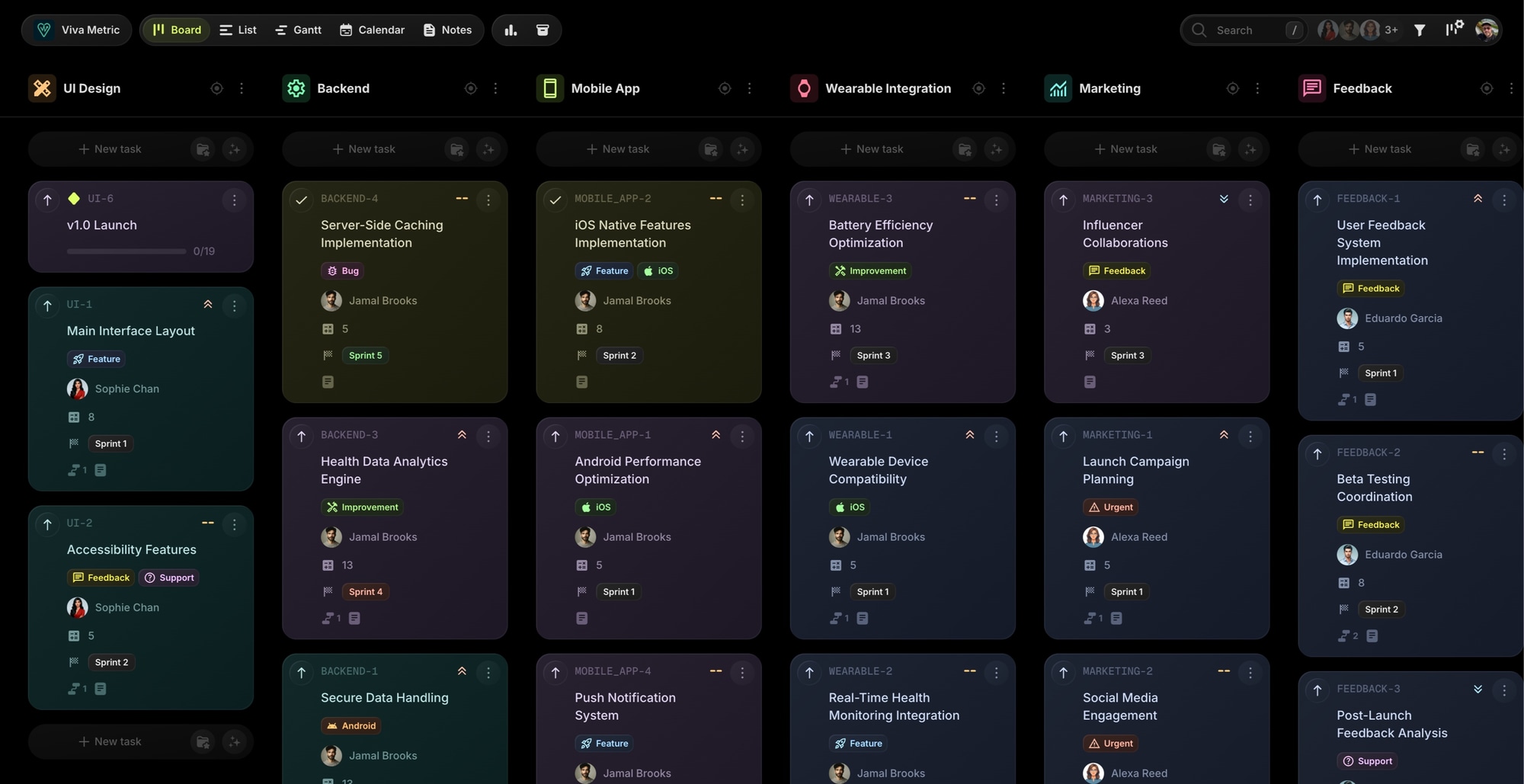
t0ggles's multi-project board interface. Multiple projects (e.g., "UI Design", "Backend", "Mobile App") are visible on one screen. This unified view gives complete oversight of various workstreams without switching contexts.
When it comes to onboarding: a non-technical team member can start using t0ggles with minimal instruction - creating tasks, dragging them across columns, and adding notes is straightforward. With Jira, new users might struggle with concepts like issue types, JQL (Jira Query Language), or the difference between company-managed vs. team-managed projects. t0ggles lowers the barrier to entry for team collaboration.
#Pricing And Cost Considerations
Pricing is another area where the two tools diverge significantly.
t0ggles Pricing: The entry point is a free forever plan - no card, no trial clock. It covers 1 board, 3 team members, 5 projects per board, 100 tasks, 50 notes, 100 MB of file storage, and 25 AI actions a month, and it includes every view (Columns/Kanban, List, Calendar, Gantt), task dependencies, milestones, report viewing, public board sharing, 1 form per board with 50 submissions a month, the GitHub and Figma integrations, and t0ggles Crew. Free boards have no archive, so deletion is permanent, and public boards show a "Made with t0ggles" badge. Past those limits there is one flat plan: $5 per user per month (billed annually), with unlimited projects, boards, tasks, notes, and all features - dependencies, reports, automations, integrations, guest users, custom domains, API access, and unlimited forms and submissions with per-form webhooks and no badge. There are no feature-based tiers. At $5/user, t0ggles is competitively priced and includes features that competitors charge extra for.
Jira Pricing: Jira offers a freemium model. The Free plan supports up to 10 users at no cost, though it has limitations (2GB storage, community support only, limited automations, no advanced features). The Standard plan costs about $7.50 per user/month. The Premium plan with advanced features (Advanced Roadmaps, unlimited automations, more storage) is about $13.50 per user/month.
Jira's cost can grow when you incorporate other Atlassian products. Many teams pair Jira with Confluence (documentation) at $5-$10 per user/month. If you want customer-facing request portals with SLAs and queues, Jira Service Management is another product and another cost, while t0ggles includes board forms on every plan. Getting the full suite of project management capabilities in Jira often requires paying for several products.
| Plan / Cost | t0ggles | Jira (Cloud) |
|---|---|---|
| Free Tier | Yes - 1 board, 3 members, 100 tasks | Yes, free for up to 10 users (limited features) |
| Paid Plans | $5/user/month - all features included | Standard: ~$7.50/user; Premium: ~$13.50/user |
| Dependencies | Included | Standard tier (basic), Premium for advanced |
| Reports | Included | Included, some advanced reports Premium only |
| Automations | Unlimited, included | Limited on Free/Standard, unlimited on Premium |
| Intake Forms | Included, unlimited on paid | Native Jira forms; SLA portals need Jira Service Management |
| API Access | Included | Included |
| Documentation | Built-in Notes, included | Requires Confluence ($5-$10/user extra) |
On free tiers, Jira is the more generous of the two: 10 users at no cost against 3 members and a single board on t0ggles free. Small teams that fit inside Jira's free plan can run there for a long time. For a team of 15 users, t0ggles costs $75/month total with all features. Jira Standard would be about $112.5/month, and you'd need Confluence for docs. The gap widens when you need Premium features.
#Pros And Cons Summary
t0ggles - Pros:
- Modern, intuitive interface that requires little training
- Multi-project visibility on a single board for easier portfolio management
- Fast performance with a responsive, lightweight application
- Free forever plan to start on - no card, no trial clock
- All features included at one price - dependencies, reports, automations, integrations, API
- Built-in documentation with Notes, no separate tool needed
- Flexible integrations via Zapier (5,000+ apps), Google Calendar, GitHub, Figma, and Public API
- AI-powered features for task creation and content writing
- Board forms for public intake - a shareable form per board, answers mapped to task fields, optional approval queue, and email replies to the submitter
- Full change history for transparency and auditing
- Guest users and project-specific access for flexible collaboration
- MCP Server for AI assistant integration - a unique capability
t0ggles - Cons:
- Smaller free tier - the free plan stops at 1 board, 3 members, and 100 tasks, where Jira's free plan takes 10 users, so larger teams reach the $5/user plan sooner
- Newer platform - less name recognition than established tools, though the feature set is now comprehensive
- Smaller native marketplace - relies on Zapier for most third-party connections rather than native plugins
Jira - Pros:
- Proven and battle-tested over years in thousands of organizations
- Highly customizable to fit almost any process or methodology
- Extensive reporting and analytics for data-driven project management
- Vast integration options via the Atlassian Marketplace (3,000+ apps)
- Free for small teams (up to 10 users with limitations)
- Enterprise features including advanced roadmaps, portfolios, and compliance tools
- Mature request intake through native Jira forms with public links and conditional logic, plus Jira Service Management portals with SLAs and queues for full service desks
Jira - Cons:
- Steep learning curve for new users and admins
- Potential for bloat - with so many features and add-ons, Jira can become unwieldy
- Performance issues at scale - can be sluggish with large projects or many customizations
- Costs add up when you need Confluence, Premium tier, or multiple products
- Requires maintenance - companies often need a dedicated Jira admin
- Form building sits with admins - only space admins can create or edit forms, public forms are an org-level toggle, and branded customer portals still mean licensing Jira Service Management with its request types, field schemes, and permissions
- No native AI features - requires third-party plugins
#Why t0ggles Is the Best Jira Alternative
If you're weighing a Jira alternative, the choice comes down to philosophy. Jira brings a heavyweight, all-encompassing platform that can be bent to almost any purpose - if you have the time and expertise to configure it. t0ggles offers a modern approach that prioritizes ease-of-use and a unified experience while still delivering powerful features.
If your team is frustrated with Jira's complexity, or if you want enterprise-grade features without enterprise-grade setup time, t0ggles is worth serious consideration. It covers dependencies, reports, automations, integrations, and public intake forms - features that put it on par with Jira's Premium tier - at a fraction of the complexity and cost. The ability to see multiple projects at once, combined with snappy performance and modern design, boosts productivity without the learning curve. Start on the free plan and upgrade only when your team or backlog outgrows it.
If you require highly specialized workflows, run a full service desk with SLAs and agent queues, have a large IT organization with dedicated Jira admins, or your company is deeply invested in the Atlassian ecosystem (Confluence, Bitbucket, etc.), Jira remains a solid choice. It's an industry standard for a reason.
For teams that want to manage projects effectively without fighting their tools, t0ggles offers a compelling alternative. It delivers the features modern teams need - dependencies, automations, reports, integrations, intake forms, AI assistance - in a fast, intuitive package. The development team continues to ship new capabilities regularly, and the platform has matured significantly since launch.
For teams seeking a modern project management experience that keeps everyone aligned and productive - without the steep learning curve or complex pricing - t0ggles is the Jira alternative to pick.
#Who Is This For?
Looking for a Jira alternative? See how t0ggles works for your team:
- t0ggles for Developers - GitHub integration without the complexity
- t0ggles for Product Managers - Roadmaps and sprint planning made simple
- t0ggles for Startups - Enterprise features at startup-friendly pricing
- t0ggles for Small Teams - Powerful tools without the overhead
- t0ggles for DevOps - Infrastructure tracking without Jira's complexity
- t0ggles for Data Science - ML workflows and experiment tracking
Need help with sprint ceremonies? Try our free tools - the Standup Generator for daily syncs, the Retrospective Generator for sprint reviews, and the Status Report Generator for weekly updates to stakeholders.
If you're comparing other options, see how t0ggles stacks up against GitHub Projects, Linear, Todoist, Wrike, and Monday.com.
Wondering how Jira stacks up against other tools besides t0ggles? See our head-to-head comparisons: Jira vs Asana, Jira vs Monday, Jira vs ClickUp, and Jira vs Notion, and more on our comparisons page.
Ready to toggle your tasks to zero?
Start on the free plan and transform your workflow today. No card, no trial clock - upgrade whenever you outgrow it.