Daily Standup Template - Free Board + Copyable Format
Everything you need to run a daily standup: the three-question format to copy into a doc or chat, an async Slack variant, a weekly variant, an email variant for stakeholders, and a ready-made Daily Standup board with two weeks of realistic standups, tracked blockers, and follow-ups already in place.
Explore the demo board or create your own from the template on the free plan.
#Daily Standup Template (Copy And Paste)
The classic format. Each person answers the same three questions, in this order, in one or two lines each.
Daily Standup - [Date]NameYesterday: [what you finished - outcomes, not activity]Today: [what you will finish or move forward]Blockers: [none, or what is stopping you and who can unblock it]Notes and decisions- [anything decided during the standup, with who decided it]- [follow-ups, with an owner and a date]
Three rules make this template work:
- Outcomes, not activity. "Merged the retry PR", not "worked on retries".
- Blockers get an owner before the standup ends. A blocker mentioned three days in a row without an owner is a process failure, not a status update.
- Discussion goes to the parking lot. Anything longer than a sentence is a follow-up after the standup.
#Async Standup Template (Slack Or Chat)
For teams that skip the call on some days, or every day. Post before an agreed time, keep each answer to one line, and link blockers to the task that tracks them.
Standup - [Day]Yesterday: [what you finished]Today: [what you will finish or move]Blockers: [none, or a link to the blocker task]
The lead posts a summary once everyone has checked in:
Standup summary - [Day]Done yesterday: [2 to 4 bullet points]Focus today: [2 to 4 bullet points]Blockers: [list with owners, or "none"]Decisions: [anything decided in the thread]
#Weekly Standup Template
The same structure on a weekly cadence, for teams whose work moves in longer cycles or as a Monday planning sync on top of daily async updates.
Weekly Standup - Week of [Date]Last week: [what shipped]This week: [top 2 to 3 priorities]Blockers and risks: [what could slip and why]Needs a decision: [open questions with the person who can answer them]
#Daily Standup Email Template
For teams that report to a stakeholder who is not in the standup, or distributed teams that do not use chat. Send once, after the standup, at the same time every day.
Subject: Daily standup - [Team] - [Date]Hi all,Quick summary of today's standup.Progress since yesterday- [Outcome 1]- [Outcome 2]Plan for today- [Focus 1]- [Focus 2]Blockers- [Blocker, owner, what is needed from whom]Decisions- [Decision and who made it]Full details on the board: [link to today's standup task]Thanks,[Name]
Need the update written for you? The free Daily Standup Generator turns a few bullet points into a formatted update in text or markdown, no signup required.
#The Daily Standup Board Template
Text templates capture a single day. The board keeps the whole history, and it turns blockers and follow-ups into work that gets tracked instead of repeated every morning.
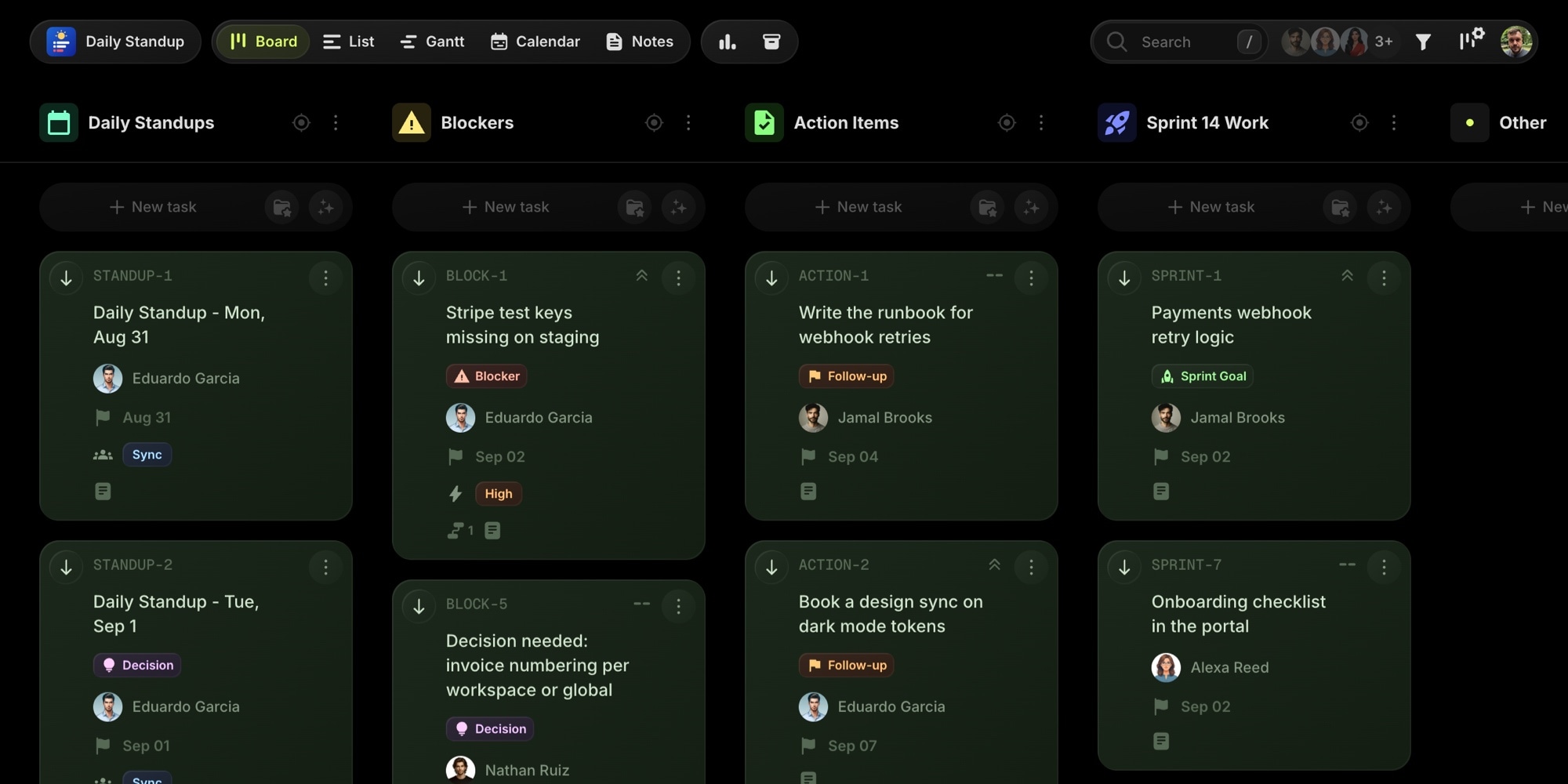
The template is modeled on a six-person product team in the middle of a sprint. It ships with two weeks of completed standups, today's standup in progress, next week's standups pre-created with the empty format, five tracked blockers, six action items, and the sprint work the updates refer to.
#Pre-Built Projects
| Project | Purpose |
|---|---|
| Daily Standups | One task per day. The description holds every person's Yesterday / Today / Blockers entry plus notes and decisions |
| Blockers | Every blocker raised in standup, with an owner, an impact, and a resolution |
| Action Items | Follow-ups that come out of standup and have a due date |
| Sprint 14 Work | The sprint tasks the updates refer to, linked to the blockers that hold them up |
#Status Columns
- Up Next - future standups carrying the empty template, and work not started yet
- In Progress - today's standup and active sprint work
- Blocked - work waiting on a blocker task
- Done - completed standups, resolved blockers, finished work
#Custom Properties
- Format (Select) - Sync or Async, so you can see at a glance which days ran as a call and which ran in chat
- Impact (Select) - Low, Medium, High, Critical, for prioritizing blockers
#Tags
- Blocker (red) - raised in standup and needs an owner
- Follow-up (orange) - action item that came out of a standup
- Decision (purple) - the standup where a decision was recorded, easy to find later
- Async (blue) - standups that ran in chat instead of a call
- Sprint Goal (green) - the work the sprint is measured by
#Notes
Four notes come with the board: the standup format and rules, the async Slack template, the email template, and the sprint goal and scope. Notes live next to the tasks, so the rules are one click away when someone new joins the standup.
#Dependencies
Blockers link to the sprint work they block through task dependencies. Resolve the blocker and the dependent task unblocks. Open the Gantt view to see which blocker sits on the critical path to the release.
#How To Use This Template
#1. Create Your Board
Sign up on the free plan and create a new board from the Daily Standup template. The projects, statuses, tags, properties, notes, and sample standups are ready instantly. Delete the sample content when you have seen how it fits together, or keep it as reference for the first week.
#2. Run One Standup Per Day
Create a task in the Daily Standups project for each day, with the due date set to that day. Each person adds their Yesterday / Today / Blockers entry to the description before or during the standup. Save the empty format as a task template so tomorrow's standup is one click.
The calendar view shows the standups as a recurring pattern, one per weekday, with the async days marked.
#3. Turn Blockers Into Tasks
When a blocker comes up, create a task for it in the Blockers project with an owner and an impact before the standup ends. Link it to the work it blocks with a dependency. The Blocked column shows exactly what is waiting and on whom.
#4. Track Follow-Ups As Action Items
Anything that needs discussion after the standup becomes an action item with a due date and an assignee. Reminders make sure they do not get lost between standups.
#5. Record Decisions Where They Happen
Write decisions in the Notes and decisions section of the day's standup task and tag the task with Decision. Two months later, when someone asks why invoice numbering is per workspace, the answer is one search away.
#Best Practices For Daily Standups
#Same Time, Every Day, Whether Everyone Is There Or Not
Standups die when they float. Pick a time, start on time, and let latecomers catch up from the task. The written entries mean nobody has to repeat their update for someone who walked in late.
#Make Friday Async
A sync standup every day is more than most teams need. The sample board runs Fridays in chat: everyone posts by 11, the lead summarizes at noon. The Format property tracks which days went async so you can adjust the ratio over time.
#Keep The Standup Separate From The Sprint Board
The standup is a record, the sprint board is the work. Keeping them as separate projects on the same board means standup tasks never clutter the sprint, and the sprint never gets buried under thirty standup entries. Focus mode shows either one on its own.
#Let The Board Write The Update
Once your work lives in t0ggles, the update writes itself from task activity: what moved to Done yesterday, what is In Progress today, what sits in Blocked. The MCP server exposes a standup report tool, so an AI assistant can pull the day's standup from the board without anyone typing it.
#Key t0ggles Features For Standups
- Calendar view - one standup per day, visible as a week at a glance
- Task templates - the empty three-question format, one click per day
- Task dependencies - link blockers to the work they hold up
- Notes - standup rules and message templates next to the tasks
- Reminders - action items that come back before the next standup
- MCP server - generate the standup report from task activity
#Frequently Asked Questions
#Try The Template
Copy the text format above and use it today. When you want the history, the blockers, and the follow-ups in one place, open the board.
The whole template fits inside the free plan: 5 projects, 100 tasks, and 3 team members are enough for a standup board with a month of history. No card, no trial clock.
View the demo board, create your board from the template, or get started free.
#Related Resources
#Free Tools
- Daily Standup Generator - write a formatted standup update in seconds
- Retro Generator - structured sprint retrospectives
- Meeting Cost Calculator - what a 15-minute standup costs, and what a 45-minute one costs
#Use Cases
- t0ggles for Remote Teams
- t0ggles for Developers
- t0ggles for Small Teams
- t0ggles for Product Managers
#Similar Templates
- Viva Metric - SaaS sprint planning with story points
- OSS Crew - Open source project management with GitHub sync
#Documentation
#Further Reading
- Two New Board Templates: Daily Standup and Lesson Planner
- Agile Project Management Guide
- Top 5 Collaboration Tips For Remote Teams
- The Scrum Guide - the Daily Scrum as originally defined
Don't Miss What's Next
Get updates, design tips, and sneak peeks at upcoming features delivered straight to your inbox.