Lesson Plan Template & Teacher Planner Board (Free)
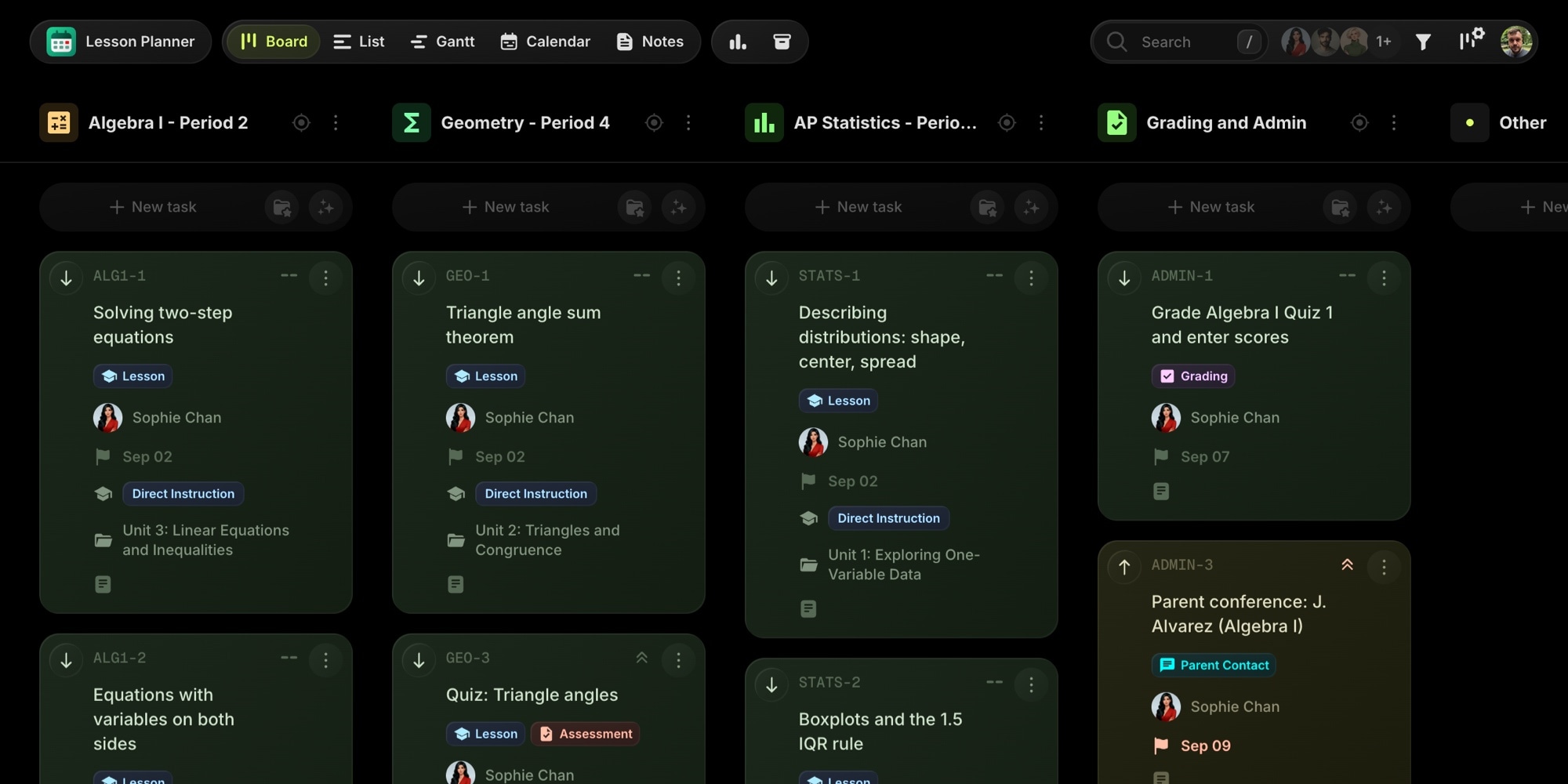
Everything you need to plan a teaching week: a lesson plan template to copy into any document, a weekly planning routine, and a ready-made Lesson Planner board with three class sections, two weeks of full lesson plans, grading and admin work, and a calendar that reads as a teacher planner.
Explore the demo board or create your own from the template on the free plan.
#Lesson Plan Template (Copy And Paste)
One page per lesson. Delete the sections you do not need, but keep the objective and the exit ticket: the first says what the lesson is for, the second tells you whether it worked.
Lesson: [Title]Class: [Class / period] Date: [Date]Unit: [Unit name] Standard: [Standard code]Lesson type: [Direct instruction / Group work / Lab / Review / Quiz / Test / Project]ObjectiveStudents will be able to ...Materials- [Slides, handouts, manipulatives, copies needed]Lesson sequenceWarm-up (5 min): [Quick review or a hook question. Connect to yesterday.]Direct instruction (15 min): [Model the new skill. Two worked examples, one easy, one with the common mistake.]Guided practice (15 min): [Pairs or groups. Circulate and check for the misconception from the worked example.]Independent practice (10 min): [Problems students do alone. This is what you grade for understanding.]Exit ticket (5 min): [One question that tells you whether the objective was met.]Homework[Problem set and numbers]DifferentiationSupport: [Scaffolds for students who need them]Extension: [For students who finish early]Accommodations: [From IEPs and 504 plans]Reflection (after class)[What worked, what did not, what to reteach tomorrow. Two sentences is enough.]
#Weekly Lesson Planning Routine
A template only helps if there is a fixed time to fill it in. This is the routine the sample board is built around.
Friday, one planning period: plan next week
- Review this week. Which lessons need a reteach? Decide where each one fits next week.
- Create next week's lessons. One per class per day, dated to the lesson day, with the lesson type set.
- Check the week as a whole. Two tests on the same day? A lab the day before a test? Move things before they become a problem.
- Fill in the plans. Objective, materials, and sequence for Monday and Tuesday in full. Wednesday to Friday can stay as objective plus materials until midweek.
- Add the admin. Copies, grading, and parent contact go on the calendar with a due date.
Every morning, five minutes: every lesson for today is in Ready, and the materials list matches what is on your desk.
After each class, two minutes: write the reflection, mark the lesson Done, or flag it for follow-up.
#The Lesson Planner Board Template
The text template is one lesson. The board is the whole term: every class, every lesson, the grading and admin around them, and a calendar that shows the week the way a paper planner does, without the erasing.
The template is modeled on a high-school math teacher with three sections. It ships with 29 lesson plans across Algebra I, Geometry, and AP Statistics (last week taught, this week ready, next week to plan), nine grading and admin tasks, and five reference notes.
#Pre-Built Projects
| Project | Purpose |
|---|---|
| Algebra I - Period 2 | One task per lesson, with the full lesson plan in the description |
| Geometry - Period 4 | Same structure, its own color on the calendar |
| AP Statistics - Period 6 | Same structure, with a lab and a student-teacher-led lesson |
| Grading and Admin | Quizzes to grade, conferences, copies, department meetings, sub plans |
Rename the projects to your classes. An elementary teacher makes one per subject, a college instructor one per section.
#Status Columns
- To Plan - lesson exists on the calendar, plan not written yet
- Preparing - plan in progress, materials being gathered
- Ready - everything in place for the lesson day
- Needs Follow-up - taught, but a reteach or a parent contact is needed
- Done - taught and reflected on
#Custom Properties
- Lesson Type (Select) - Direct Instruction, Group Work, Lab, Review, Quiz, Test, Project
- Unit (Text) - the unit the lesson belongs to, for filtering a whole unit at once
- Standard (Text) - the standard code, so you can find every lesson covering one standard
#Tags
- Lesson (blue) - every lesson task
- Assessment (red) - quizzes and tests, high priority by default
- Grading (purple) - grading work in the admin project
- Differentiation (green) - lessons with scaffolded or extended versions
- Parent Contact (cyan) - conferences and calls home
- Sub Plans (yellow) - the emergency folder and its updates
#Notes
Five notes come with the board: the lesson plan template, the weekly planning routine, emergency sub plans, a differentiation strategies quick reference, and a parent contact log. They live next to the lessons, so the sub plans are one click away on the morning you need them.
#Dependencies
The board uses task dependencies for the sequences teachers get bitten by: the review lesson comes before the test, the accommodations copies come before the test, the grading comes after it. Move the test and the Gantt view shows what else has to move.
#How To Use This Template
#1. Create Your Board
Sign up on the free plan and create a new board from the Lesson Planner template. Rename the three class projects to your sections. Keep the sample lessons for a week as a reference, then delete them.
#2. Put Every Lesson On The Calendar
Create one task per class per day, dated to the lesson day. Save the lesson plan structure as a task template so every new lesson starts with the sections already in the description. The calendar view becomes your weekly planner: drag a lesson to another day when a fire drill eats a period.
#3. Fill In The Plans
Write the objective, materials, and sequence in the task description. Set the Lesson Type, Unit, and Standard properties. Filter by unit to see the whole arc, or by standard to check coverage before the department review.
#4. Keep Grading And Admin On The Same Board
Quizzes to grade, conference bookings, copies, and department meetings go in the Grading and Admin project with a due date. Reminders fire before grades are due to the office. Sync the board with Google Calendar to see lessons alongside IEP meetings and PD days.
#5. Reflect And Reuse
After each class, add two sentences of reflection and mark the lesson Done, or Needs Follow-up if a reteach is needed. Next year, duplicate the unit's lessons and improve them instead of starting over.
#Best Practices For Lesson Planning
#One Board, All Classes
Separate planners per class hide the collisions: two tests on Thursday, a lab the day before a quiz, three sets of grading due the same Monday. One board with a project per class shows the week for every section at once, in color. Focus mode narrows it to a single class when you are planning deep.
#Plan Two Days In Full, The Rest In Outline
Writing five full plans per class on Friday is how planning periods disappear. Write Monday and Tuesday completely, leave the rest as objective plus materials, and finish them in Tuesday's block once you know how Monday went.
#Let The Exit Ticket Decide Tomorrow
The reflection and the Needs Follow-up status exist so that a lesson that did not land shows up on Friday's review instead of being forgotten. A reteach that is planned is a fifteen-minute warm-up; one that is not is a unit test surprise.
#Share The Board With Your Co-Teacher
Co-teachers, student teachers, and department heads can see the same board. Assign the scaffolded version of a practice set to the co-teacher as a task, and let the department head follow the pacing guide without a meeting. Guest access covers the people who need to see but not edit.
#Key t0ggles Features For Teachers
- Calendar view - the week as a planner, every class in its color
- Task templates - every new lesson starts with the plan structure filled in
- Custom properties - lesson type, unit, and standard on every lesson
- Notes - sub plans, differentiation strategies, and the contact log next to the lessons
- Task dependencies - review before test, copies before test, grading after
- Google Calendar sync - lessons next to school meetings
#Frequently Asked Questions
#Try The Template
Copy the lesson plan template above and use it for tomorrow's class. When you want every class on one calendar with the plans attached, open the board.
For a single teacher the free plan is enough: 5 projects cover three classes plus admin, and 100 tasks hold a full quarter of lessons. No card, no trial clock. Departments planning together pay $5 per user per month.
View the demo board, create your board from the template, or get started free.
#Related Resources
#Use Cases
#Similar Templates
- Launch Academy - Cohort-based course delivery with modules and student progress
- Daily Standup - A recurring-task board for a different kind of daily routine
#Documentation
#Further Reading
#External Resources
- Understanding by Design - the backward-design approach behind objective-first lesson plans
- Common Core State Standards - the standard codes used in the sample board
Don't Miss What's Next
Get updates, design tips, and sneak peeks at upcoming features delivered straight to your inbox.