Two New Board Templates: Daily Standup and Lesson Planner
Every t0ggles board template so far has been a company. PixelForge Games, Viva Metric, Smile Well, and the five we added in January: realistic boards that show what a game studio, a SaaS team, or a dental clinic looks like in t0ggles. They are great for seeing the product in action, but they answer the question "what does a board look like" rather than "how do I run my standup".
The two templates shipping today start from the workflow instead. Daily Standup and Lesson Planner are boards built around a routine you already have, with two weeks of realistic content, the notes that explain the rules, and a template page that includes the text version of the format. Copy the format into a doc, or open the board and skip the setup.
#Daily Standup
Most standup templates are a text snippet: yesterday, today, blockers. That covers one morning. The board version keeps the whole history and turns the blockers into work that gets tracked instead of repeated every day.
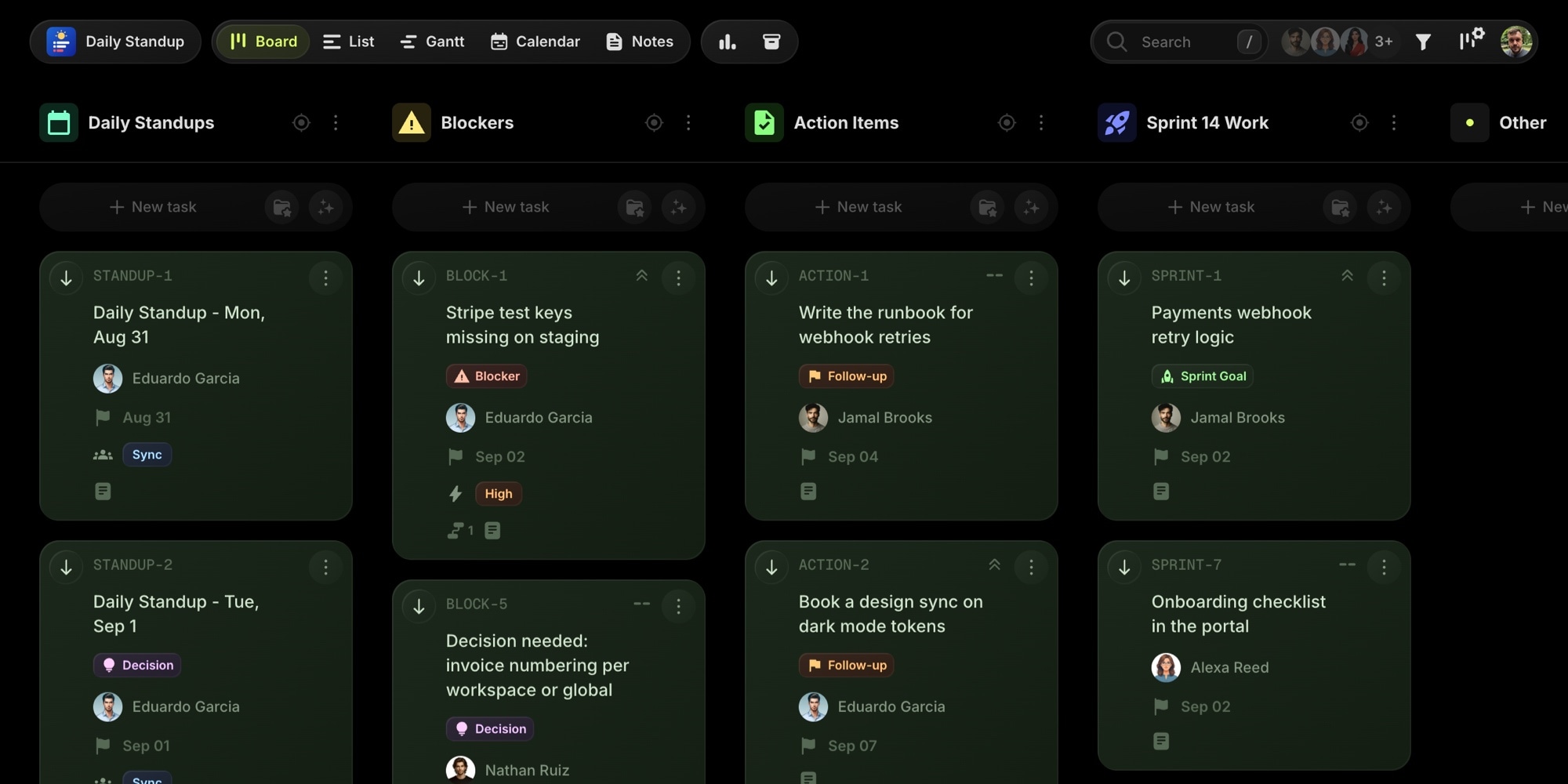
The template is modeled on a six-person product team in the middle of a sprint. It ships with:
- One task per standup in a Daily Standups project, with every person's Yesterday / Today / Blockers entry in the description and a Notes and decisions section at the bottom. Two weeks are filled in, today's is in progress, next week's carry the empty format.
- Blockers as tasks. Every blocker raised in standup gets a task in the Blockers project with an owner and an Impact property, linked through task dependencies to the sprint work it holds up. The Blocked column shows what is waiting and on whom.
- Action items with due dates for the follow-ups that come out of standup, and the sprint work the updates refer to, so the standup and the sprint live on the same board without cluttering each other.
- Four notes: the standup format and rules, an async Slack template, a stakeholder email template, and the sprint goal.
Open the calendar view and the standups appear as a recurring pattern, one per weekday, with the async Fridays marked by the Format property. Save the empty standup as a task template and tomorrow's is one click.
The Daily Standup template page has the copyable formats too: the classic three questions, the async Slack version with the lead's summary, a weekly variant, and the email version. If you just need the update written, the free standup generator does that without an account.
Explore the Daily Standup demo board
#Lesson Planner
Teachers keep finding t0ggles through searches for lesson plan templates, and the teacher planner page describes the setup: one project per class, lessons on the calendar, materials in notes. What was missing was a board that shows it.
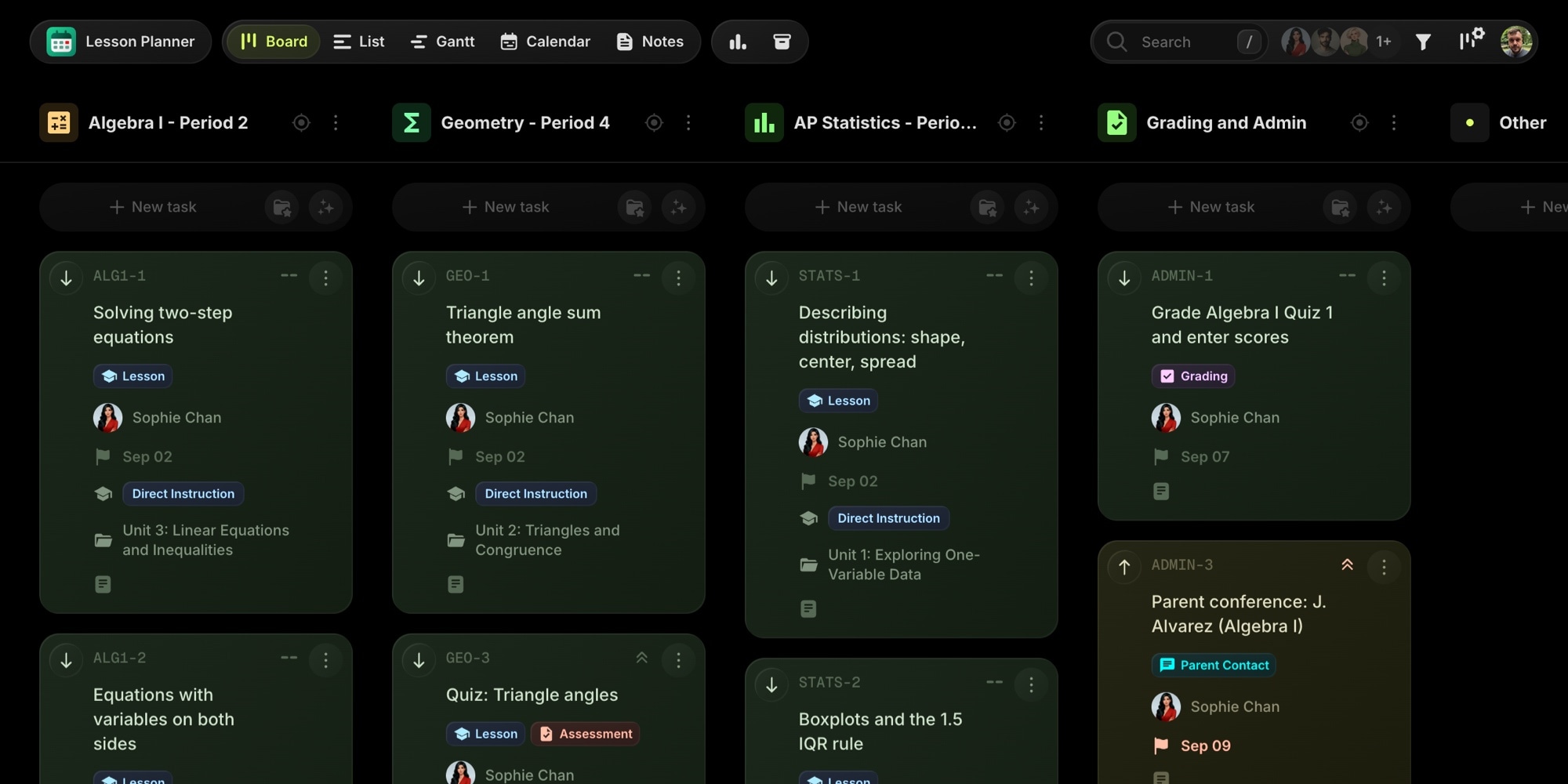
The template is modeled on a high-school math teacher with three sections. It ships with:
- One project per class, so Algebra I, Geometry, and AP Statistics each get their own color and task list, while the calendar shows the whole week at once. Rename them to your sections; an elementary teacher makes one per subject.
- One task per lesson, 29 of them across three weeks, each with a full lesson plan in the description: objective, standard, materials, the sequence from warm-up to exit ticket, homework, differentiation, and a reflection to fill in after class.
- Lesson Type, Unit, and Standard as custom properties, so you can filter a whole unit or check standards coverage before the department review.
- A Grading and Admin project for quizzes to grade, parent conferences, copies, and department meetings, with dependencies for the sequences that bite: review before the test, accommodations copies before the test, grading after.
- Five notes: the lesson plan template, a Friday planning routine, emergency sub plans, differentiation strategies, and a parent contact log.
With a due date on every lesson, the calendar view reads as a weekly planner. When a fire drill eats a period, drag the lesson to tomorrow instead of erasing.
The Lesson Planner template page includes the lesson plan template as plain text and the weekly planning routine the board is built around.
Explore the Lesson Planner demo board
#Templates You Can Use Without An Account
Both template pages are written so that the format is useful on its own. The standup formats and the lesson plan template sit in copyable blocks at the top of each page, before any mention of creating a board. Use them in a doc, a Slack channel, or a paper planner.
When the text version stops being enough, because you want the history, the blockers, or every class on one calendar, the board is one click away. And both templates fit inside the free plan: no card, no trial clock.
#Getting Started
- Open the templates catalog and pick Daily Standup or Lesson Planner, or go straight to the demo boards linked above.
- Create a new board and choose the template. The template pages link directly to board creation with the template preselected.
- Keep the sample content for a week as a reference, then delete it and start adding your own standups or lessons.
Which workflow should get a board next? Sprint planning, retrospectives, and a content calendar are on the list. Tell us in feature requests what you would use.
Don't Miss What's Next
Get updates, design tips, and sneak peeks at upcoming features delivered straight to your inbox.