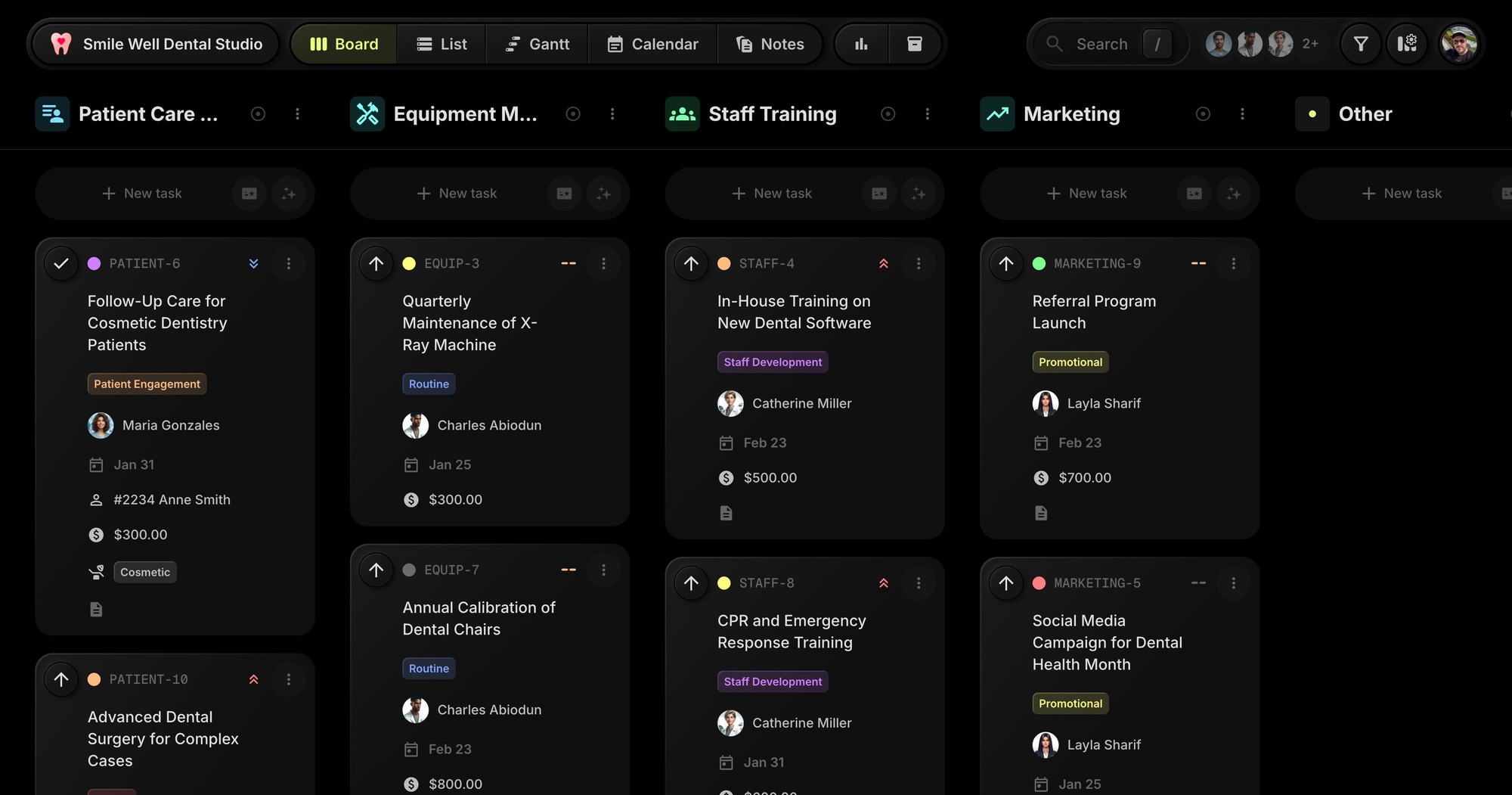
Smile Well - Dental Clinic Management Template
The Smile Well template gives dental practices a ready-to-use board for managing clinical operations. Track patient appointments, equipment maintenance, staff training, and marketing campaigns with patient tracking and cost management built in.
#Who This Template Is For
- Dental clinic managers and practice owners
- Healthcare administrators tracking patient care
- Dental office staff coordinating schedules
- Practice managers handling equipment and training
- Small healthcare practices needing operational oversight
#Pain Points This Template Solves
Dental practices juggle patient care, equipment upkeep, staff development, and marketing all at once. Appointments slip through the cracks. Equipment maintenance gets deferred. Training sessions aren't tracked.
Without centralized management, patient experience suffers, compliance risks increase, and the practice can't grow efficiently.
#Why Operations Management Matters For Dental Practices
Patient experience drives practice growth. In healthcare, word of mouth is everything. Patients who feel well-cared-for refer friends and family. Those who experience dropped balls and missed communications don't come back.
Equipment failures are expensive emergencies. A broken X-ray machine doesn't just cost repair money - it cancels appointments, frustrates patients, and creates liability. Preventive maintenance is far cheaper than emergency repairs.
Compliance isn't optional. CPR certifications expire. HIPAA training needs documentation. Sterilization logs need maintaining. Missed compliance items create regulatory risk and potential legal exposure.
Staff development compounds over time. Practices that invest in training have more capable, engaged teams. Those that don't experience higher turnover and lower quality of care. Training tracking ensures development actually happens.
#What's Included In This Template
#Pre-Built Projects
| Project | Icon | Purpose |
|---|---|---|
| Patient Care Management | Patient List | Appointments and patient procedures |
| Equipment Maintenance | Tools | X-ray machines, dental chairs, calibration |
| Staff Training | Groups | Software training, CPR certification |
| Marketing | Trending | Social campaigns, referral programs |
#Status Columns
- Scheduled - Appointments and tasks on the calendar
- In Progress - Currently being worked on
- In Review - Pending approval or verification
- Awaiting Patient - Waiting for patient response
- Completed - Done and documented
- On Hold - Paused or deferred
#Custom Properties
- Patient (Text) - Patient name and ID for care tasks
- Cost (Number) - Procedure or maintenance cost in dollars
- Procedure (Select) - Cleaning, Extraction, Cosmetic, Surgery
#Tags
- Urgent (red) - High priority items
- Routine (blue) - Regular scheduled work
- Compliance (green) - Regulatory requirements
- Patient Engagement (orange) - Patient communication
- Staff Development (purple) - Training and growth
- Promotional (yellow) - Marketing activities
- Administrative (default) - Office operations
- Finance (cyan) - Budget and billing
#How To Use This Template
#1. Create Your Board
Sign up for t0ggles - it's free and needs no credit card - and create a new board using the Smile Well template. Your dental practice workspace is ready immediately.
#2. Track Patient Appointments
Use the Patient property to identify which patient each task relates to. Filter by patient to see their complete care history and upcoming procedures.
#3. Monitor Costs
The Cost property tracks procedure costs and maintenance expenses. Use Board Reports to analyze spending patterns across the practice.
#4. Manage Equipment Maintenance
The Equipment Maintenance project keeps all calibration, servicing, and repair tasks organized. Never miss critical equipment checks.
#5. Coordinate Staff Training
Track CPR certifications, software training, and continuing education. Set due dates for renewal requirements to stay compliant.
#Best Practices For Dental Practice Management
#Build Maintenance Calendars
Equipment doesn't fail randomly - it fails when maintenance is neglected. Create recurring tasks for all critical equipment: X-ray calibration, autoclave testing, chair servicing.
Tip: Set up maintenance tasks with appropriate intervals. Annual, quarterly, monthly - whatever the manufacturer recommends. Due dates create accountability. The Calendar view shows what's coming.
#Track Certification Expirations
Nothing disrupts a practice like discovering a key certification expired. CPR, HIPAA, state licenses - all have expiration dates that sneak up on busy teams.
Tip: Create tasks for every certification with due dates one month before expiration. The Compliance tag makes them easy to filter. Review monthly to catch anything approaching deadline.
#Document Patient Communications
When patients call about their care, staff need context. What was discussed? What was recommended? When is the follow-up?
Tip: Use task comments to log patient communications. The Patient property links all related tasks together. Search by patient to see complete history.
#Separate Urgent From Routine
Everything feels urgent in a busy practice. But treating everything as urgent means nothing gets proper attention. True emergencies need different handling than routine maintenance.
Tip: Reserve the Urgent tag for genuine emergencies. Routine work gets the Routine tag. Start each day by filtering for Urgent items. Then address Routine work systematically.
#Track Marketing ROI
Marketing efforts should generate measurable results. Which campaigns bring in new patients? Which referral programs work?
Tip: The Marketing project tracks all promotional activities. Use the Cost property to log expenses. Track new patient sources in comments. Over time, data reveals what works.
#Key t0ggles Features For Healthcare
- Custom properties - Track patients, costs, and procedure types
- Tags - Categorize by urgency, compliance, and department
- Notes - Store emergency procedures and clinical guidelines
- Calendar view - Visualize appointment schedules
- Multi-project boards - Manage patient care, equipment, staff, and marketing together
#Common Dental Practice Challenges
#The Scheduling Chaos
Double-bookings. Missed appointments. Patients arriving at the wrong time. Scheduling problems create frustrated patients and lost revenue.
Solution: The Scheduled status combined with Calendar view shows all upcoming appointments. The Awaiting Patient status tracks appointments needing confirmation. Clear visibility reduces scheduling conflicts.
#The Equipment Emergency
The X-ray machine breaks during a procedure. The autoclave fails inspection. Equipment emergencies disrupt care and cost money.
Solution: The Equipment Maintenance project tracks all preventive maintenance. Tasks with due dates create accountability. The Calendar view shows what's coming. Preventive maintenance prevents emergencies.
#The Training Gap
New staff don't know the systems. Experienced staff forget updated procedures. Training happens sporadically if at all.
Solution: The Staff Training project captures all development needs. Tag items with Staff Development. Set due dates for required training. Track completion with status progression.
#The Compliance Scramble
Audit time arrives and documentation is scattered. Certifications can't be located. Training records are incomplete.
Solution: Use the Compliance tag for all regulatory items. Filter by tag to see complete compliance picture. Store certifications and documentation in Notes. Audit preparation becomes a filter, not a scramble.
#The Marketing Mystery
Marketing happens but nobody knows what works. Money goes out but new patients are hard to attribute.
Solution: The Marketing project tracks all promotional activities. Cost property records spending. Comments document results. Over time, patterns emerge about what drives new patients.
#Healthcare Workflow Patterns
#The Morning Huddle
Start each day aligned:
- Review Scheduled items for the day
- Check Urgent items that need immediate attention
- Review Awaiting Patient items - any follow-up needed?
- Confirm equipment and rooms are ready
- Assign any open tasks to team members
#The Weekly Review
Keep the practice on track:
- Review completed work from the week
- Check upcoming equipment maintenance
- Review staff training - any deadlines approaching?
- Review marketing activities and results
- Plan for the upcoming week
#The Monthly Compliance Check
Stay ahead of regulatory requirements:
- Filter by Compliance tag
- Review all items - any approaching deadlines?
- Verify certifications are current
- Update documentation as needed
- Create tasks for upcoming renewals
#The Patient Follow-Up Process
Ensure patients don't fall through cracks:
- After procedures, create follow-up tasks
- Set due dates based on care plan
- Use Awaiting Patient status for pending responses
- Track multiple attempts in comments
- Escalate non-responsive patients appropriately
#Try The Template
Bring organization to your dental practice. Smile Well gives you patient tracking, cost visibility, and operational coordination from day one.
The free plan covers the template exactly as shipped - one board with all four projects, plus room for the tasks your practice runs each week. The calendar and list views your front desk lives in are included, and the plan stays free with no credit card.
View the demo board to see it in action, or Create your board for free.
#Related Resources
#Use Cases
#Similar Templates
- Structura Engineering - Project phases with budget tracking
- GreenPath ESG - Client project management
- Viva Metric - Operations with custom properties
#Documentation
#External Resources
- American Dental Association - Practice resources and guidelines
- Dental Practice Management - Industry best practices
Don't Miss What's Next
Get updates, design tips, and sneak peeks at upcoming features delivered straight to your inbox.