How to Migrate From Trello to Linear: The Importer, What Carries Over, and What Is Lost
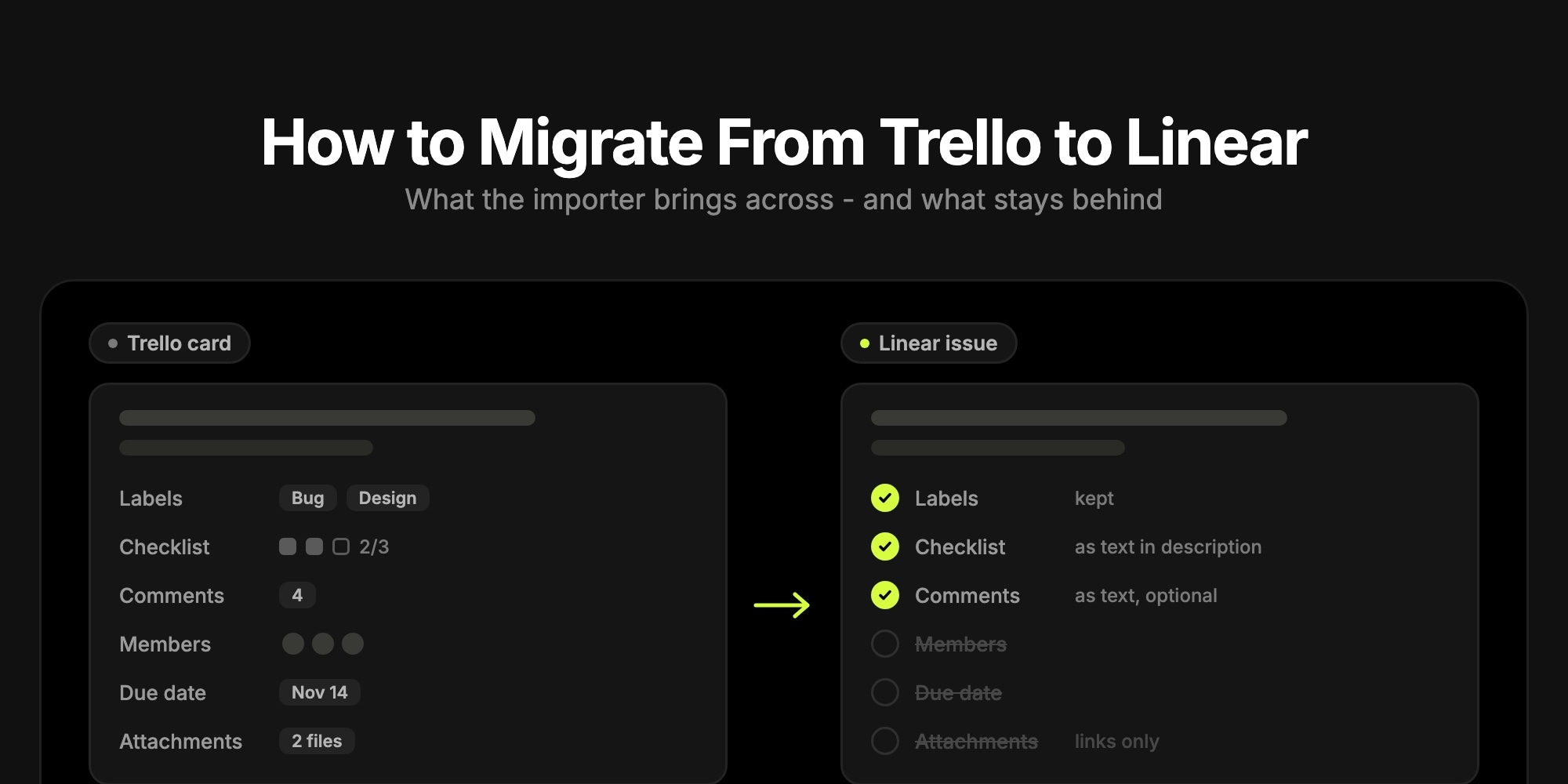
You can import a Trello board into Linear, but not from Linear's in-app import assistant - that one covers Jira, GitHub, Asana and Shortcut. Trello goes through Linear's open-source command-line importer, @linear/import. Export the board from Trello as JSON, run the importer with a Linear API key, and every card becomes an issue in a Linear team: titles, descriptions, labels and links to the original cards come across, and lists can become workflow statuses. Checklists and comments are pasted into the issue description as text. Assignees, start and due dates, and the attachment files themselves are not imported.
This guide walks through the migration step by step, shows exactly how each Trello field lands in Linear (taken from the importer's source code, not just its README), and covers what to clean up afterwards - plus where a different destination fits better.
#Can You Import Trello Into Linear?
Yes, with one catch: the route is less obvious than for other tools. Linear's import docs list dedicated importers for Jira, GitHub Issues, Asana, Shortcut and Linear itself, and recommend a dedicated importer "whenever possible" because it keeps more data. Trello is not on that list. Instead, Settings → Import/Export has a CLI import entry that points to the @linear/import package, and its Trello option reads a board's JSON export.
What that means in practice:
- It runs in a terminal, not the browser. You need Node.js installed and a Linear personal API key.
- You need to be a workspace admin in Linear - the import tools are admin-only.
- One run imports one Trello board into one Linear team, and optionally into a project inside that team. Several boards means several runs.
- It is a one-time copy. Nothing syncs afterwards. Running it again into the same team skips issues that were already imported.
- Dates reset. The importer's README says creation and modification dates do not carry over, so every issue shows the import date.
#What Carries Over From Trello to Linear
The Trello importer is about 200 lines of open code, so the mapping can be checked rather than guessed:
| Trello | In Linear after import |
|---|---|
| Card name | Issue title |
| Card description | Issue description (Trello markdown is kept) |
| Lists | Optional: each list becomes a workflow status, matched by name, or a new status is created |
| Labels | Labels, with Trello colors mapped to Linear colors. Color-only labels get names like Trello-green |
| Checklists | Markdown checkboxes appended to the description, ticked items checked. Not sub-issues |
| Attachments | Links appended to the description, pointing back to Trello. The files are not copied |
| Comments | Optional: pasted into the bottom of the description with author name and date. Not real Linear comments |
| Card link | Every issue ends with "Trello Card #N" and a "View original card in Trello" link |
| Archived cards | Skipped by default. If you keep them, they are imported as archived issues |
| Members | Not mapped. By default every issue is assigned to whoever runs the import; you can pick one person or leave them unassigned |
| Start and due dates | Not imported |
| Everything else | Not imported: covers, custom fields, Power-Up data, Butler automations, votes, card order, and board activity |
A few rows deserve more detail, because they decide how much cleanup you are in for.
Lists become statuses only by name. When you say yes to mapping lists, the importer looks for an existing status in the target team with the same name (case does not matter). If it finds one, the issue goes there. If not, it creates a new status - always in the Backlog category, because a Trello card carries no started or completed date to go on. Trello's default lists show the effect: "Done" matches Linear's default Done status, but "To Do" (Linear's is "Todo") and "Doing" become two new Backlog statuses, so work that was in progress in Trello is not counted as started in Linear.
Comments are a snapshot, not a thread. Opting in adds each comment to the description as a block with the author's name and date. Nobody is notified, there are no replies or reactions, and Trello's JSON export only includes the 1,000 most recent actions on a board - comments included. On a busy, long-lived board, older comments are simply not in the file.
Attachment links depend on Trello. Since 2021, Trello attachment URLs require you to be signed in to Trello with access to the board. The links in your Linear descriptions work while your team keeps Trello access, and stop working for anyone who does not have it. Images embedded in descriptions are re-uploaded to Linear when the importer can download them, but images hosted on Trello itself sit behind the same sign-in, so expect those to stay as links too. If you need the files, download them before you close the Trello board.
#How to Migrate From Trello to Linear, Step by Step
#1. Prepare the Trello Board
Small changes in Trello save cleanup in Linear:
- Rename lists to match the target team's statuses - typically Backlog, Todo, In Progress, Done and Canceled. Matching names land cards in the right status and category instead of creating new Backlog statuses.
- Name your color-only labels, or they arrive as
Trello-red,Trello-blueand so on. - Decide on archived cards. The importer can skip them (the default) or bring them in as archived issues. Archived issues do not count toward the 250-issue limit on Linear Free, so this matters on a large board.
- Note who owns what if assignees matter - they will not come across. By default every imported issue is assigned to you, the person running the import.
#2. Export the Board as JSON
Open the board menu in Trello, choose Print, export, and share, then Export as JSON. Any board member can export JSON on any Trello plan, including Free (CSV export is a Premium feature, and the importer does not use it). Save the file somewhere you can reach from a terminal.
#3. Create a Linear API Key
In Linear, open Settings → Account → Security & Access and create a personal API key. The importer creates issues, statuses and labels as you, so use an admin account.
#4. Run the Importer
Install the CLI globally and start it:
npm i --location=global @linear/importlinear-import
Or run it without installing, with pnpm dlx @linear/import. The importer asks for your API key, then which service to import from - choose Trello (JSON export) - and then four Trello questions:
- Select your exported JSON file of Trello cards - the file from step 2.
- Would you like to map Trello lists to statuses? - yes, unless you want every issue in the team's default status.
- Would you like to discard the archived cards? - yes by default.
- Would you like to discard the (possibly unarchived) cards within archived lists? - also yes by default.
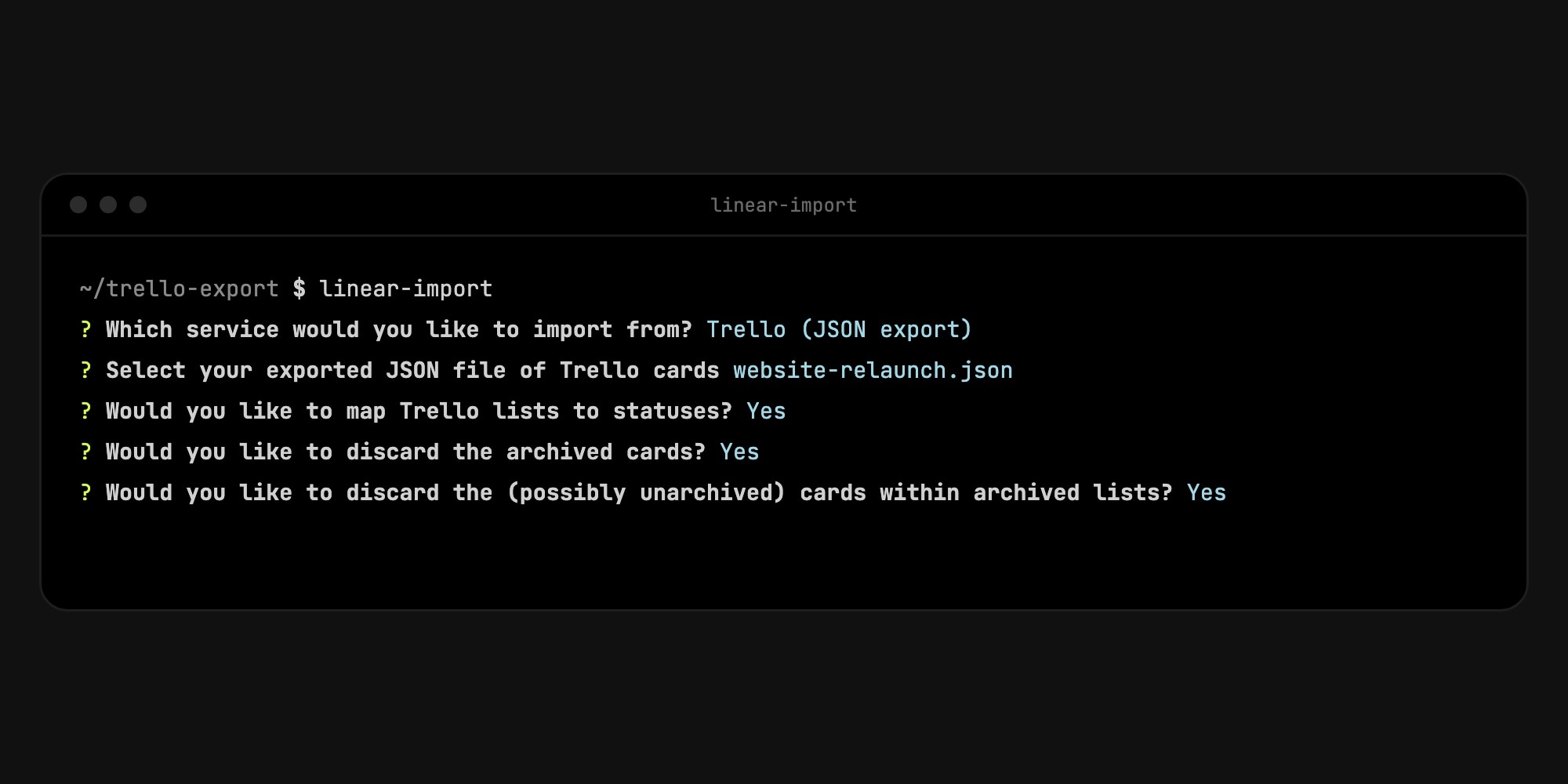
Next it asks whether to create a new team (named "Trello" by default) or import into an existing one, whether to file the issues under one of that team's projects, and whether to include comments in the issue description. The last question is Do you want to assign these issues to yourself? - it defaults to yes, which puts every imported issue on your plate. Answer no to pick another person or [Unassigned]. Linear Free allows two teams, so on a free workspace that already has two, pick an existing team.
For scripted runs, set LINEAR_API_KEY and pass --importer trelloJson, plus --team with the team key, --project, --include-comments or --self-assign as needed. The file and archive questions are still asked interactively.
#5. Clean Up in Linear
Open the team in Linear and check, roughly in this order:
- Statuses - in Team Settings, merge any duplicate statuses the import created ("To Do" next to "Todo") by moving their issues and deleting the extras.
- Assignees and due dates - re-enter them from Trello, ideally before you archive the board. Filtering the team's issues by label or status and bulk-editing a selection is the fastest route. If you kept the default self-assign answer, clear your name from the issues you do not own first.
- Checklists - convert long checklists into sub-issues if you want them tracked. Short ones work fine as checkboxes in the description.
- Attachments - re-upload any file you need to keep, since the links point at Trello.
If the result is badly off, Linear's docs say an import can be deleted from Settings → Import/Export for a limited time after it runs. Delete it, fix the Trello board, and run again - a re-import without deleting first skips the issues it already created.
#Keeping Trello and Linear in Sync Instead
Linear has no native Trello integration, and the importer never syncs. If both tools need to stay live for a while - for example, a client still works in Trello while your engineers move to Linear - you need a third-party sync service such as Unito, or one-way automations through Zapier or a similar tool. These are paid services and copy fields, not whole boards, so plan the field mapping as carefully as for the import.
#Is Linear the Right Destination After Trello?
For many teams, yes. Linear is fast, keyboard-driven, and built around cycles, triage and Git integrations - a real step up for an engineering team that outgrew a Trello board. Its Board view covers the day-to-day kanban (see Does Linear Have a Kanban Board?), and the Free plan has unlimited members.
The migration is worth a second look in three cases. Teams that leaned on Trello's freedom find that every Linear column has to be a workflow status, with no WIP limits. Mixed teams of designers, marketers and engineers find issue-tracker vocabulary heavy. And a team with a big board hits the 250-issue cap on Linear Free quickly, which leads to Linear's paid plans at $10 to $16 per user per month billed yearly.
t0ggles is built for teams that want to keep a board-first workflow. It also imports Trello's JSON export directly in the browser: open a project, choose Import Tasks from the project menu and pick the file. t0ggles recognizes a Trello export and pre-fills the mapping - card name to title, description, list to status, labels to tags, members to assignee, and start and due dates - and you choose which t0ggles status each Trello list becomes and which board member each Trello person is. Each Trello board becomes a project, and several projects sit side by side on one board.
| After Trello | Linear | t0ggles |
|---|---|---|
| Trello import | Command-line tool, admin + API key | In the browser, from any project's menu |
| Lists | Matched by name, or new Backlog statuses | You map each list to a status of your choice |
| Labels | Created automatically with colors | Mapped to tags you have already created |
| Assignees and dates | Not imported | Members mapped to board members, start and due dates kept |
| Checklists, comments | Pasted into the description | Not imported |
| Board columns | Workflow statuses only, no WIP limits | Status columns with a Max tasks WIP limit per status |
| Several Trello boards | One team per board, or many boards into one team | One project per board, all on one shared board |
| Views | List, Board, Timeline on projects | Columns, List, Calendar and Gantt |
| Free plan | Unlimited members, 250 issues, 2 teams | 1 board, 3 members, 100 tasks |
| Paid | Basic $10, Business $16 per user/month (yearly) | $5/user/month, everything unlimited |
Be honest about the trade-offs. Linear brings checklists and comments across as text, while t0ggles leaves them behind, and Linear creates missing statuses and labels for you, while t0ggles maps to the ones you have set up. Linear's free plan also holds more imported cards - 250 issues against 100 tasks on the t0ggles free board. t0ggles fits when the board itself is the product: WIP limits, swim lanes, task dependencies, a calendar and a Gantt chart without building them, at a flat $5/user/month for everything.
For the full picture see Linear vs Trello, t0ggles vs Trello and t0ggles vs Linear. If you are still deciding where your Trello board should go, our guide to building a Trello board in Notion covers the Notion route.
#Frequently Asked Questions
#Getting Started
- In Trello, rename lists to match your Linear statuses and name any color-only labels.
- Export the board: Print, export, and share → Export as JSON.
- Create a Linear API key under Settings → Account → Security & Access.
- Run
linear-import, choose Trello (JSON export), and answer the prompts. - Fix statuses, assignees and due dates in Linear before you archive the Trello board. And if you would rather keep a board-first workflow with your assignees and dates intact, try t0ggles free and import the same JSON file from any project's menu.
Don't Miss What's Next
Get updates, design tips, and sneak peeks at upcoming features delivered straight to your inbox.