Monthly Awards: Celebrate Your Team With Automated Recognition
Your team's work tells a story every month. Who shipped the fastest? Which task sparked the most discussion? Who kept the longest active streak? These moments usually go unnoticed - buried in task lists and status updates.
Today we're adding Monthly Awards to t0ggles Reports. At the bottom of your Reports page, you'll now find a collection of automatically generated awards that highlight the standout tasks and team members from the previous month. No setup required - just open Reports and scroll down.
#How It Works
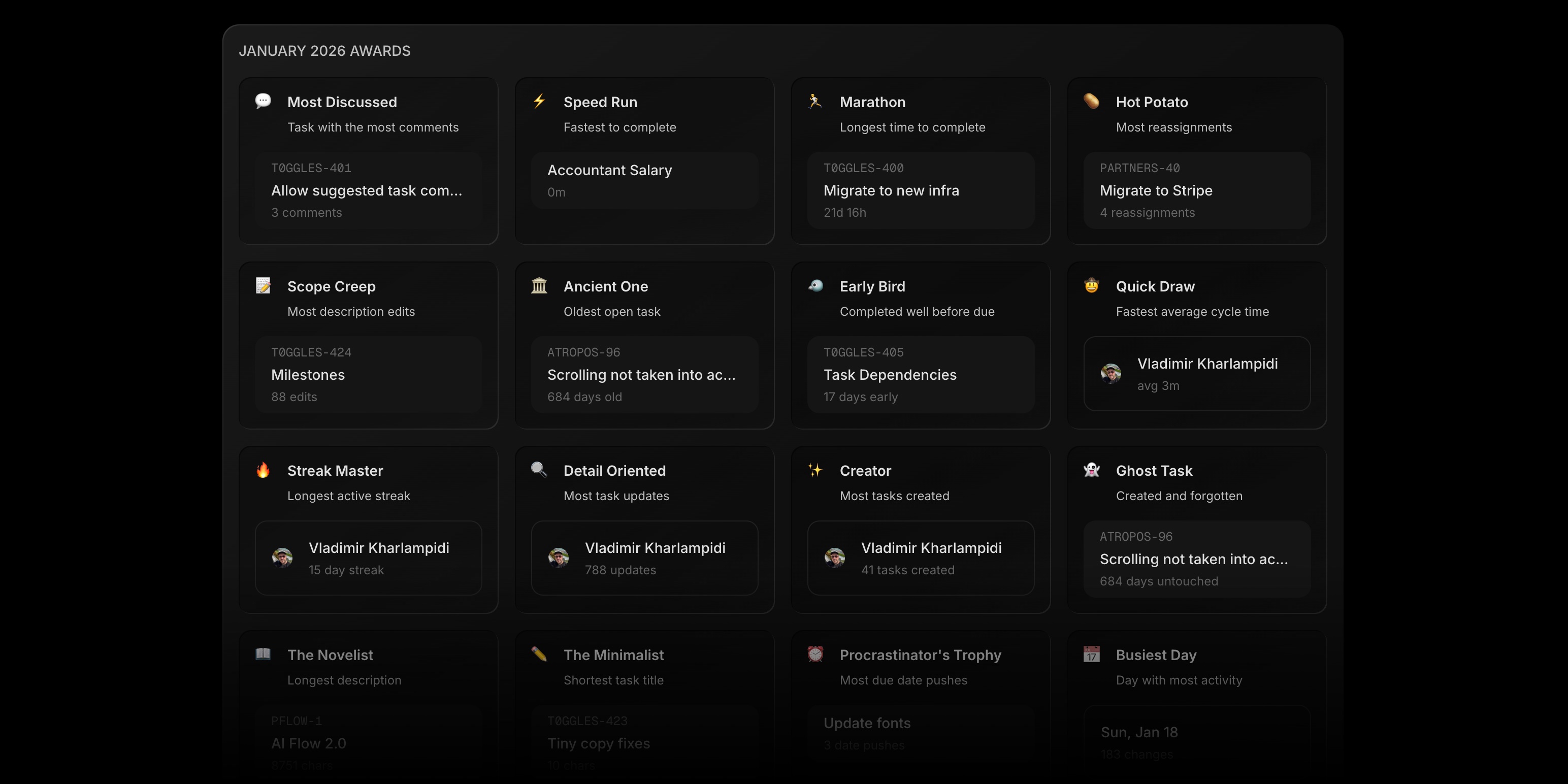
Monthly Awards are calculated automatically from your board's activity data. Every month, t0ggles analyzes completed tasks, comments, time logs, status changes, and more to determine winners across 30+ awards in 6 categories. Results load instantly alongside your other report data.
Awards appear as a grid of cards at the bottom of the Reports page. Each card shows the award name, a short description of what it recognizes, and the winner - either a task (with its project key) or a team member (with their avatar).
Click any task award to jump directly to that task on your board.
#Award Categories
Awards span six categories - from productivity metrics your project managers will love to lighthearted fun that makes standups more interesting.
#Task Awards
These surface the tasks worth talking about:
- Most Discussed - The task that generated the most comments. Great for identifying decisions that required the most collaboration.
- Speed Run - Fastest task to complete, measured by cycle time. Your team's quick wins.
- Marathon - The opposite - the task that took the longest from start to finish.
- Hot Potato - Most reassignments. A sign that ownership was hard to pin down.
- Scope Creep - Most description edits. The requirements kept changing.
- Ancient One - The oldest open task still sitting on your board. A gentle nudge to address it.
- Early Bird - Completed well ahead of its due date. The overachiever.
- Last Minute Hero - Completed just before the deadline. Cutting it close.
- Zombie Task - Keeps coming back from done. Someone marked it complete, but it wasn't.
- Phoenix Task - Risen from the archive. Thought it was dead, turns out it wasn't.
- The Blocker - The task blocking the most other tasks from starting.
- Collaboration Hub - The task touched by the most distinct editors.
#Team Awards
These put a spotlight on the people driving your projects forward:
- MVP - Most tasks completed. Your top closer.
- Quick Draw - Fastest average cycle time across multiple tasks.
- Streak Master - Longest consecutive active days on the board.
- Detail Oriented - Most task updates. This person cares about keeping things current.
- Creator - Most tasks created. The one who keeps the backlog full.
- Chatterbox - Most comments written. Every team needs one.
- Multitasker - Most concurrent in-progress tasks.
#Fun Awards
Because project management doesn't have to be all serious:
- Ghost Task - Created and forgotten. No updates for 14+ days.
- The Novelist - Longest task description. Someone had a lot to say.
- The Minimalist - Shortest completed task title. Sometimes less is more.
- Procrastinator's Trophy - Most due date pushes. We've all been there.
- The Comeback - Was overdue but still got completed. Better late than never.
#Time Tracking Awards
When time tracking is enabled, additional awards appear:
- Time Champion - Most time logged for the month.
- Deep Focus - Longest single work session.
- Time Slicer - Most individual time entries.
- Time Sink - The task that consumed the most tracked hours.
#Milestone And Activity Awards
Rounding out the collection:
- Milestone Crusher - The milestone with the most linked tasks completed.
- Photo Finish - Milestone completed closest to its due date.
- Busiest Day - The day with the most board activity.
- Busiest Hour - The peak hour for changes.
#Why Recognition Matters
Most project management tools focus entirely on what needs to get done next. That's important - but it misses something. Teams that celebrate progress stay motivated. Recognizing effort, speed, and collaboration builds a culture where people feel seen.
Monthly Awards do this automatically. No manager needs to compile a list. No one needs to nominate colleagues. The data speaks for itself. Open Reports, scroll to the awards, and share the results in your next standup or retro.
For remote teams especially, these small moments of recognition help bridge the gap that comes with async communication. When you can't high-five someone in the hallway, seeing your name on the Streak Master award is the next best thing.
#Awards In Exports
Monthly Awards are included when you export reports to CSV or PDF. This makes it easy to share the results with stakeholders, include them in sprint retrospectives, or post them in your team's Slack channel.
The PDF export renders the awards in a clean grid format, ready for presentations or printed handouts.
#Getting Started
- Open your board and click the Reports icon in the navigation bar
- Scroll to the bottom of the Reports page
- Your previous month's awards are already there
That's it. No configuration, no opt-in. Awards are generated automatically for every board with activity. Each award has a minimum threshold - for example, Most Discussed requires at least 3 comments, MVP requires at least 5 completed tasks - so only meaningful winners appear.
#Built For Teams That Ship
Monthly Awards take data your team is already generating - task completions, comments, time logs, status changes - and turn it into something worth celebrating.
Combined with burndown charts, milestone tracking, dependency health, and workload distribution, Reports in t0ggles gives your team everything it needs to understand performance, spot issues early, and recognize the people making it happen.
Read the full Reports documentation | See what else shipped recently
Don't Miss What's Next
Get updates, design tips, and sneak peeks at upcoming features delivered straight to your inbox.