The New t0ggles Dashboard: Your Project Management Overview in One View
You open your project management tool in the morning. You have tasks on three boards, a timer you forgot to stop yesterday, and two overdue items you didn't know about. Finding all of that used to mean clicking through each board one by one.
The new t0ggles Dashboard changes that. It's a project management overview redesigned from the ground up to give you a single view of everything that needs your attention - across all your boards, all your teams.

#Two Tabs, One Dashboard
The dashboard is now split into two tabs:
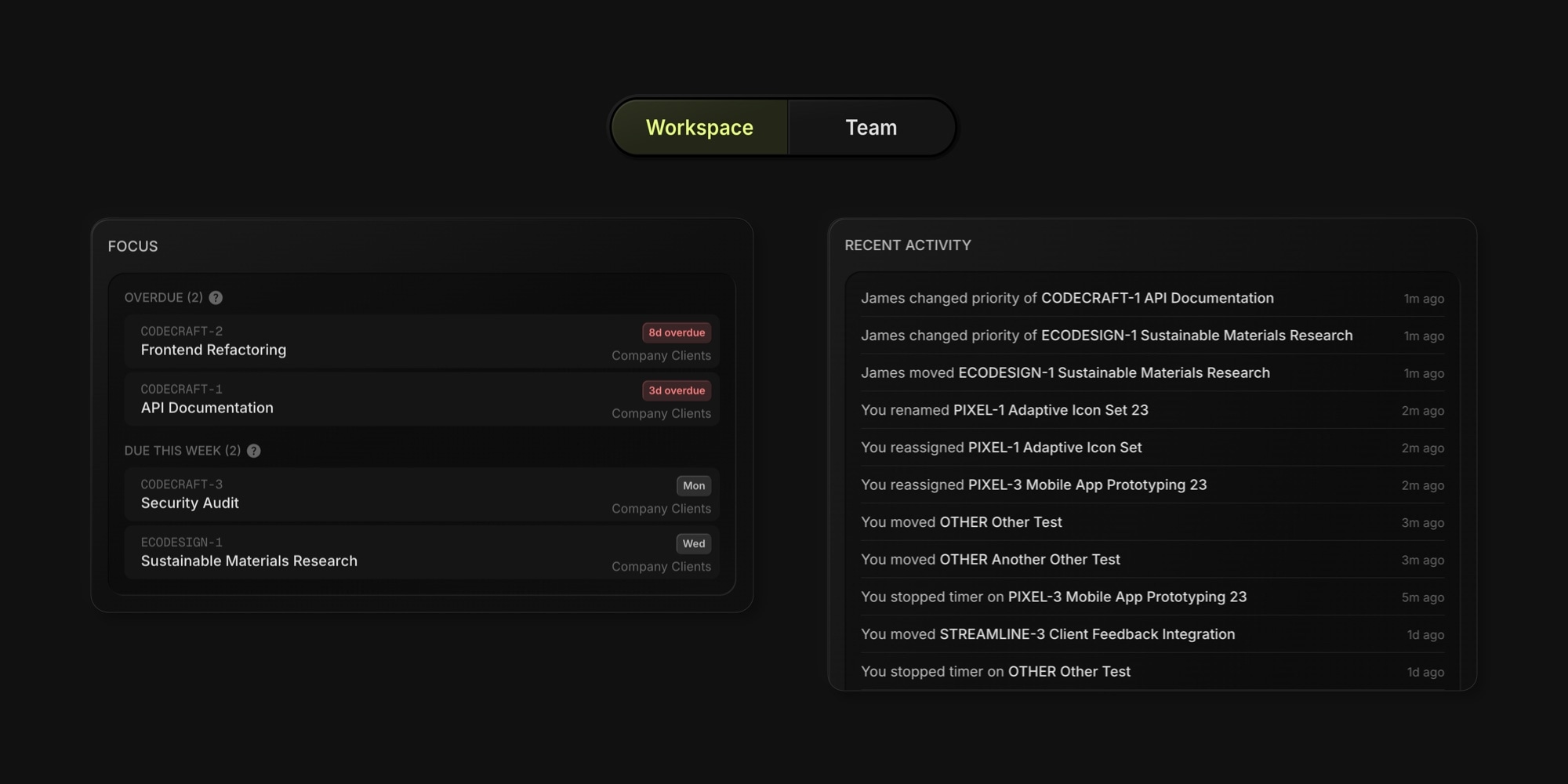
Workspace is your personal view - focus tasks, boards with stats, and a feed of recent activity. Everything you need to start your day.
Team is where you manage the people side - team settings, member roles, board access, and invitations.
Click the toggle at the top to switch between them.
#Workspace: Everything at a Glance
#Focus: Overdue Tasks and Running Timers
The Focus section puts your most urgent work front and center. It surfaces three types of items:
- Running Timers - any active time tracking timers across all your boards. You can stop a timer right from the dashboard without opening the board.
- Overdue - up to 5 tasks assigned to you that are past their due date, sorted by closest due date first. Each shows the task key, title, how many days overdue, and which board it belongs to.
- Due This Week - up to 5 tasks assigned to you due within the next 7 days, so nothing sneaks up on you by Friday.

The Focus section only appears when there's something to show. If you're all caught up, it stays out of your way.
Click any task to jump directly to it on its board - whether you're working in Kanban columns, calendar, or list view.
#Board Stats at a Glance
The Boards section lists every board you have access to, grouped by team. Each board card now shows stats you used to have to open the board to find:
- Overdue count - tasks assigned to you that are past due
- Mine - total tasks currently assigned to you
- Completion rate - percentage of completed tasks on the board

These numbers refresh every time you open the dashboard. If you see "5 overdue" on a board card, you know exactly where to focus next - no clicking in and out of boards to check on things.
You can still create new boards and delete boards from here - that hasn't changed.
#Recent Activity Feed
The activity feed shows what's been happening across all your boards over the last 14 days. It tracks:
- Tasks you created, moved, or completed
- Title, description, and priority changes
- Status updates
- Due date changes
- Time tracking entries
- Changes to tasks assigned to you made by other team members

One thing you'll notice - the feed is clean. If you edit a task description ten times in a row, you'll see one entry instead of ten. Consecutive duplicate actions on the same item are automatically collapsed so the feed stays useful.
#Team: Manage Your People
The Team tab brings all team management into one place:
- My Team - update your team name and logo
- Team Members - see who's on your team, manage their board access and roles
- Invite Team Members - send invitations with specific board access pre-configured

Everything you could do before is still here - now it has its own dedicated space instead of sharing the page with your boards. For details on managing team members and permissions, see the Team Members docs.
#Why We Built This
The previous dashboard was a board list with team settings below it. Functional as a task management hub, but flat. As teams grew and used multiple boards, there was no way to know what needed attention without opening each board individually. Overdue tasks, running timers, recent changes - all invisible until you went looking.
The new dashboard answers the questions you have every morning: What's overdue? What's due soon? What happened while I was away? And it does it across all your boards at once.
For teams using t0ggles for multi-project boards and real-time collaboration, this means less time navigating and more time on actual work. Project managers get immediate visibility into their task load. Team members see exactly what needs attention first.
If you're an agency juggling multiple client boards, the dashboard shows which projects are falling behind without switching between them. Remote teams spread across time zones can open the activity feed to catch up on everything that happened overnight. Freelancers managing their own workload get a clear priority list the moment they sit down. Whatever the setup, the dashboard adapts to how you work.
#Getting Started
The new dashboard is live for everyone - no setup, no opt-in. Head to t0ggles.com/dashboard and it's already there.
For the full walkthrough of every section, check out the Dashboard documentation.
Don't Miss What's Next
Get updates, design tips, and sneak peeks at upcoming features delivered straight to your inbox.