Team Custom Domains: Your Whole Workspace on Your Own URL
Last year we shipped custom domains for boards: one board, one branded URL. It quickly became the default setup for client portals and public roadmaps. It also raised the obvious follow-up question from teams running a dozen boards: "Can we put all of it on our domain?"
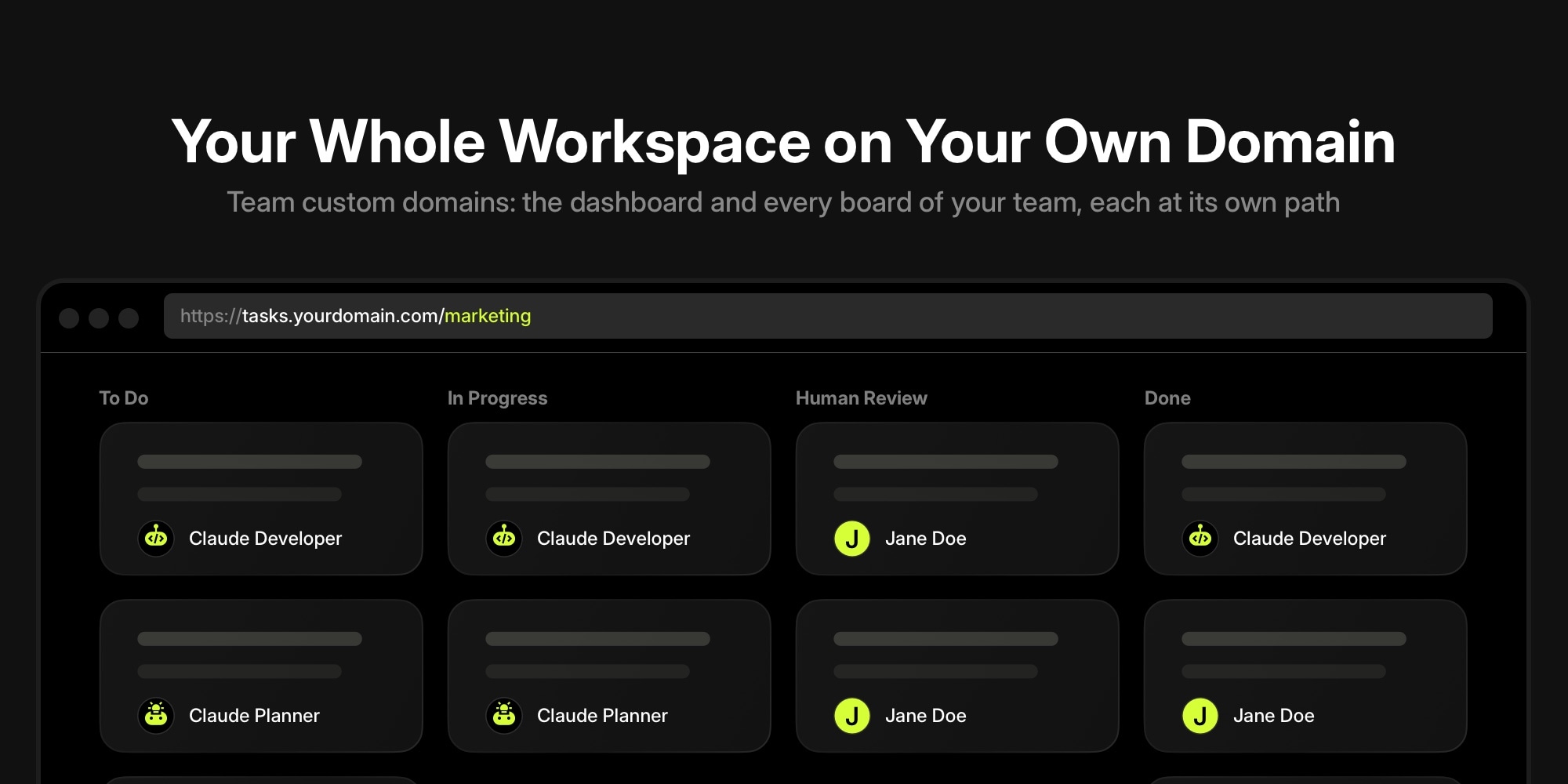
Now you can. A team custom domain serves your whole workspace from a hostname you own. The dashboard, every board of your team, tasks, notes, and reports all live under tasks.yourdomain.com, with each board at its own path. Set it up once from the dashboard and every board you create afterwards is on-brand automatically.
#Board Domain vs. Team Domain
Both kinds of custom domain use the same DNS setup and the same paid plan feature. They differ in what sits at the root of the hostname.
| Board domain | Team domain | |
|---|---|---|
| Where you set it up | Board Settings → Services → Custom Domain | Dashboard → Team → Custom Domain |
| What opens at the root | That one board | Your dashboard (or the sign-in screen) |
| Boards | One board per hostname | Every board of the team, e.g. tasks.yourdomain.com/marketing |
| Branding | Board Image for favicon and sign-in | Team image and team name for favicon, page title, and sign-in |
| Who can manage it | Board admins | Team owner |
The two work together. A board that has its own custom domain keeps opening there, even after you add a team domain. Each hostname can be linked to only one board or one team, so roadmap.yourdomain.com can stay dedicated to your public roadmap while tasks.yourdomain.com fronts everything else.
#What A Team Domain Gives You
- One address for the whole team. New hires, contractors, and clients get a single URL to remember. Board switching, quick search, and notifications all stay on your domain.
- Every board, every link. Task links, note links, shared task pages, and email notifications resolve under your hostname, so nothing a teammate copies out of t0ggles points back to a generic URL.
- Zero maintenance as you grow. Create a new board and it is instantly available at
tasks.yourdomain.com/new-board-url. No extra DNS records, no per-board setup. - Team branding on the sign-in screen. The team image and name are used for the favicon, the page title, and the auth screen on your domain. Pair it with Board Appearance for a brand color and background on each board.
- HTTPS out of the box. A certificate is issued automatically once the domain is verified. Nothing to renew.
For agencies this means one portal per agency instead of one domain per client board. For product teams it means the engineering board, the design board, and the roadmap share a hostname that matches the rest of your internal tools. For remote teams it is simply one less thing to explain in onboarding.
#How To Set It Up
The team owner does this once. It takes about a minute, plus DNS propagation.
- Open Dashboard → Team. The Custom Domain section sits right below your team details.
- Add your subdomain. Enter something like
tasks.yourdomain.comand click Add Domain. A subdomain is strongly recommended over an apex domain. - Create the two DNS records. t0ggles shows you a CNAME pointing at
t0ggles.comand a TXT record that proves you own the domain. Add both at your DNS provider. - Click Verify. DNS usually propagates within 5 to 30 minutes. Once verification passes, the status changes to Linked, the SSL certificate is issued, and your workspace is live.
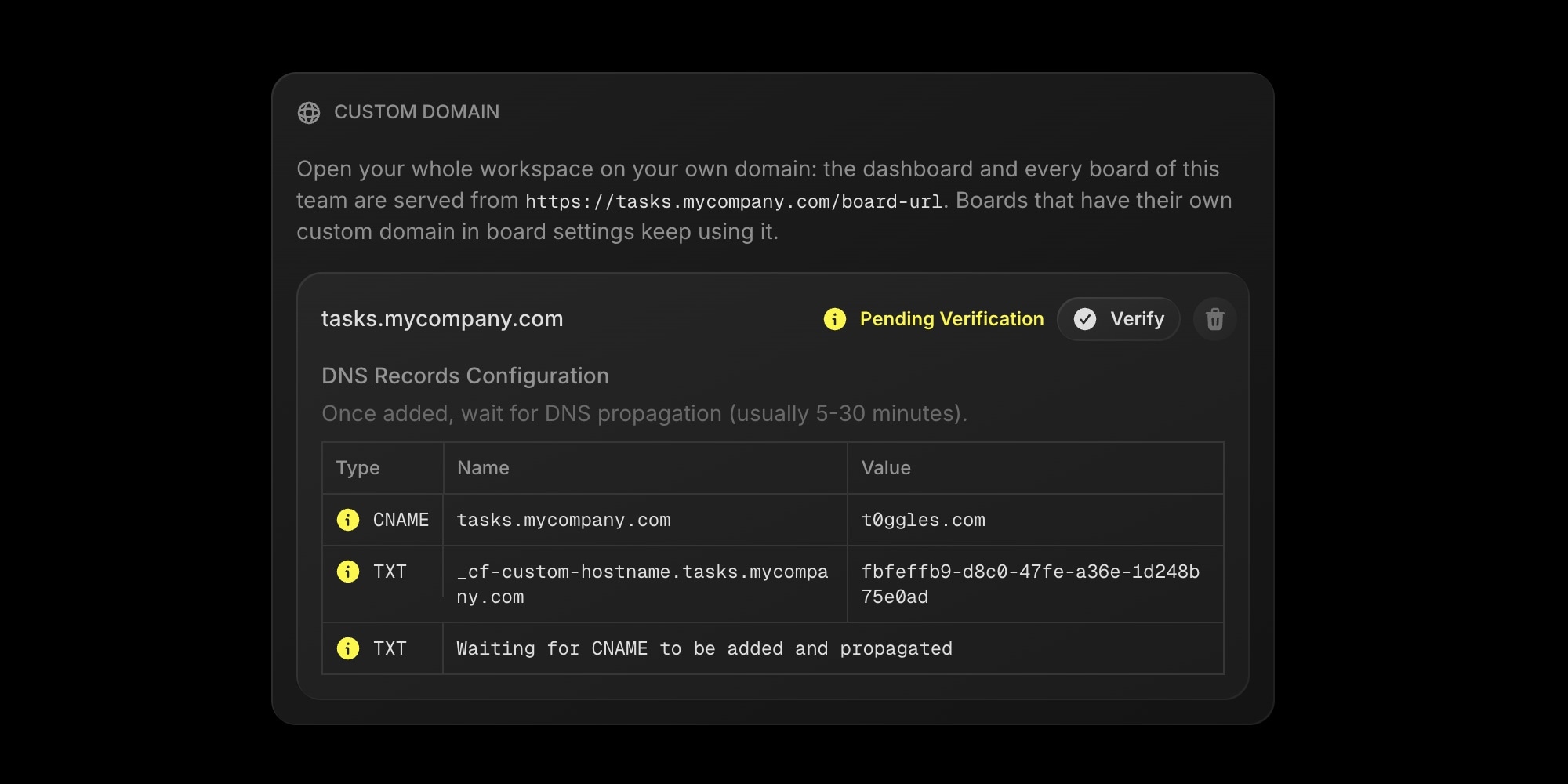
If a hostname is already linked to one of your boards, t0ggles tells you which board holds it, so you can remove it there first. Full step-by-step instructions, an example DNS table, and troubleshooting are in the Custom Domain docs.
#Which One Should You Use?
- Public roadmap, changelog, or a single client portal: a board domain. One board, one URL, optionally public.
- Your team's day-to-day workspace: a team domain. Everyone signs in at your hostname and lands on the dashboard.
- Both: a team domain for the workspace plus a board domain for the one board you show to the outside world. This is the setup we expect most agencies and product teams to end up with.
#Getting Started
Team custom domains are available on the paid plan, which unlocks everything in t0ggles for $5 per user per month. If you are on the free plan, start there and upgrade whenever you are ready to put the workspace on your domain - every first subscription starts with a 14-day free trial.
- Custom Domain documentation
- Team details in the dashboard
- Custom domains for boards and the original release note
- Pricing
Don't Miss What's Next
Get updates, design tips, and sneak peeks at upcoming features delivered straight to your inbox.