Human-in-the-Loop Workflows for Coding Agents
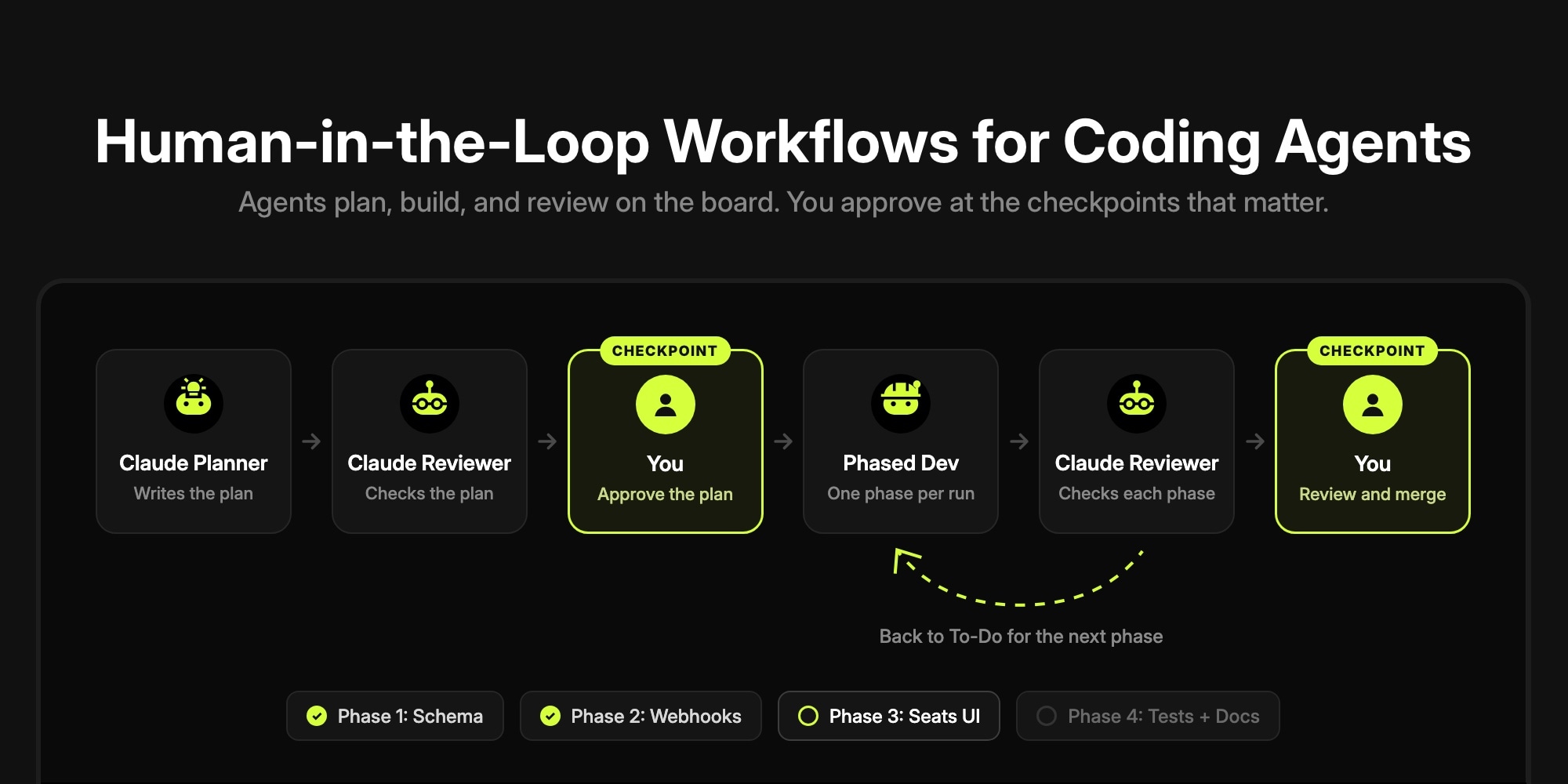
A human-in-the-loop workflow for coding agents puts a person at a few fixed checkpoints - approving the plan, reviewing each phase of a large change, and merging - and lets agents run unattended in between. On a task board, each checkpoint is just a status plus an assignment: when an agent finishes a step, it moves the task to In Review and assigns it to the next reviewer. Agents only pick up tasks assigned to their own bot user, so nothing moves past a checkpoint until a person reassigns the task.
This post is the practical version of that idea: where the checkpoints go, what the agent prompts need to say, how to steer an agent mid-task, and how to monitor runs without babysitting them. It uses t0ggles Crew pipelines on a t0ggles board, with screenshots of the full flow on an example project. If you have not connected an agent to a board yet, start with How to Give Your AI Agents a Task Board and come back.
#Where the Human Belongs in an Agent Workflow
Every team running coding agents ends up choosing, deliberately or not, where oversight lives. There are three options:
| Where oversight lives | What it looks like | Why it breaks down |
|---|---|---|
| Every action | Approve each file edit and shell command as the agent works | You become the agent's keyboard. Nothing runs while you are in a meeting |
| Only the end | The agent works for an hour, you review one large PR | A wrong direction is found after the work is done, and big diffs get skimmed |
| Checkpoints at boundaries | Approve the plan, review each phase, merge | Minutes of your time per checkpoint, hours of agent work in between (this post) |
Per-action approval is the right tool when you are pairing with an agent in a terminal. For agents that run on their own, the unit of review is the task, not the tool call. Put checkpoints where the cost of a wrong turn jumps: before any code exists, between phases of a large change, and before anything reaches main.
#The Checkpoint Pattern: Statuses and Assignment
The board needs four statuses: To-Do, In Progress, In Review, and Done. Each agent has its own agent user - Claude Planner, Claude Developer, Claude Phased Developer, Claude Reviewer - and each one only works on tasks assigned to it. Assignment is the lock. A task assigned to you is a task no agent will pick up.
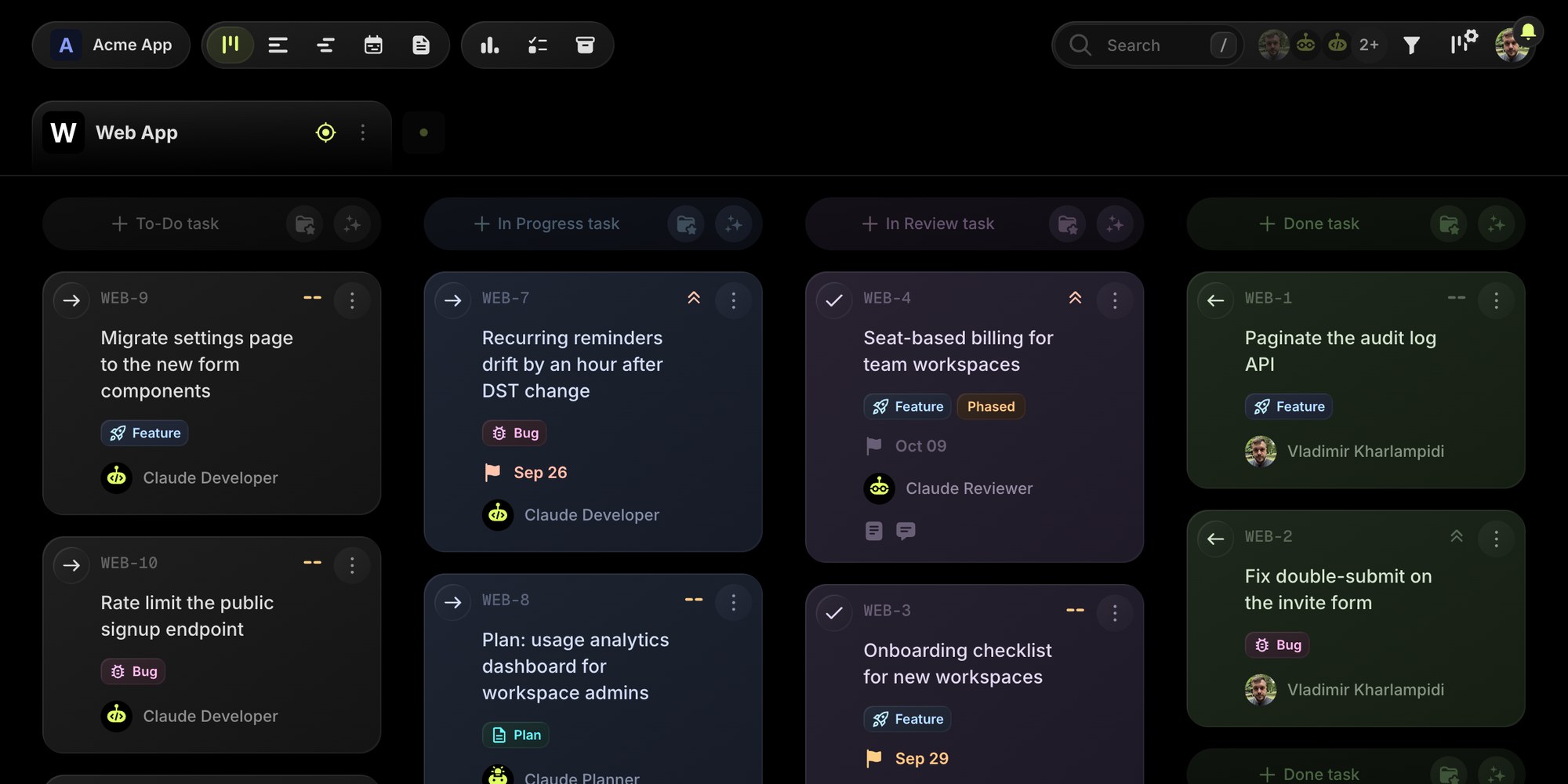
Look at the In Review column above. It holds two kinds of tasks: WEB-4 is assigned to Claude Reviewer, so the reviewer agent picks it up on its next run. WEB-3 is assigned to a person, so it is waiting at a human checkpoint. The avatar on each card tells you who has to act next, which is most of what monitoring means at the board level.
Three rules make the pattern hold:
- One identity per role. The history should say "Claude Reviewer approved Phase 1", not your name. Create an agent user for each role, not for each tool.
- Agents never touch work that is not theirs. Every prompt in the Crew pipeline examples includes the line "Never take tasks and never look into tasks not assigned to your bot user or in other projects."
- Agents never close tasks. The last agent in the chain assigns the task to a person. Only a person moves it to Done or merges the PR.
#Checkpoint 1: Approve the Plan Before Any Code
The cheapest review you will ever do is a plan review. A plan takes two minutes to read, while a wrong plan costs an hour of agent work plus your time reviewing code that should not exist.
The flow: you create a task and assign it to Claude Planner. The planner researches the codebase, writes an implementation plan to docs/plans/ (scope, affected files, technical approach, acceptance criteria), commits it, and assigns the task to Claude Reviewer. The reviewer checks the plan, improves it directly in the file, and assigns the task to you.
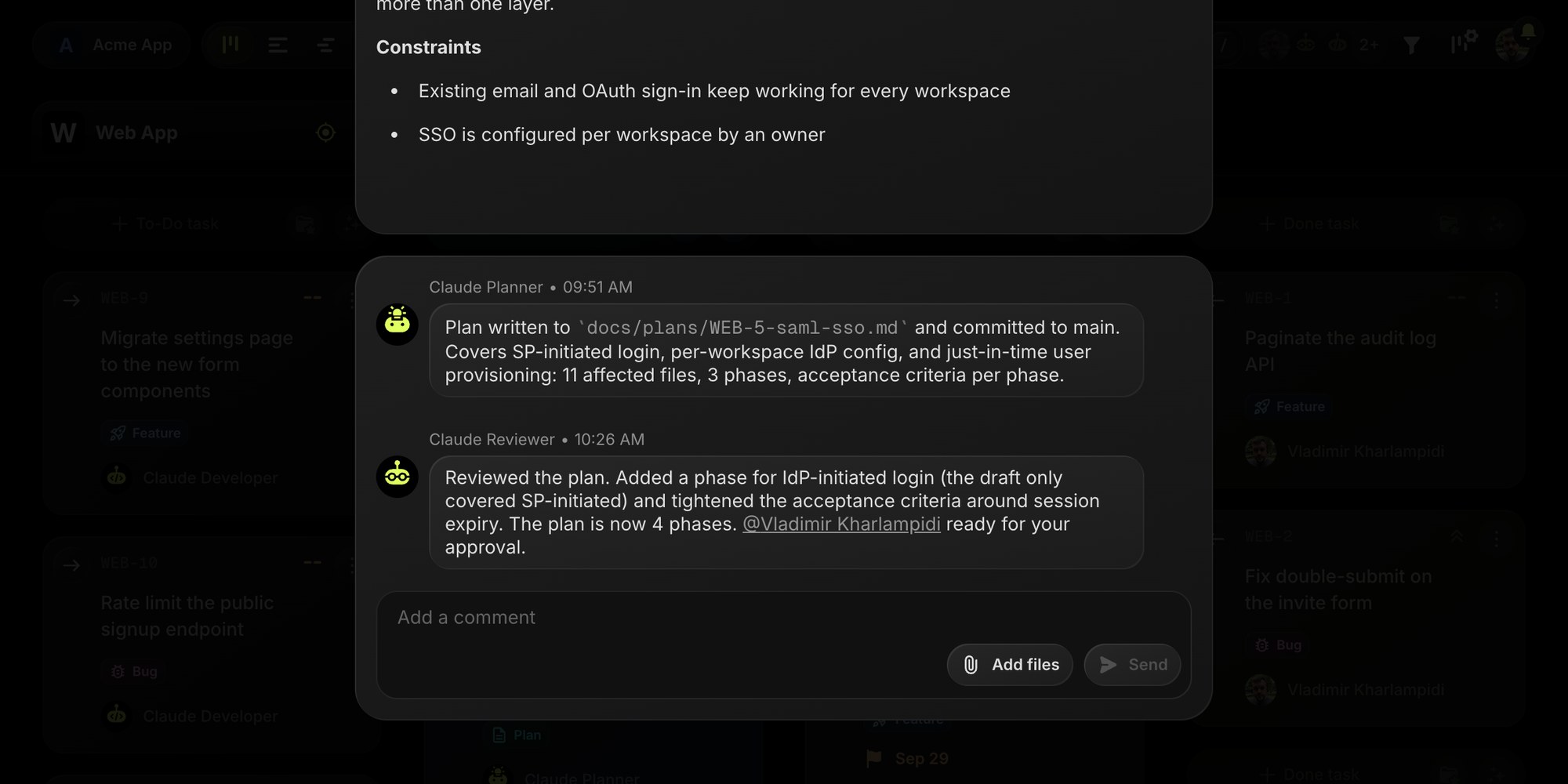
In the thread above, the reviewer caught a gap the planner missed (IdP-initiated login) before a single line of SSO code was written. That is the point of chaining an agent reviewer before the human checkpoint: the plan you read has already had one pass.
What to check when a plan lands on you:
- Scope. Does it do what the task asked, and nothing more?
- Phases. Anything that touches more than one layer (schema, API, UI) should be split into numbered phases.
- Risky surfaces. Auth, billing, migrations, and anything that deletes data deserve a closer read and probably a per-phase human gate (see below).
- Acceptance criteria. They become the definition of done for the developer and the checklist for the reviewer.
To approve, reassign the task to Claude Developer (or Claude Phased Developer for a phased plan) and move it back to To-Do. To send it back, reply on the task with @Claude Planner and what to change.
#Checkpoint 2: Review Every Phase, Not Just the Final PR
Large tasks are where unattended agents go wrong: the longer the run, the further the agent drifts from the plan, and the larger the diff you get at the end. Phased development fixes that by making the phase the unit of work.
The task description (or the plan it references) lists numbered phases. Claude Phased Developer implements exactly one phase per run, pushes to the task branch, comments Phase X/N completed: <summary>, and assigns the task to Claude Reviewer. The reviewer checks only that phase's commits, fixes small issues directly, and routes the task:
- Phase approved, more to go: back to To-Do, assigned to Claude Phased Developer, with "Phase X reviewed and approved. Ready for Phase X+1."
- Phase needs rework: back to To-Do for the developer, with what to fix, without advancing the phase counter.
- Last phase approved: assigned to you for the final review.
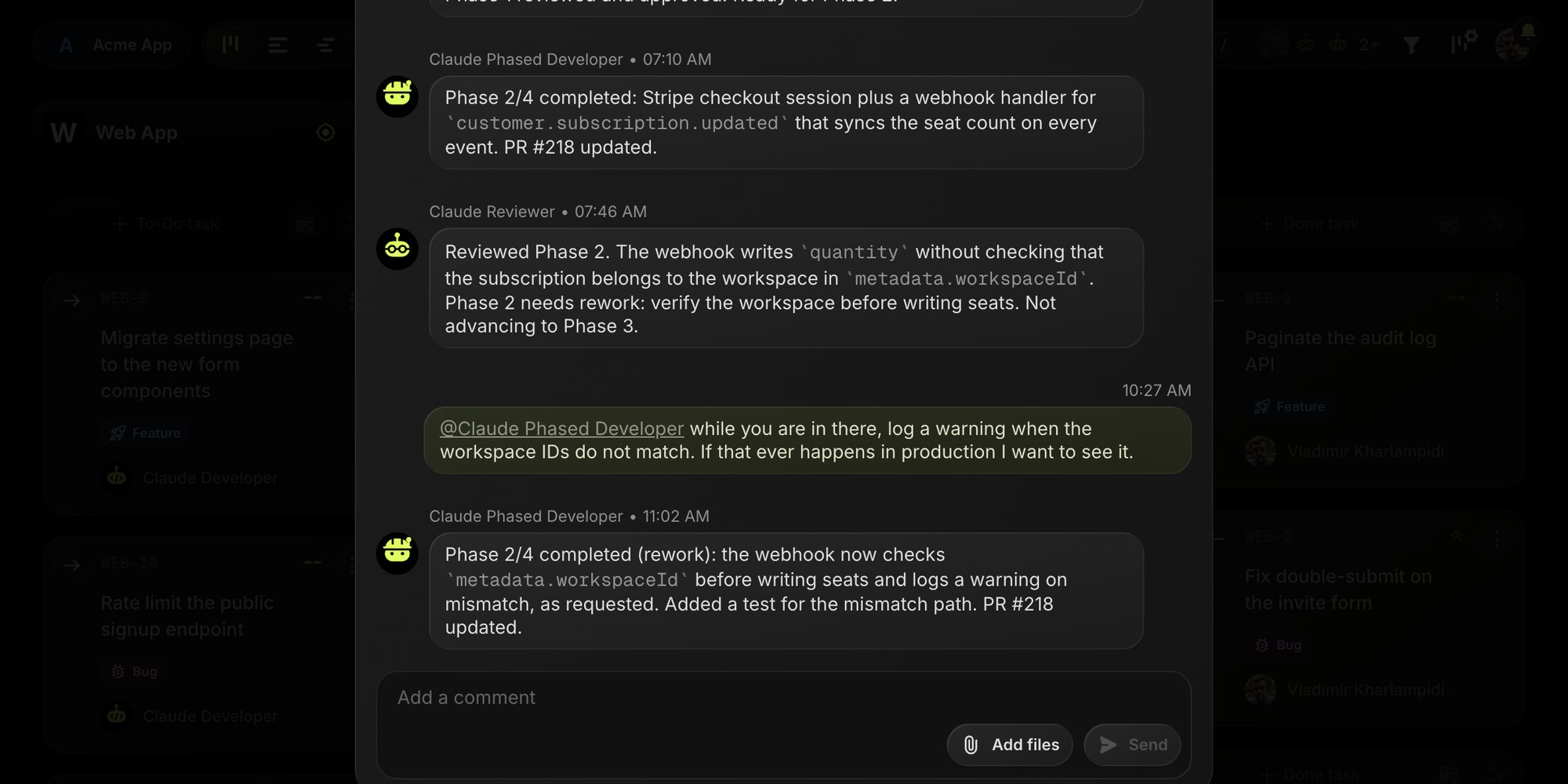
This thread shows a Phase 2 cycle on a billing task. The reviewer found that the Stripe webhook trusted the seat count without checking which workspace the subscription belongs to, and sent it back instead of advancing to Phase 3. The person then added one requirement mid-flight with a mention, and the developer's rework covered both. Notice that the Phase X/N completed comments are also the state machine: on each run, the developer reads them to decide which phase comes next, so the thread is both the progress log and the source of truth.
By default the phased reviewer only hands the task to a person after the last phase. For high-risk work you can make every phase a human checkpoint by changing one line in the reviewer prompt:
- If this is NOT the last phase (X < N): Keep the task in In Review and assign itto Jane Doe (jane@example.com). Add a note: "Phase X reviewed. Reassign toClaude Phased Developer and move to To-Do to start Phase X+1."
Your approval is then the reassignment itself: nothing starts Phase 3 until you move the task.
#Checkpoint 3: Final Review and Merge
After the last phase, or after a single-run task, the reviewer posts a review summary and assigns the task to you. This is the checkpoint that should never be automated: you read the reviewer's summary, look at the PR, and merge. The Crew development prompts name each branch after the task key (for example WEB-4-seat-based-billing), so with the GitHub integration merging it into main moves the task to Done, and the board reflects reality without anyone touching it.
If something is off, reply on the task and mention the agent that should act. That brings us to the lightest checkpoint of all.
#Steering an Agent Mid-Flight With Mentions
Not every intervention needs a gate. Sometimes you just want to add a requirement, ask for a rebase, or ask why the agent chose an approach. In Crew, a comment that mentions an agent is a trigger:
- Writing
@Claude Phased Developer log a warning when the IDs do not matchstarts a focused run for that agent on the next poll, even if the task is assigned to someone else. - The run gets the full comment thread plus the agent's original pipeline prompt, so branch naming, commit rules, and type checks still apply.
- Once the agent replies on the task, the mention counts as handled and does not trigger again.
Mentions are how you stay in the loop without becoming a blocker: a quick note on the task, and the agent picks it up within minutes.
#Setting It Up With t0ggles Crew
The whole flow above is configuration, not code. Crew is a free desktop app that runs Claude Code, OpenAI Codex, or OpenCode as pipelines against your board. The getting started guide covers installation; here is what the human-in-the-loop setup needs on top of it:
- Statuses. Add In Review between In Progress and Done in Board Settings > Statuses.
- Agent users. Create Claude Planner, Claude Developer, Claude Phased Developer, and Claude Reviewer in Board Settings > Services.
- Pipelines. One Crew pipeline per agent, each with its agent identity (name and bot user ID), the Auto schedule, and a prompt from the pipeline examples.
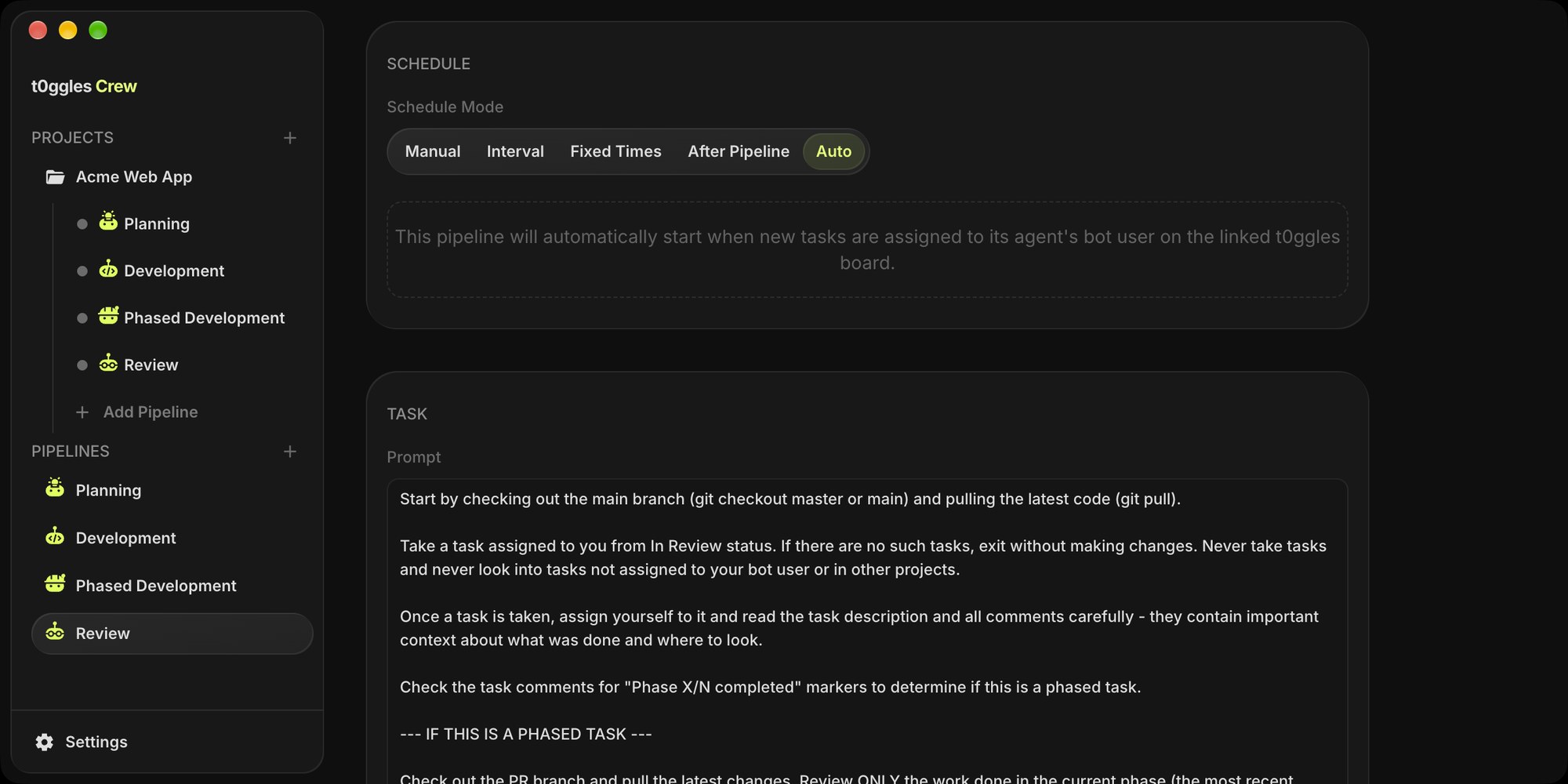
Auto mode is what makes checkpoints feel instant. Crew polls the board every 5 minutes, and when it finds a task assigned to a pipeline's bot user that is not done, or a new mention of that agent, it starts a run. The moment you reassign an approved plan to Claude Developer, the build starts on the next poll. No button to press.
The checkpoints themselves live in a few lines of each prompt. These are the lines that matter, taken from the pipeline examples:
Planner: Finally, move the task to In Review and assign it to Claude Reviewer.Developer: Finally, move the task to In Review and assign it to Claude Reviewer.Reviewer: Finally, assign the task to Jane Doe (jane@example.com).All: If you cannot complete the task, add a comment explaining what wentwrong and move the task back to To-Do.
The last line matters as much as the handoffs. An agent that fails silently leaves a task stuck in In Progress; an agent that explains the failure and puts the task back hands you a readable decision.
#Agent Workflow Monitoring Without Babysitting
Unattended agents only save time if you can check on them in seconds. Monitoring works at three levels:
- The board answers "who has the ball?" Filter by assignee to see everything waiting on you, or by agent to see an agent's queue. Mentions and assignments from agents arrive as notifications, like they would from a teammate.
- The task answers "what happened here?" The comment thread is what the agent says it did. The change history is what it actually changed: every status move, reassignment, and edit, attributed to the agent user with a timestamp. Tracking What Your AI Agents Actually Did covers how to read it and check a whole board at once.
- The Crew run history answers "is the pipeline healthy?" Every run is recorded with its status (success, error, timeout, or cancelled), duration, and the agent's summary, and each run keeps its full output log. You can stream a run's output live, and remote access lets you check runs from a phone or another machine on your network.
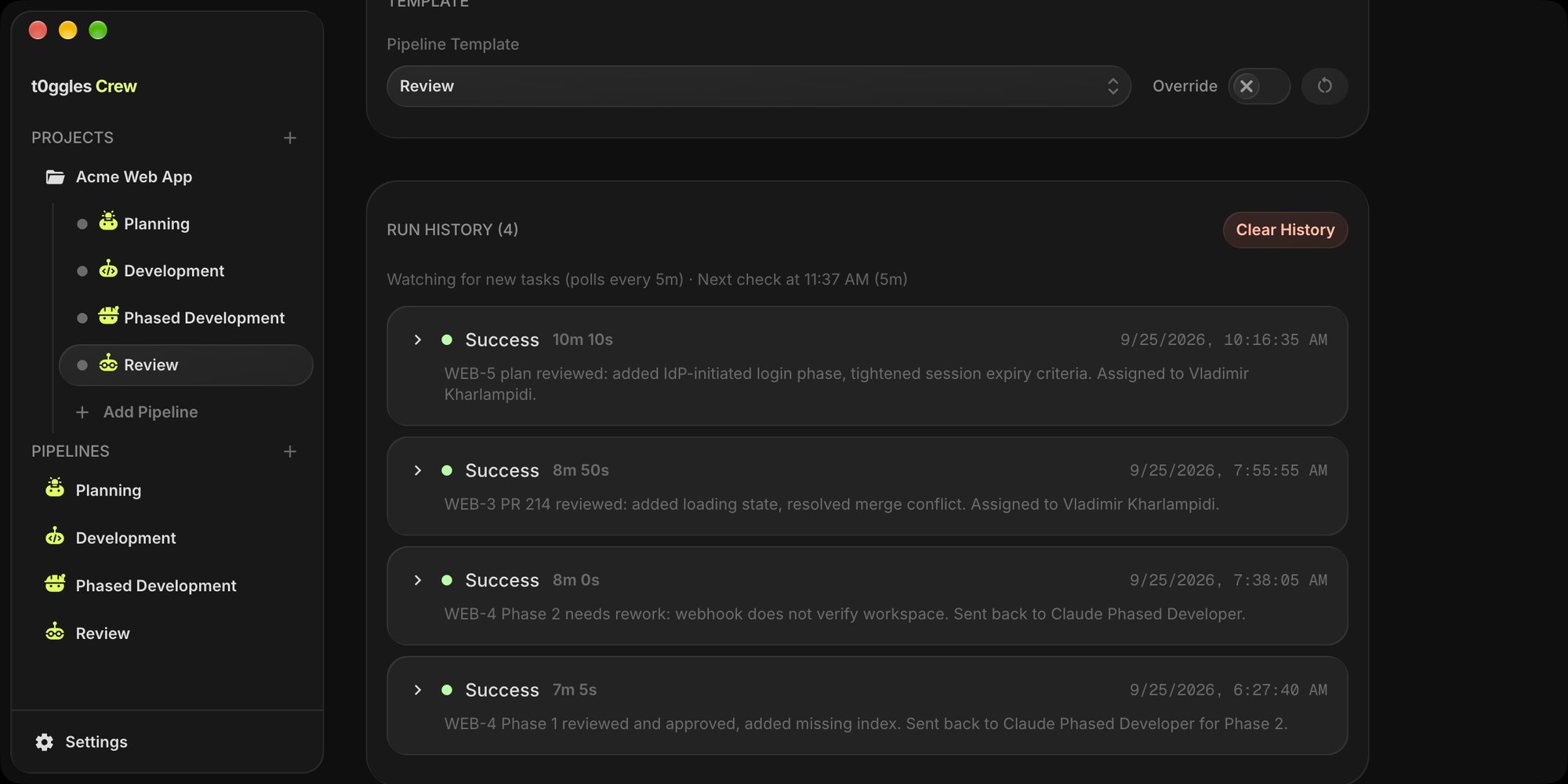
The signals worth watching:
- A task bouncing between developer and reviewer more than twice. The plan is wrong or the task is ambiguous. Step in with a comment instead of letting them loop.
- Runs ending in timeout. The task or phase is too big for one run. Split it into more phases.
- Your In Review queue growing. You are the bottleneck, which is the next section.
- Runs that end with "no tasks" while work is waiting. The task is assigned to the right agent but sits in the wrong status, or the other way around.
#Keep the Human From Becoming the Bottleneck
Agents work faster than people review. If you do not plan for that, checkpoints turn into a queue that grows every hour.
- Put a WIP limit on In Review. In Board Settings > Statuses, set Max tasks on In Review. The column turns red when the limit is exceeded, which makes the pile-up visible (more on choosing the number in how to set WIP limits). WIP limits in t0ggles are visual, not enforced, so if you want real backpressure, add it to the developer prompt: "Before taking a new task, use list-statuses and list-tasks to count the tasks in In Review for this project. If the count is at the status's max tasks limit, exit without taking new work."
- Let the reviewer agent fix small things. The review prompts tell the reviewer to make fixes directly and commit them to the branch. Your checkpoint should be a judgment call, not a list of typos.
- Match checkpoints to risk. Not every task needs all three gates:
| Task risk | Example | Checkpoints |
|---|---|---|
| Low | Copy change, dependency bump, docs | Final review only (Development pipeline) |
| Medium | New feature inside one layer | Plan approval + final review |
| High | Billing, auth, migrations, data model | Plan approval + every phase + final review |
#Guardrails That Keep Checkpoints Honest
Board checkpoints decide when work moves forward. They do not limit what an agent can do during a run. Crew runs the CLI non-interactively so it can work unattended: Claude Code with --dangerously-skip-permissions, Codex with --yolo. The agent will not stop to ask before running a command, so the safety comes from where it runs and what it can reach:
- Give Crew its own clone of the repo, not the working copy you edit by hand. The prompts check out main and pull before every run.
- Branches and pull requests only. Each task gets its own branch, and agents open PRs instead of merging. The planning pipeline commits markdown plans straight to main; if you would rather review those as PRs too, change that line in its prompt.
- Protect main in GitHub. Require a pull request review before merging, so even an agent that ignores its prompt cannot land code on its own.
- Keep secrets out of the project folder. Agents run with your local environment, so production credentials do not belong in it.
- Use the limits Crew gives you. Each pipeline has a timeout (60 minutes by default), by default at most 3 runs execute at once across projects and one pipeline per project runs at a time so agents do not edit the same folder in parallel.
The rule of thumb: prompts define the workflow, but repository settings define the blast radius.
#Without Crew: The Same Checkpoints By Hand
Crew is the unattended version. The same checkpoints work with any MCP client, one session at a time. Connect Claude Code, Cursor, or Codex to the t0ggles MCP server, give the agent its own agent user, and put the handoff rules in CLAUDE.md or AGENTS.md: move the task to In Review when done, mention the reviewer, never move a task to Done. The task board walkthrough has the full instructions file and the exact MCP calls, plus how to repeat the loop with Claude Code's /loop and Codex scheduled tasks.
#Tools for Human-in-the-Loop AI Agents: What to Look For
Whatever you use, a human-in-the-loop setup for coding agents needs these pieces. If one is missing, it tends to get replaced by a Slack thread and someone's memory:
| Need | Why it matters | In t0ggles |
|---|---|---|
| Shared queue | Agents and people work from the same list of tasks | Kanban board, agents connected through MCP |
| Agent identities | Every action is attributed to a role, not to whoever ran it | Agent users with bot user IDs |
| Handoff by assignment | The checkpoint is enforced by who owns the task | Review status plus reassignment, Crew agents take only their own tasks |
| Artifacts on the task | You review in one place: plan, PR link, review notes | Comments with mentions, links, and phase markers |
| Mid-flight steering | Small corrections without a full review cycle | @mentions trigger a focused Crew run |
| Run monitoring | Know when agents fail, stall, or loop | Crew run history, live output, remote access |
| Audit trail | Reconstruct what happened after the fact | Task change history, get-activity-log MCP tool |
The task management for AI agents page covers how these fit next to observability tools, and the Crew launch post covers the rest of what Crew does, from scheduled reports to batch runs.
#Getting Started
- Create a free t0ggles account and a board with To-Do, In Progress, In Review, and Done statuses.
- Add agent users for the planner, developer, phased developer, and reviewer roles.
- Download t0ggles Crew, connect it to your board, and configure the t0ggles MCP server in your CLI provider (CLI providers).
- Create four pipelines with the Auto schedule and the prompts from the pipeline examples, replacing the placeholder reviewer name with yours.
- Write one task with numbered phases, assign it to Claude Planner, and approve the plan when it lands on you.
Start with one real task, not a toy one. The first plan review will tell you more about where your checkpoints belong than any amount of setup.
#Frequently Asked Questions
Don't Miss What's Next
Get updates, design tips, and sneak peeks at upcoming features delivered straight to your inbox.